> ## Documentation Index
> Fetch the complete documentation index at: https://docs.antryk.com/llms.txt
> Use this file to discover all available pages before exploring further.
# Email Services
> Send reliable transactional emails with domain verification, SPF/DKIM authentication, analytics, templates, scalable delivery infrastructure, and advanced email management dashboards.
Reliable transactional email infrastructure for modern applications.
Send verification emails, password resets, notifications, invoices, onboarding emails, and system alerts with high deliverability and secure domain authentication.
Antryk Email Services helps developers and businesses send production-ready emails without managing SMTP servers, deliverability issues, DNS complexity, or scaling infrastructure.
Explore API endpoints, SDK usage, request formats, authentication, and integration examples.
***
## Why Use Antryk Email Services?
Building and maintaining a reliable email infrastructure is complex.
Antryk simplifies email delivery with managed authentication, scalable infrastructure, analytics, real-time tracking, and developer-friendly APIs.
### Benefits
* **High Deliverability** — Optimized infrastructure for inbox placement
* **Secure Email Authentication** — SPF, DKIM, and domain verification support
* **Scalable Infrastructure** — Send from a few emails to millions reliably
* **Real-Time Tracking** — Monitor deliveries, opens, clicks, and bounces
* **Template Management** — Reusable and dynamic email templates
* **Webhook Events** — Real-time delivery and engagement notifications
* **Developer Friendly** — Fast API integration with official SDK support
* **Production Ready** — Designed for SaaS, startups, eCommerce, and enterprise applications
* **Advanced Dashboard** — Manage domains, DNS records, logs, and analytics from a centralized interface
***
## Common Use Cases
Antryk Email Services can power a wide range of transactional and business email workflows.
### Authentication Emails
* Email verification
* OTP and login codes
* Password reset emails
* Account recovery notifications
### Product & SaaS Notifications
* User onboarding emails
* Feature announcements
* Billing notifications
* Subscription updates
* Usage alerts
### eCommerce Emails
* Order confirmations
* Shipping notifications
* Invoice delivery
* Refund confirmations
### Team & Collaboration
* Workspace invitations
* Team notifications
* Internal alerts
* Activity summaries
### Marketing & Engagement
* Newsletters
* Product updates
* Campaign emails
* Re-engagement workflows
***
## Getting Started
Set up your email infrastructure in minutes.
### Step 1 — Create an Email Service
Create and configure your email service directly from the dashboard.
### Step 2 — Verify Your Domain
Verify ownership of your sending domain using DNS records.
### Step 3 — Configure SPF & DKIM
Improve deliverability and protect your domain reputation with email authentication records.
### Step 4 — Send Test Emails
Validate DNS configuration and confirm successful delivery.
### Step 5 — Integrate with Your Application
Connect using the Email API or the official SDK.
Install the official Antryk SDK for Node.js applications and integrations.
***
# Email Service Dashboard
Manage domains, monitor delivery performance, configure DNS records, and track email activity from a centralized dashboard.
The Email Services dashboard is designed to simplify transactional email management for developers, startups, SaaS applications, and enterprise platforms.
### Dashboard Features
* Manage multiple verified domains
* Monitor email delivery statistics
* Configure SPF, DKIM, and DNS records
* Track transactional email logs
* Verify domains instantly
* Manage regional email infrastructure
* View sending performance and delivery metrics
* Centralized domain and email management
***
## Domain Listing Page
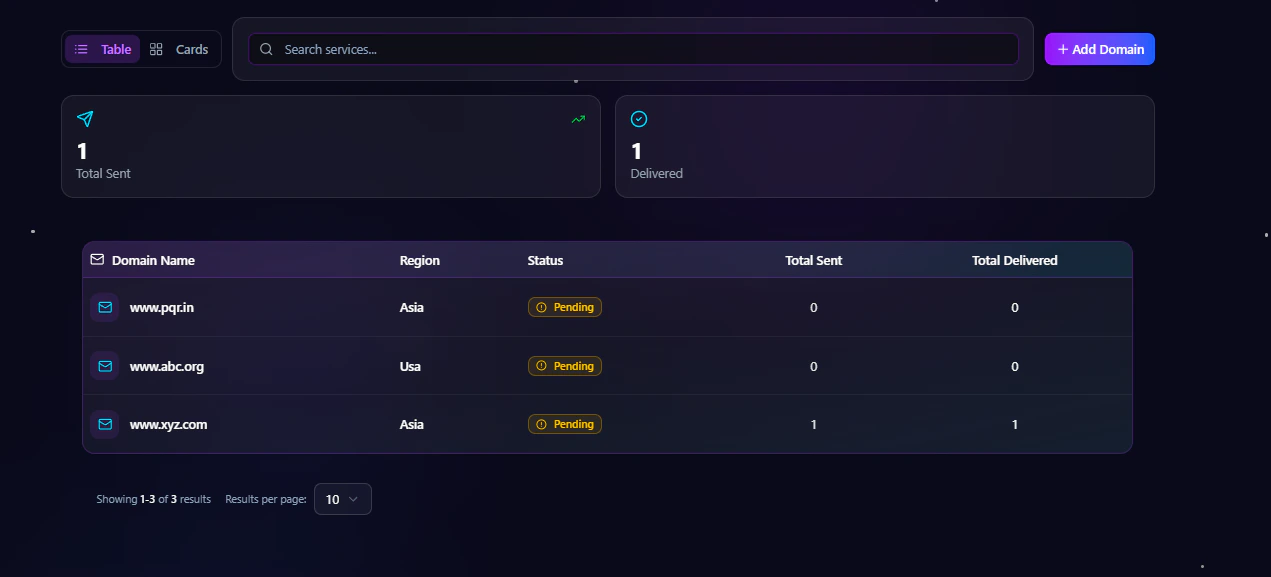
The Email Services listing page gives you a complete overview of all configured email domains.
You can quickly monitor:
* Verified and pending domains
* Sending regions
* Total emails sent
* Total delivered emails
* Domain status and activity
This centralized view helps teams manage multiple email domains efficiently while monitoring delivery health and infrastructure performance.
 ### Add New Domain
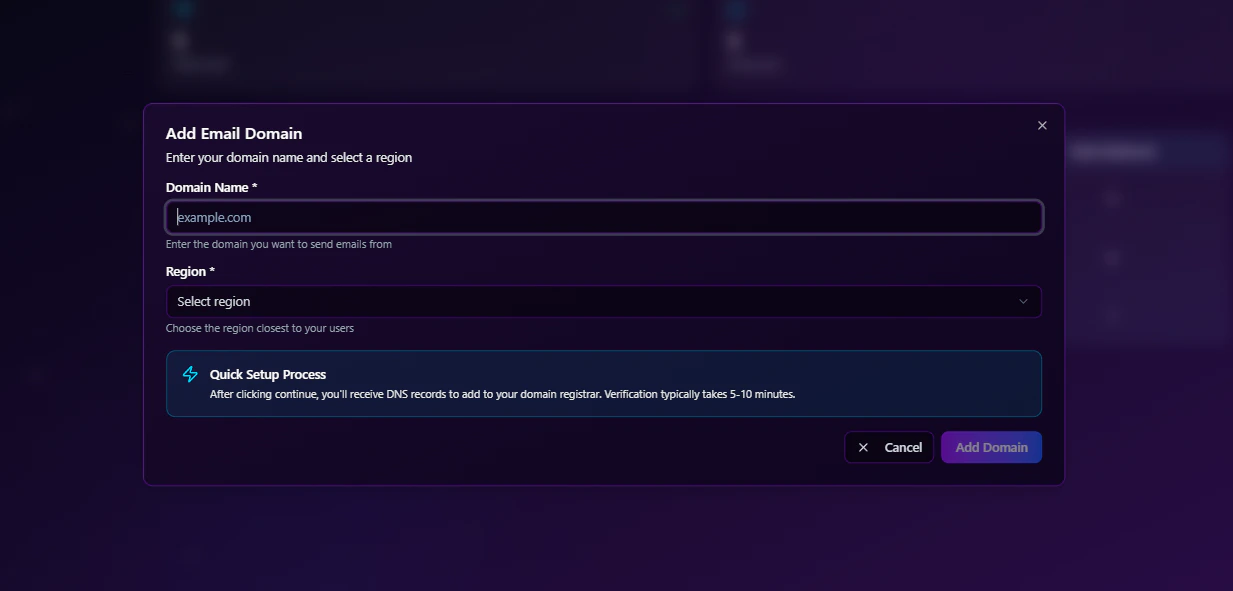
You can add a new sending domain directly from the dashboard using the **Add Domain** action.
The add domain dialog allows you to:
* Enter your domain name
* Select the preferred sending region
* Create and configure the email service instantly
This setup flow simplifies onboarding and helps developers quickly start sending authenticated transactional emails.
### Add New Domain
You can add a new sending domain directly from the dashboard using the **Add Domain** action.
The add domain dialog allows you to:
* Enter your domain name
* Select the preferred sending region
* Create and configure the email service instantly
This setup flow simplifies onboarding and helps developers quickly start sending authenticated transactional emails.
 ***
## Email Service Detail Page
Each domain includes a dedicated detail page where you can manage configuration, monitor activity, and verify domain settings.
The detail page contains multiple management tabs for complete email infrastructure control.
### Available Tabs
* Overview
* DNS Config
* Email Logs
* Settings
At the top of the page, a **Verify Domain** action allows you to validate DNS configuration and activate email sending capabilities.
***
## Overview Tab
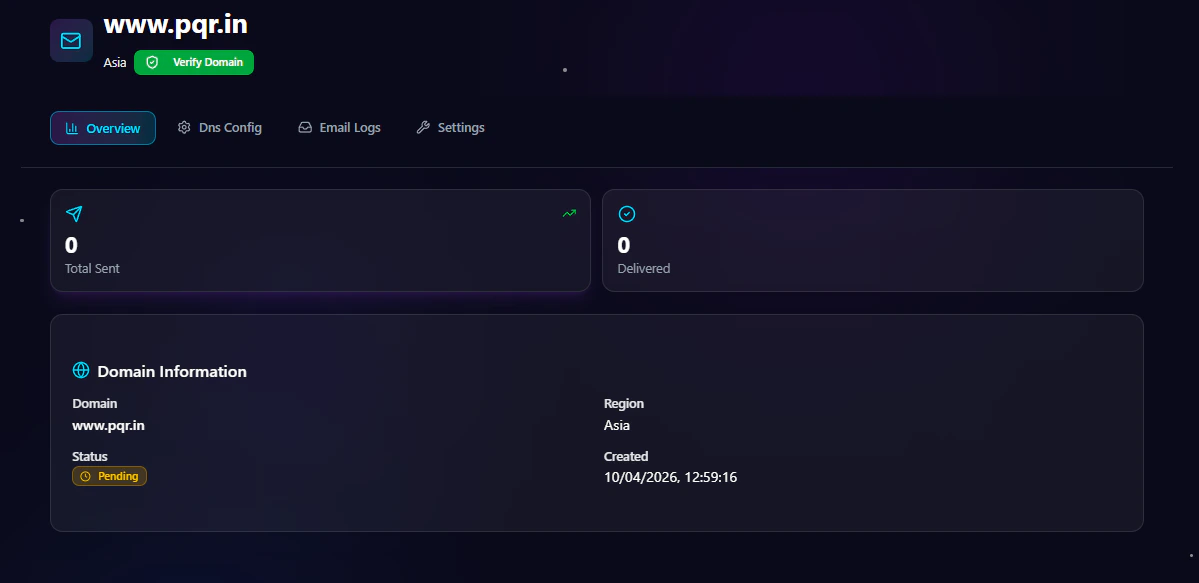
The Overview tab provides high-level analytics and domain information for your email service.
### Overview Information
* Total emails sent
* Total delivered emails
* Domain name
* Domain status
* Region
* Created date
* Verification state
This section helps teams monitor sending activity, delivery performance, and domain health at a glance.
***
## Email Service Detail Page
Each domain includes a dedicated detail page where you can manage configuration, monitor activity, and verify domain settings.
The detail page contains multiple management tabs for complete email infrastructure control.
### Available Tabs
* Overview
* DNS Config
* Email Logs
* Settings
At the top of the page, a **Verify Domain** action allows you to validate DNS configuration and activate email sending capabilities.
***
## Overview Tab
The Overview tab provides high-level analytics and domain information for your email service.
### Overview Information
* Total emails sent
* Total delivered emails
* Domain name
* Domain status
* Region
* Created date
* Verification state
This section helps teams monitor sending activity, delivery performance, and domain health at a glance.
 ***
## DNS Configuration Tab
The DNS Config tab helps you configure and verify your email authentication records.
To activate email sending, you need to add the provided DNS records to your domain registrar.
### DNS Configuration Includes
* SPF records
* DKIM records
* Verification records
* Domain authentication setup
Proper DNS configuration improves:
* Email deliverability
* Sender reputation
* Inbox placement
* Email security
The platform provides all required DNS records in a simplified format for faster setup and verification.
***
## DNS Configuration Tab
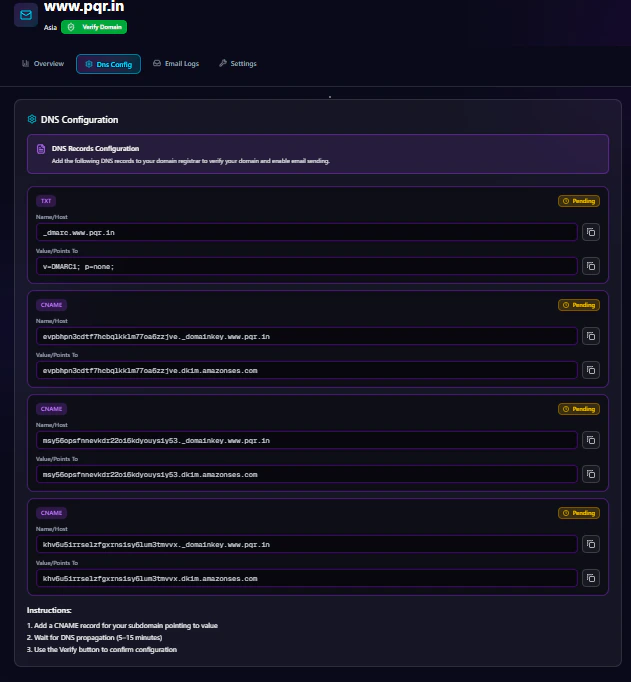
The DNS Config tab helps you configure and verify your email authentication records.
To activate email sending, you need to add the provided DNS records to your domain registrar.
### DNS Configuration Includes
* SPF records
* DKIM records
* Verification records
* Domain authentication setup
Proper DNS configuration improves:
* Email deliverability
* Sender reputation
* Inbox placement
* Email security
The platform provides all required DNS records in a simplified format for faster setup and verification.
 ***
## Email Logs Tab
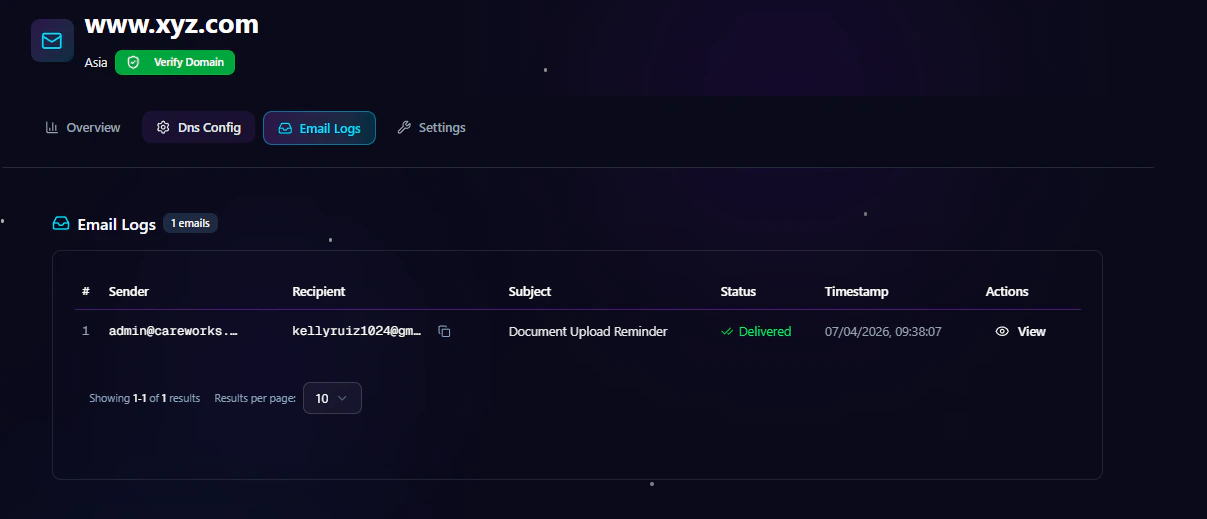
The Email Logs tab provides detailed visibility into every email event generated from your application.
You can monitor:
* Sender email address
* Recipient email address
* Email subject
* Delivery status
* Timestamp
* Email actions and events
The email logs table includes:
| Sender | Recipient | Subject | Status | Timestamp | Actions |
| ------ | --------- | ------- | ------ | --------- | ------- |
This logging system helps developers troubleshoot delivery issues, monitor transactional workflows, and audit email activity in real time.
***
## Email Logs Tab
The Email Logs tab provides detailed visibility into every email event generated from your application.
You can monitor:
* Sender email address
* Recipient email address
* Email subject
* Delivery status
* Timestamp
* Email actions and events
The email logs table includes:
| Sender | Recipient | Subject | Status | Timestamp | Actions |
| ------ | --------- | ------- | ------ | --------- | ------- |
This logging system helps developers troubleshoot delivery issues, monitor transactional workflows, and audit email activity in real time.
 ***
## Settings Tab
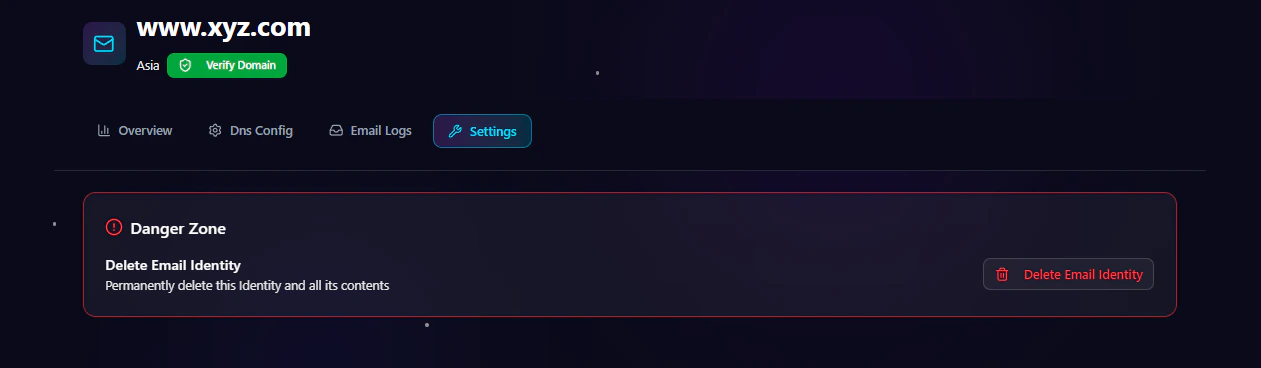
The Settings tab allows you to manage advanced domain actions and service controls.
### Available Settings
* Domain management
* Verification controls
* Service configuration
* Delete domain option
You can permanently remove a domain and its associated email configuration directly from the settings panel.
***
## Settings Tab
The Settings tab allows you to manage advanced domain actions and service controls.
### Available Settings
* Domain management
* Verification controls
* Service configuration
* Delete domain option
You can permanently remove a domain and its associated email configuration directly from the settings panel.
 ***
## Domain Verification
Domain verification ensures that emails are sent securely and trusted by receiving mail providers.
### Why Domain Verification Matters
* Prevents email spoofing
* Improves inbox placement
* Protects sender reputation
* Enables authenticated sending
* Builds trust with email providers
### Supported Authentication Standards
#### SPF (Sender Policy Framework)
SPF verifies which mail servers are allowed to send emails from your domain.
#### DKIM (DomainKeys Identified Mail)
DKIM adds a cryptographic signature to outgoing emails to verify authenticity.
#### DMARC Support
Strengthen domain protection and improve email trust policies.
***
## Email Deliverability
Deliverability is critical for transactional emails.
Antryk Email Services is optimized to maximize successful inbox delivery rates.
### Deliverability Features
* Dedicated sending infrastructure
* Automatic retry handling
* Bounce management
* Reputation monitoring
* Spam prevention mechanisms
* Authentication best practices
* Email validation workflows
***
## Email Templates
Create reusable and dynamic templates for consistent branding and faster development.
### Template Features
* Dynamic variables
* Reusable layouts
* Personalized content
* Multi-language support
* Transactional workflows
* Consistent branding
Templates help reduce development time while maintaining professional email experiences.
***
## Real-Time Analytics
Track the performance and health of your email infrastructure with detailed analytics.
### Analytics Available
* Delivery rate
* Open rate
* Click-through rate
* Bounce tracking
* Spam complaint monitoring
* Engagement insights
* Device and client analytics
These insights help optimize email performance and user engagement.
***
## Webhooks & Event Notifications
Receive real-time updates whenever email events occur.
### Supported Events
* Email delivered
* Email opened
* Link clicked
* Email bounced
* Spam complaint
* Delivery failed
* Unsubscribe events
Webhooks allow you to automate workflows and maintain accurate communication tracking.
***
## Security & Compliance
Security is built into the platform to protect your data and email reputation.
### Security Features
* Secure API authentication
* Domain verification
* DKIM signing
* SPF validation
* TLS email delivery
* Access control support
* Activity monitoring
***
## Performance & Scalability
Designed for growing applications and high-volume workloads.
### Infrastructure Highlights
* Low-latency email delivery
* Horizontal scalability
* Queue-based processing
* Reliable retry systems
* High availability architecture
* Optimized sending pipelines
Whether you're sending 100 emails or millions per month, the infrastructure scales with your application.
***
## Best Practices for Transactional Emails
Improve deliverability and engagement with recommended practices.
### Recommended Practices
* Verify your sending domain
* Configure SPF, DKIM, and DMARC
* Use recognizable sender names
* Keep email content clean and relevant
* Monitor bounce and complaint rates
* Warm up new domains gradually
* Avoid spam-triggering language
* Maintain healthy email lists
***
## SDK & Developer Integration
Integrate quickly using the official SDK and developer APIs.
Learn how to authenticate requests, send emails, configure templates, and handle webhooks.
***
## Pricing
Email Services pricing is designed to scale with your usage.
### Pricing Includes
* Pay-as-you-send model
* Volume-based discounts
* No setup fees
* Free domain verification
* Scalable infrastructure access
Contact the sales team for enterprise-scale requirements and dedicated infrastructure.
***
## Optimized for Modern Email Infrastructure
The Email Services dashboard is built for scalability, reliability, and operational visibility.
Whether you're managing a single domain or enterprise-scale transactional email infrastructure, the platform provides:
* Simplified domain management
* Real-time monitoring
* Secure DNS authentication
* Delivery tracking
* Centralized email operations
***
***
## Domain Verification
Domain verification ensures that emails are sent securely and trusted by receiving mail providers.
### Why Domain Verification Matters
* Prevents email spoofing
* Improves inbox placement
* Protects sender reputation
* Enables authenticated sending
* Builds trust with email providers
### Supported Authentication Standards
#### SPF (Sender Policy Framework)
SPF verifies which mail servers are allowed to send emails from your domain.
#### DKIM (DomainKeys Identified Mail)
DKIM adds a cryptographic signature to outgoing emails to verify authenticity.
#### DMARC Support
Strengthen domain protection and improve email trust policies.
***
## Email Deliverability
Deliverability is critical for transactional emails.
Antryk Email Services is optimized to maximize successful inbox delivery rates.
### Deliverability Features
* Dedicated sending infrastructure
* Automatic retry handling
* Bounce management
* Reputation monitoring
* Spam prevention mechanisms
* Authentication best practices
* Email validation workflows
***
## Email Templates
Create reusable and dynamic templates for consistent branding and faster development.
### Template Features
* Dynamic variables
* Reusable layouts
* Personalized content
* Multi-language support
* Transactional workflows
* Consistent branding
Templates help reduce development time while maintaining professional email experiences.
***
## Real-Time Analytics
Track the performance and health of your email infrastructure with detailed analytics.
### Analytics Available
* Delivery rate
* Open rate
* Click-through rate
* Bounce tracking
* Spam complaint monitoring
* Engagement insights
* Device and client analytics
These insights help optimize email performance and user engagement.
***
## Webhooks & Event Notifications
Receive real-time updates whenever email events occur.
### Supported Events
* Email delivered
* Email opened
* Link clicked
* Email bounced
* Spam complaint
* Delivery failed
* Unsubscribe events
Webhooks allow you to automate workflows and maintain accurate communication tracking.
***
## Security & Compliance
Security is built into the platform to protect your data and email reputation.
### Security Features
* Secure API authentication
* Domain verification
* DKIM signing
* SPF validation
* TLS email delivery
* Access control support
* Activity monitoring
***
## Performance & Scalability
Designed for growing applications and high-volume workloads.
### Infrastructure Highlights
* Low-latency email delivery
* Horizontal scalability
* Queue-based processing
* Reliable retry systems
* High availability architecture
* Optimized sending pipelines
Whether you're sending 100 emails or millions per month, the infrastructure scales with your application.
***
## Best Practices for Transactional Emails
Improve deliverability and engagement with recommended practices.
### Recommended Practices
* Verify your sending domain
* Configure SPF, DKIM, and DMARC
* Use recognizable sender names
* Keep email content clean and relevant
* Monitor bounce and complaint rates
* Warm up new domains gradually
* Avoid spam-triggering language
* Maintain healthy email lists
***
## SDK & Developer Integration
Integrate quickly using the official SDK and developer APIs.
Learn how to authenticate requests, send emails, configure templates, and handle webhooks.
***
## Pricing
Email Services pricing is designed to scale with your usage.
### Pricing Includes
* Pay-as-you-send model
* Volume-based discounts
* No setup fees
* Free domain verification
* Scalable infrastructure access
Contact the sales team for enterprise-scale requirements and dedicated infrastructure.
***
## Optimized for Modern Email Infrastructure
The Email Services dashboard is built for scalability, reliability, and operational visibility.
Whether you're managing a single domain or enterprise-scale transactional email infrastructure, the platform provides:
* Simplified domain management
* Real-time monitoring
* Secure DNS authentication
* Delivery tracking
* Centralized email operations
***