> ## Documentation Index
> Fetch the complete documentation index at: https://docs.antryk.com/llms.txt
> Use this file to discover all available pages before exploring further.
# Influx
> Deploy fully managed InfluxDB databases on Antryk with automated backups, secure access control, scalable infrastructure, and production-ready performance.
## What is InfluxDB?
InfluxDB is a high-performance time series database designed for storing, querying, and analyzing large volumes of time-stamped data. It is commonly used for monitoring systems, IoT applications, real-time analytics, DevOps metrics, and event tracking workloads.
With Antryk InfluxDB, you can deploy fully managed InfluxDB databases in minutes while Antryk handles infrastructure management, backups, networking, and operational maintenance.
***
## InfluxDB Features on Antryk
* Fully managed InfluxDB deployments
* Multiple InfluxDB version support
* Secure database access control
* Automated backups and retention management
* Regional database deployments
* Connection information dashboard
* Scalable plans for development and production
* Simplified database administration
* Secure credential management
* Production-ready infrastructure
***
## Guide On Deploying InfluxDB
***
# Deploy an InfluxDB Database
Creating an InfluxDB database on Antryk takes only a few steps.
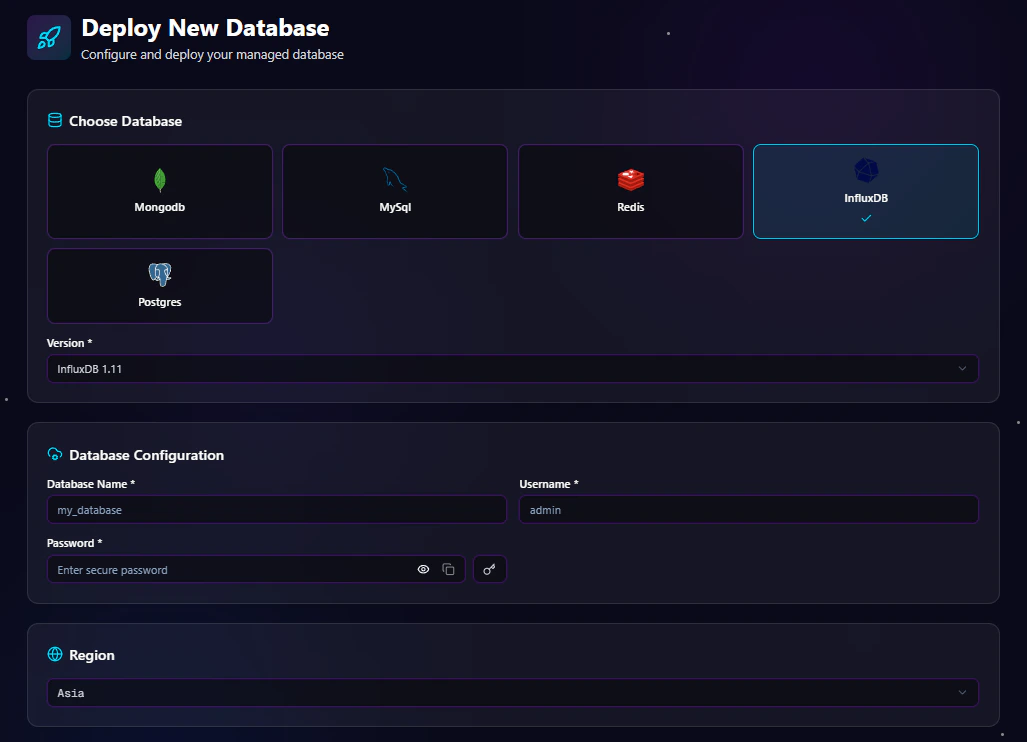
## Step 1: Choose Database Type
From the deployment dashboard:
1. Click **Create Database**
2. Select **InfluxDB**
***
## Step 2: Select InfluxDB Version
Choose the InfluxDB version you want to deploy.
Example versions may include:
* InfluxDB 1.8
* InfluxDB 2.7
* InfluxDB 3.0
* InfluxDB 3.1
Using the latest stable version is recommended for new applications unless your application requires compatibility with an older version.
***
## Step 3: Configure Database Settings
Enter your database configuration details.
### Configuration for InfluxDB 1.x and 2.x
For InfluxDB versions starting with **1.x** or **2.x**, configure the following fields:
| Field | Description |
| ------------- | ---------------------------------- |
| Database Name | Name of your InfluxDB database |
| Username | Database admin username |
| Password | Secure password for authentication |
### Example Configuration
```bash theme={null}
Database Name: metrics_db
Username: admin_user
Password: ********
```
***
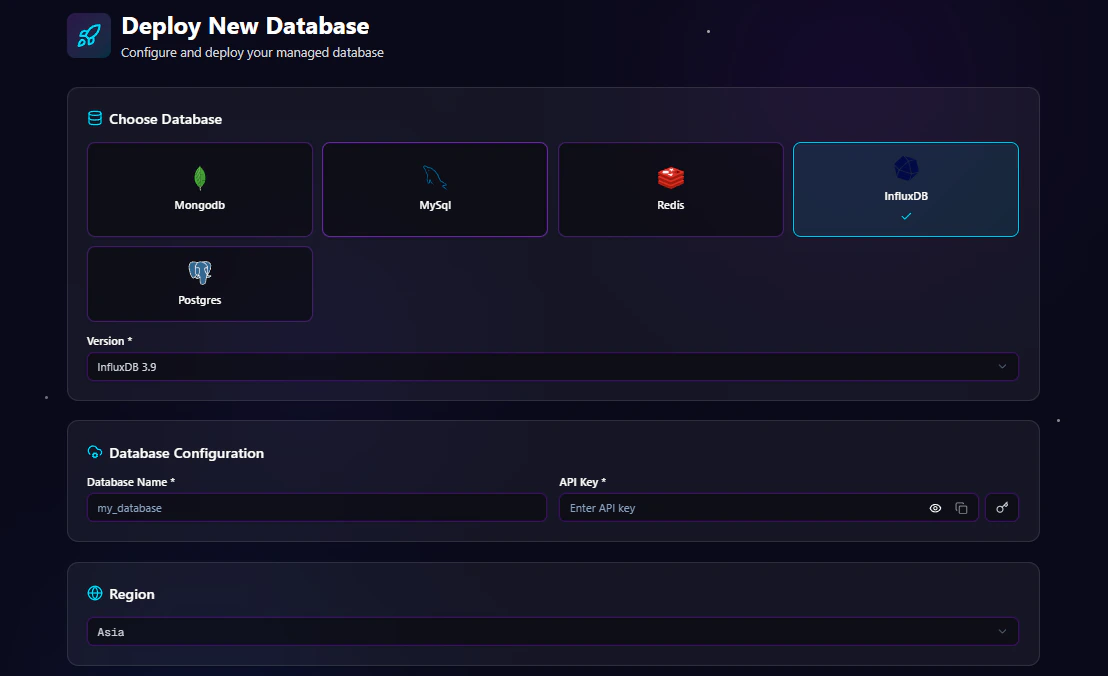
### Configuration for InfluxDB 3.x
For InfluxDB versions starting with **3.x**, configure the following fields:
| Field | Description |
| ------------- | ------------------------------- |
| Database Name | Name of your InfluxDB database |
| API Key | API key used for authentication |
### API Key Format Requirement
InfluxDB 3.x API keys must start with the following required prefix:
```bash theme={null}
apiv3_
```
Example valid API key:
```bash theme={null}
apiv3_randompassword
```
> The `apiv3_` prefix is mandatory for all InfluxDB 3.x API keys.
### Example Configuration
```bash theme={null}
Database Name: metrics_db
API Key: apiv3_randompassword
```
***
## Step 4: Select Deployment Region
Choose the region closest to your users or application infrastructure.
Available regions include:
* USA
* ASIA
* EUROPE
Selecting the nearest region helps reduce latency and improves application performance.
***
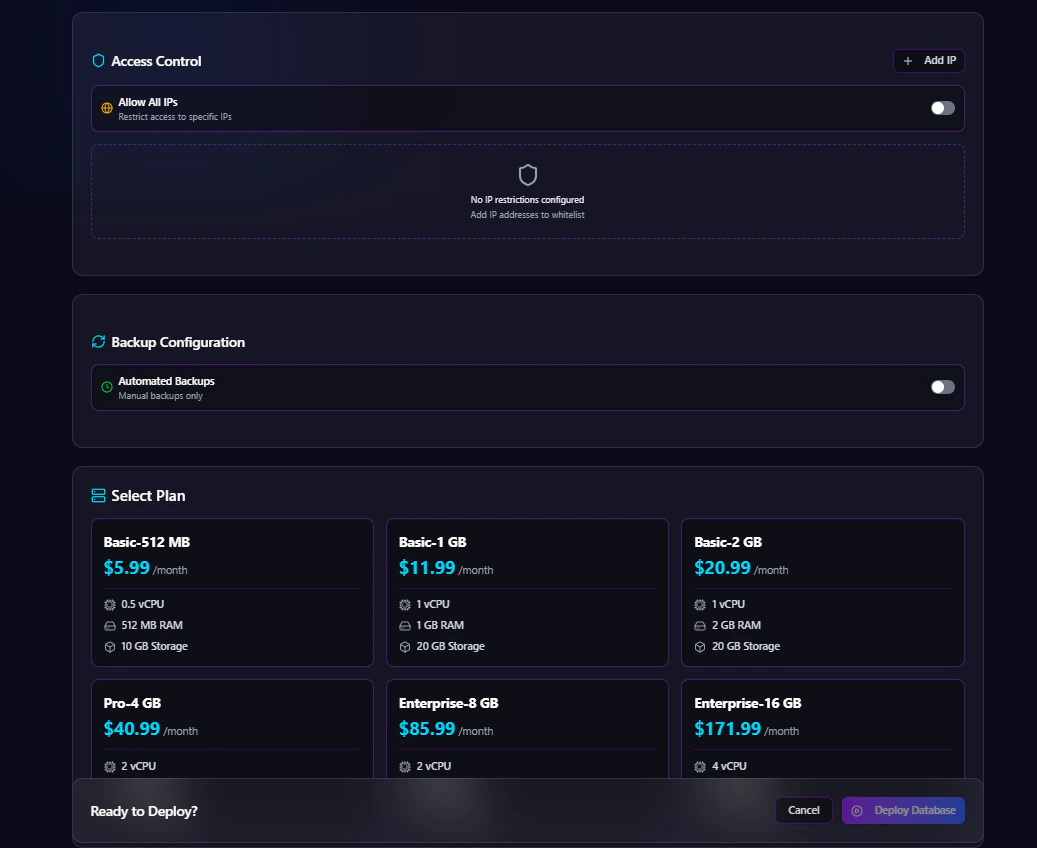
## Step 5: Configure Access Control
Antryk provides flexible database access management.
### Option 1: Allow Specific IP Addresses
Restrict database access to trusted IP addresses only.
Example:
```bash theme={null}
192.168.1.10
203.0.113.45
```
### Option 2: Allow All IPs
Enable public access from all IP addresses.
> Recommended only for development environments or temporary testing.
***
## Step 6: Configure Automated Backups
Automated backups help protect your data and simplify disaster recovery.
### Enable or Disable Backups
You can:
* Enable automated backups
* Disable automated backups
### Backup Frequency Options
If backups are enabled, choose a backup schedule:
* Hourly
* Daily
* Monthly
### Backup Retention Options
Select how long backups are stored:
* 7 Days
* 14 Days
* 30 Days
* 90 Days
Example:
```bash theme={null}
Backup Frequency: Daily
Retention Period: 30 Days
```
***
## Step 7: Select a Plan
Choose an InfluxDB plan based on your workload requirements.
Plans may vary based on:
* CPU
* Memory
* Storage
* Network performance
* Backup limits
***
## Step 8: Deploy Database
After completing configuration:
1. Review all settings
2. Click **Deploy Database**
Antryk will automatically provision your InfluxDB instance and prepare it for use.
***
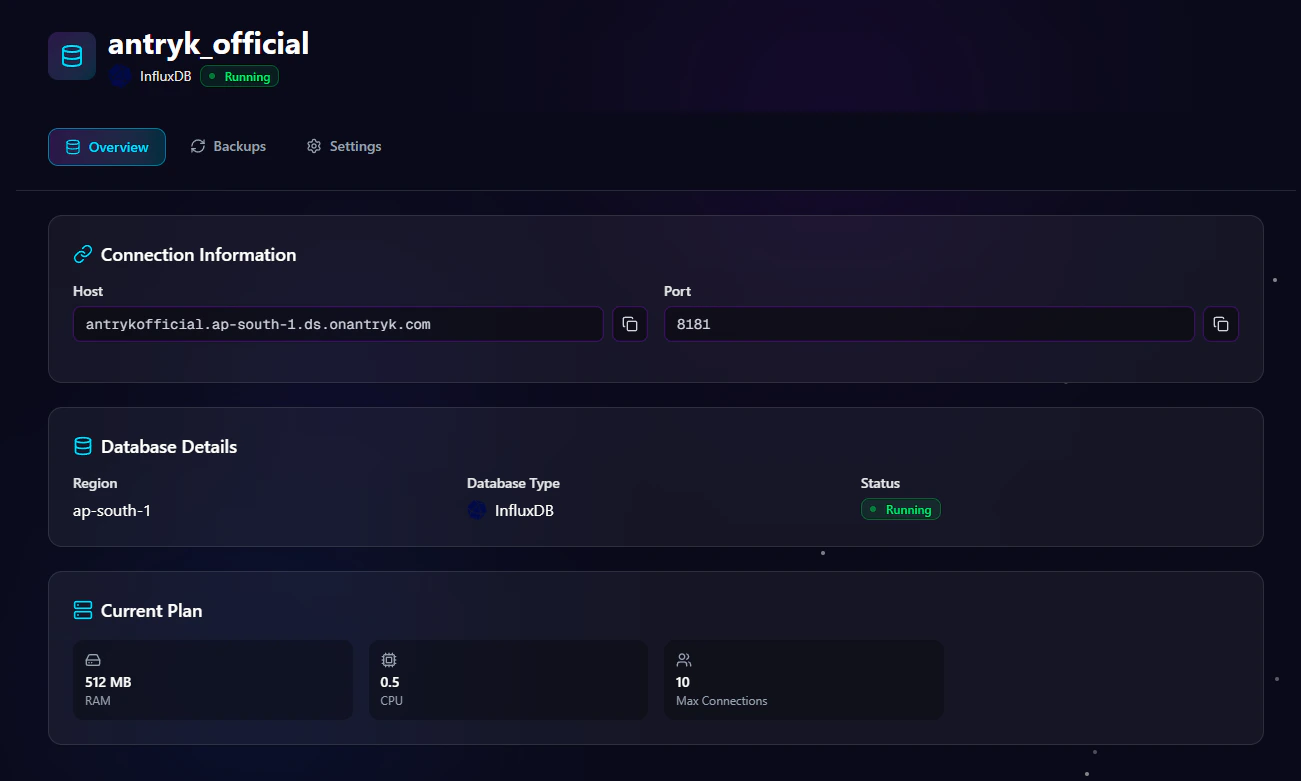
# InfluxDB Database Overview Page
The **Overview** page provides essential database connection and deployment information.
## Available Information
### Host
Database hostname used for external connections.
### Port
Default InfluxDB port:
```bash theme={null}
8086
```
***
# InfluxDB Settings Page
The **Settings** page allows you to manage database configuration and security.
## Available Settings
### Change Database Credentials
Rotate authentication credentials securely without redeploying the database.
### Regenerate API Key
Generate a new API key for secure integrations.
### Rename Database
Update the database name when needed.
### Update Access Control
Modify IP allowlists or enable/disable public access.
### Delete Service
Permanently remove the InfluxDB deployment.
> Warning: Deleting a service permanently removes the database and associated data.
***
# InfluxDB Backup Page
The **Backup** page allows you to manage backup configurations and retention settings.
## Backup Management Features
### Update Backup Frequency
Change backup schedules anytime:
* Hourly
* Daily
* Monthly
### Modify Retention Period
Adjust how long backups are stored:
* 7 Days
* 14 Days
* 30 Days
* 90 Days
### Enable or Disable Backups
Turn automated backups on or off depending on project requirements.
***
# Security Features
Antryk InfluxDB deployments include multiple security controls.
## Built-In Security
* IP-based access control
* Secure authentication management
* Encrypted connections
* Credential management
* Secure infrastructure isolation
***
# Common InfluxDB Use Cases
InfluxDB is suitable for many modern applications.
## Popular Use Cases
* Infrastructure monitoring
* IoT telemetry platforms
* Real-time analytics
* Application metrics collection
* DevOps observability
* Sensor data processing
* Financial time-series analysis
* Event tracking systems
***
# Connecting to InfluxDB
Use the connection information from the Overview page to connect your application.
## Node.js Example
```javascript theme={null}
const { InfluxDB } = require("@influxdata/influxdb-client");
const client = new InfluxDB({
url: process.env.INFLUX_URL,
token: process.env.INFLUX_API_KEY,
});
console.log("Connected to InfluxDB");
```
***
## Python Example
```python theme={null}
import os
from influxdb_client import InfluxDBClient
client = InfluxDBClient(
url=os.environ["INFLUX_URL"],
token=os.environ["INFLUX_API_KEY"],
org="default"
)
print("Connected to InfluxDB")
```
***
## PHP Example
```php theme={null}
getenv("INFLUX_URL"),
"token" => getenv("INFLUX_API_KEY")
]);
echo "Connected to InfluxDB";
```
***
# Best Practices
## Recommended Production Configuration
* Use restricted IP access
* Enable automated backups
* Select daily or hourly backups for production workloads
* Use secure authentication credentials
* Deploy in the closest region to your users
* Regularly rotate credentials and API keys
***
# Why Choose InfluxDB on Antryk?
Antryk simplifies InfluxDB infrastructure management so teams can focus on building applications instead of managing servers.
## Benefits
* Fast database deployment
* Simplified operations
* Secure infrastructure
* Flexible backup management
* Regional deployments
* Production-ready performance
* Developer-friendly experience
 Creating an InfluxDB database on Antryk takes only a few steps.
## Step 1: Choose Database Type
From the deployment dashboard:
1. Click **Create Database**
2. Select **InfluxDB**
***
## Step 2: Select InfluxDB Version
Choose the InfluxDB version you want to deploy.
Example versions may include:
* InfluxDB 1.8
* InfluxDB 2.7
* InfluxDB 3.0
* InfluxDB 3.1
Using the latest stable version is recommended for new applications unless your application requires compatibility with an older version.
***
## Step 3: Configure Database Settings
Creating an InfluxDB database on Antryk takes only a few steps.
## Step 1: Choose Database Type
From the deployment dashboard:
1. Click **Create Database**
2. Select **InfluxDB**
***
## Step 2: Select InfluxDB Version
Choose the InfluxDB version you want to deploy.
Example versions may include:
* InfluxDB 1.8
* InfluxDB 2.7
* InfluxDB 3.0
* InfluxDB 3.1
Using the latest stable version is recommended for new applications unless your application requires compatibility with an older version.
***
## Step 3: Configure Database Settings
 Enter your database configuration details.
### Configuration for InfluxDB 1.x and 2.x
For InfluxDB versions starting with **1.x** or **2.x**, configure the following fields:
| Field | Description |
| ------------- | ---------------------------------- |
| Database Name | Name of your InfluxDB database |
| Username | Database admin username |
| Password | Secure password for authentication |
### Example Configuration
```bash theme={null}
Database Name: metrics_db
Username: admin_user
Password: ********
```
***
### Configuration for InfluxDB 3.x
For InfluxDB versions starting with **3.x**, configure the following fields:
| Field | Description |
| ------------- | ------------------------------- |
| Database Name | Name of your InfluxDB database |
| API Key | API key used for authentication |
### API Key Format Requirement
InfluxDB 3.x API keys must start with the following required prefix:
```bash theme={null}
apiv3_
```
Example valid API key:
```bash theme={null}
apiv3_randompassword
```
> The `apiv3_` prefix is mandatory for all InfluxDB 3.x API keys.
### Example Configuration
```bash theme={null}
Database Name: metrics_db
API Key: apiv3_randompassword
```
***
## Step 4: Select Deployment Region
Choose the region closest to your users or application infrastructure.
Available regions include:
* USA
* ASIA
* EUROPE
Selecting the nearest region helps reduce latency and improves application performance.
***
## Step 5: Configure Access Control
Antryk provides flexible database access management.
### Option 1: Allow Specific IP Addresses
Restrict database access to trusted IP addresses only.
Example:
```bash theme={null}
192.168.1.10
203.0.113.45
```
### Option 2: Allow All IPs
Enable public access from all IP addresses.
> Recommended only for development environments or temporary testing.
***
## Step 6: Configure Automated Backups
Automated backups help protect your data and simplify disaster recovery.
### Enable or Disable Backups
You can:
* Enable automated backups
* Disable automated backups
### Backup Frequency Options
If backups are enabled, choose a backup schedule:
* Hourly
* Daily
* Monthly
### Backup Retention Options
Select how long backups are stored:
* 7 Days
* 14 Days
* 30 Days
* 90 Days
Example:
```bash theme={null}
Backup Frequency: Daily
Retention Period: 30 Days
```
***
## Step 7: Select a Plan
Choose an InfluxDB plan based on your workload requirements.
Plans may vary based on:
* CPU
* Memory
* Storage
* Network performance
* Backup limits
***
## Step 8: Deploy Database
After completing configuration:
1. Review all settings
2. Click **Deploy Database**
Antryk will automatically provision your InfluxDB instance and prepare it for use.
***
# InfluxDB Database Overview Page
The **Overview** page provides essential database connection and deployment information.
Enter your database configuration details.
### Configuration for InfluxDB 1.x and 2.x
For InfluxDB versions starting with **1.x** or **2.x**, configure the following fields:
| Field | Description |
| ------------- | ---------------------------------- |
| Database Name | Name of your InfluxDB database |
| Username | Database admin username |
| Password | Secure password for authentication |
### Example Configuration
```bash theme={null}
Database Name: metrics_db
Username: admin_user
Password: ********
```
***
### Configuration for InfluxDB 3.x
For InfluxDB versions starting with **3.x**, configure the following fields:
| Field | Description |
| ------------- | ------------------------------- |
| Database Name | Name of your InfluxDB database |
| API Key | API key used for authentication |
### API Key Format Requirement
InfluxDB 3.x API keys must start with the following required prefix:
```bash theme={null}
apiv3_
```
Example valid API key:
```bash theme={null}
apiv3_randompassword
```
> The `apiv3_` prefix is mandatory for all InfluxDB 3.x API keys.
### Example Configuration
```bash theme={null}
Database Name: metrics_db
API Key: apiv3_randompassword
```
***
## Step 4: Select Deployment Region
Choose the region closest to your users or application infrastructure.
Available regions include:
* USA
* ASIA
* EUROPE
Selecting the nearest region helps reduce latency and improves application performance.
***
## Step 5: Configure Access Control
Antryk provides flexible database access management.
### Option 1: Allow Specific IP Addresses
Restrict database access to trusted IP addresses only.
Example:
```bash theme={null}
192.168.1.10
203.0.113.45
```
### Option 2: Allow All IPs
Enable public access from all IP addresses.
> Recommended only for development environments or temporary testing.
***
## Step 6: Configure Automated Backups
Automated backups help protect your data and simplify disaster recovery.
### Enable or Disable Backups
You can:
* Enable automated backups
* Disable automated backups
### Backup Frequency Options
If backups are enabled, choose a backup schedule:
* Hourly
* Daily
* Monthly
### Backup Retention Options
Select how long backups are stored:
* 7 Days
* 14 Days
* 30 Days
* 90 Days
Example:
```bash theme={null}
Backup Frequency: Daily
Retention Period: 30 Days
```
***
## Step 7: Select a Plan
Choose an InfluxDB plan based on your workload requirements.
Plans may vary based on:
* CPU
* Memory
* Storage
* Network performance
* Backup limits
***
## Step 8: Deploy Database
After completing configuration:
1. Review all settings
2. Click **Deploy Database**
Antryk will automatically provision your InfluxDB instance and prepare it for use.
***
# InfluxDB Database Overview Page
The **Overview** page provides essential database connection and deployment information.
 ## Available Information
### Host
Database hostname used for external connections.
### Port
Default InfluxDB port:
```bash theme={null}
8086
```
***
# InfluxDB Settings Page
## Available Information
### Host
Database hostname used for external connections.
### Port
Default InfluxDB port:
```bash theme={null}
8086
```
***
# InfluxDB Settings Page
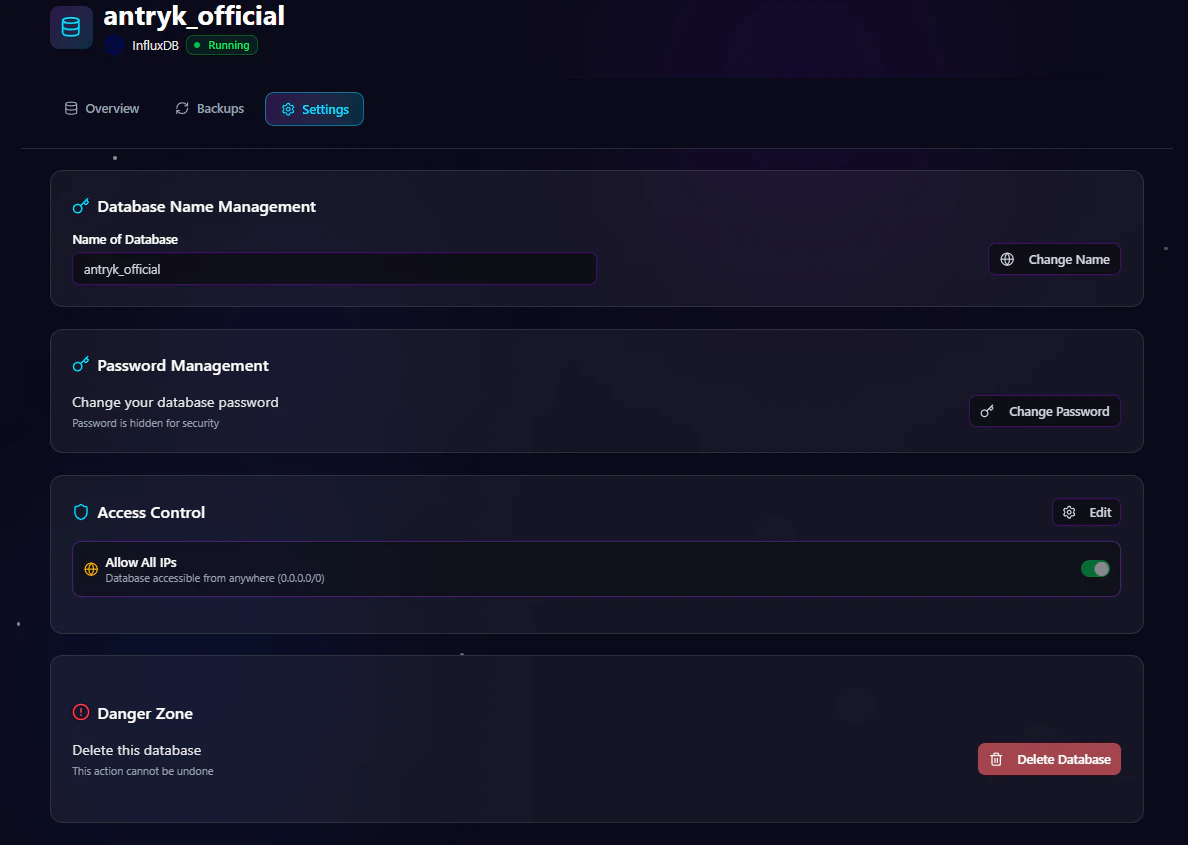 The **Settings** page allows you to manage database configuration and security.
## Available Settings
### Change Database Credentials
Rotate authentication credentials securely without redeploying the database.
### Regenerate API Key
Generate a new API key for secure integrations.
### Rename Database
Update the database name when needed.
### Update Access Control
Modify IP allowlists or enable/disable public access.
### Delete Service
Permanently remove the InfluxDB deployment.
> Warning: Deleting a service permanently removes the database and associated data.
***
# InfluxDB Backup Page
The **Settings** page allows you to manage database configuration and security.
## Available Settings
### Change Database Credentials
Rotate authentication credentials securely without redeploying the database.
### Regenerate API Key
Generate a new API key for secure integrations.
### Rename Database
Update the database name when needed.
### Update Access Control
Modify IP allowlists or enable/disable public access.
### Delete Service
Permanently remove the InfluxDB deployment.
> Warning: Deleting a service permanently removes the database and associated data.
***
# InfluxDB Backup Page
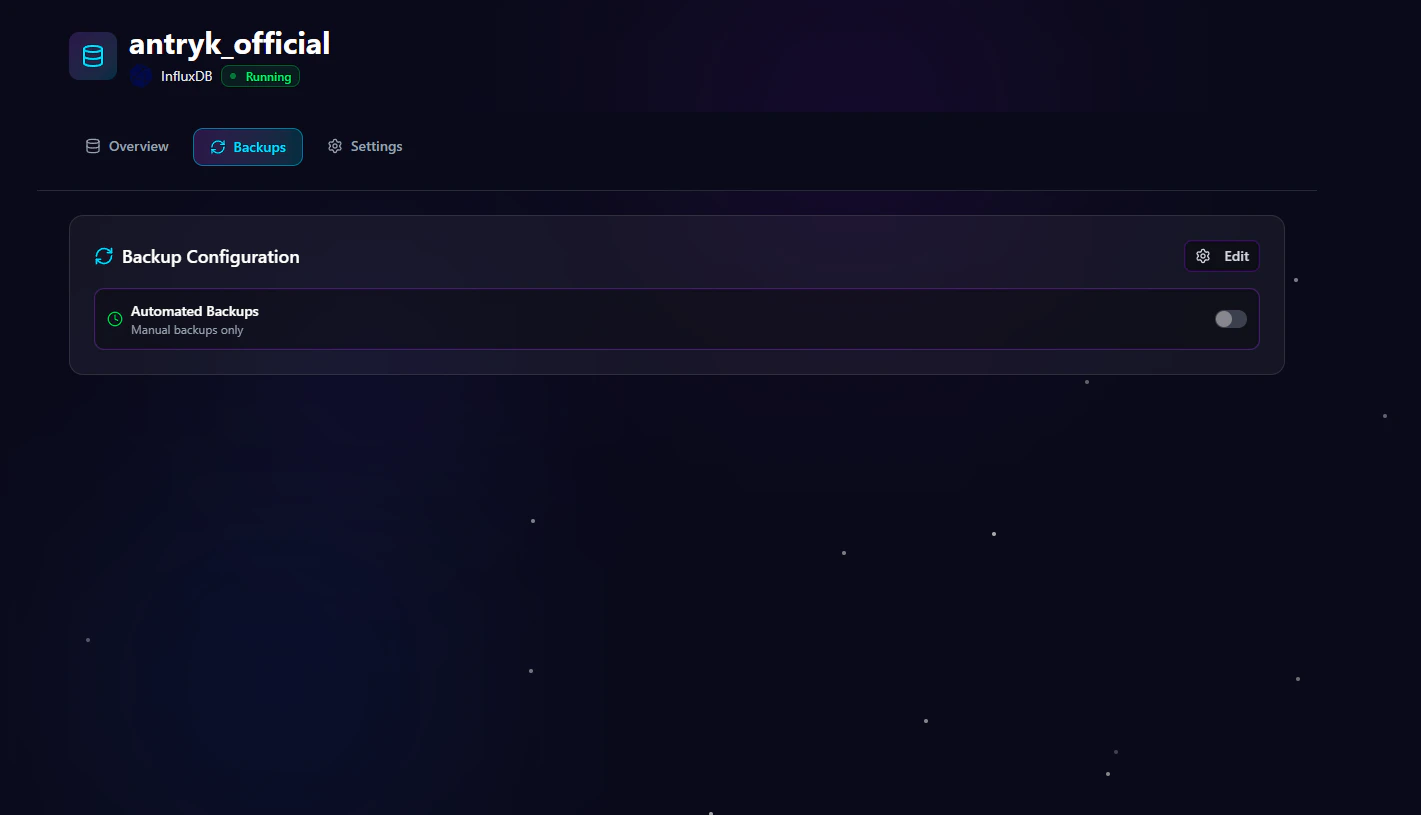 The **Backup** page allows you to manage backup configurations and retention settings.
## Backup Management Features
### Update Backup Frequency
Change backup schedules anytime:
* Hourly
* Daily
* Monthly
### Modify Retention Period
Adjust how long backups are stored:
* 7 Days
* 14 Days
* 30 Days
* 90 Days
### Enable or Disable Backups
Turn automated backups on or off depending on project requirements.
***
# Security Features
Antryk InfluxDB deployments include multiple security controls.
## Built-In Security
* IP-based access control
* Secure authentication management
* Encrypted connections
* Credential management
* Secure infrastructure isolation
***
# Common InfluxDB Use Cases
InfluxDB is suitable for many modern applications.
## Popular Use Cases
* Infrastructure monitoring
* IoT telemetry platforms
* Real-time analytics
* Application metrics collection
* DevOps observability
* Sensor data processing
* Financial time-series analysis
* Event tracking systems
***
# Connecting to InfluxDB
Use the connection information from the Overview page to connect your application.
## Node.js Example
```javascript theme={null}
const { InfluxDB } = require("@influxdata/influxdb-client");
const client = new InfluxDB({
url: process.env.INFLUX_URL,
token: process.env.INFLUX_API_KEY,
});
console.log("Connected to InfluxDB");
```
***
## Python Example
```python theme={null}
import os
from influxdb_client import InfluxDBClient
client = InfluxDBClient(
url=os.environ["INFLUX_URL"],
token=os.environ["INFLUX_API_KEY"],
org="default"
)
print("Connected to InfluxDB")
```
***
## PHP Example
```php theme={null}
getenv("INFLUX_URL"),
"token" => getenv("INFLUX_API_KEY")
]);
echo "Connected to InfluxDB";
```
***
# Best Practices
## Recommended Production Configuration
* Use restricted IP access
* Enable automated backups
* Select daily or hourly backups for production workloads
* Use secure authentication credentials
* Deploy in the closest region to your users
* Regularly rotate credentials and API keys
***
# Why Choose InfluxDB on Antryk?
Antryk simplifies InfluxDB infrastructure management so teams can focus on building applications instead of managing servers.
## Benefits
* Fast database deployment
* Simplified operations
* Secure infrastructure
* Flexible backup management
* Regional deployments
* Production-ready performance
* Developer-friendly experience
The **Backup** page allows you to manage backup configurations and retention settings.
## Backup Management Features
### Update Backup Frequency
Change backup schedules anytime:
* Hourly
* Daily
* Monthly
### Modify Retention Period
Adjust how long backups are stored:
* 7 Days
* 14 Days
* 30 Days
* 90 Days
### Enable or Disable Backups
Turn automated backups on or off depending on project requirements.
***
# Security Features
Antryk InfluxDB deployments include multiple security controls.
## Built-In Security
* IP-based access control
* Secure authentication management
* Encrypted connections
* Credential management
* Secure infrastructure isolation
***
# Common InfluxDB Use Cases
InfluxDB is suitable for many modern applications.
## Popular Use Cases
* Infrastructure monitoring
* IoT telemetry platforms
* Real-time analytics
* Application metrics collection
* DevOps observability
* Sensor data processing
* Financial time-series analysis
* Event tracking systems
***
# Connecting to InfluxDB
Use the connection information from the Overview page to connect your application.
## Node.js Example
```javascript theme={null}
const { InfluxDB } = require("@influxdata/influxdb-client");
const client = new InfluxDB({
url: process.env.INFLUX_URL,
token: process.env.INFLUX_API_KEY,
});
console.log("Connected to InfluxDB");
```
***
## Python Example
```python theme={null}
import os
from influxdb_client import InfluxDBClient
client = InfluxDBClient(
url=os.environ["INFLUX_URL"],
token=os.environ["INFLUX_API_KEY"],
org="default"
)
print("Connected to InfluxDB")
```
***
## PHP Example
```php theme={null}
getenv("INFLUX_URL"),
"token" => getenv("INFLUX_API_KEY")
]);
echo "Connected to InfluxDB";
```
***
# Best Practices
## Recommended Production Configuration
* Use restricted IP access
* Enable automated backups
* Select daily or hourly backups for production workloads
* Use secure authentication credentials
* Deploy in the closest region to your users
* Regularly rotate credentials and API keys
***
# Why Choose InfluxDB on Antryk?
Antryk simplifies InfluxDB infrastructure management so teams can focus on building applications instead of managing servers.
## Benefits
* Fast database deployment
* Simplified operations
* Secure infrastructure
* Flexible backup management
* Regional deployments
* Production-ready performance
* Developer-friendly experience