> ## Documentation Index
> Fetch the complete documentation index at: https://docs.antryk.com/llms.txt
> Use this file to discover all available pages before exploring further.
# Redis
> Deploy fully managed Redis databases on Antryk with automated backups, secure access control, scalable infrastructure, and production-ready performance.
## What is Redis?
Redis is a high-performance in-memory data store widely used for caching, real-time analytics, session management, message brokering, and fast application workloads. It delivers extremely low latency, high throughput, and flexible data structures for modern applications.
With Antryk Redis, you can deploy fully managed Redis databases in minutes while Antryk handles infrastructure management, backups, networking, and operational maintenance.
***
## Redis Features on Antryk
* Fully managed Redis deployments
* Multiple Redis version support
* Secure database access control
* Automated backups and retention management
* Regional database deployments
* Connection information dashboard
* Scalable plans for development and production
* Simplified database administration
* Secure credential management
* Production-ready infrastructure
***
## Guide On Deploying Redis
***
# Deploy a Redis Database
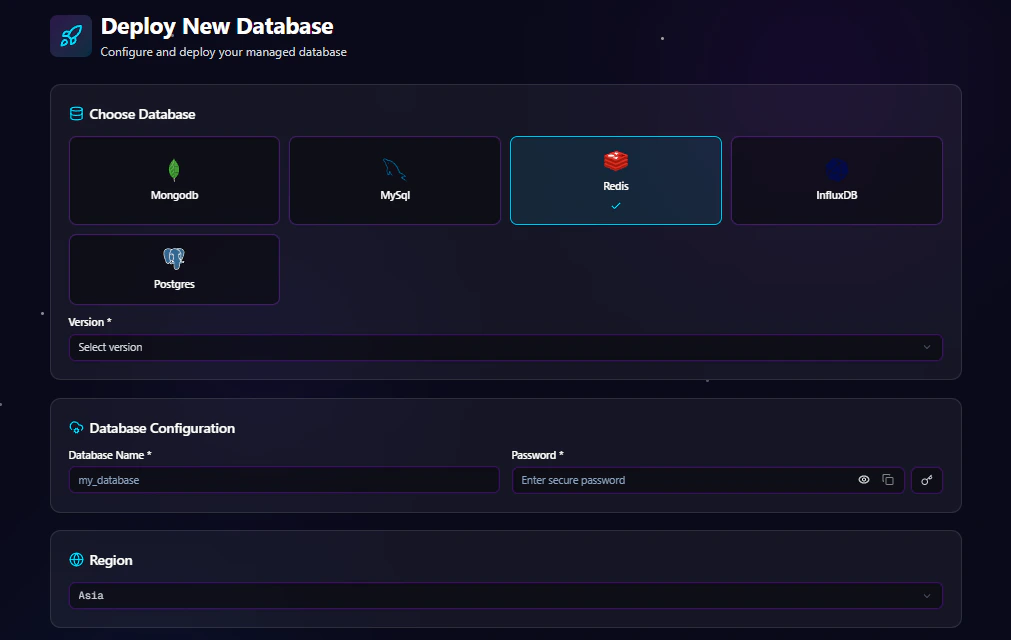
Creating a Redis database on Antryk takes only a few steps.
## Step 1: Choose Database Type
From the deployment dashboard:
1. Click **Create Database**
2. Select **Redis**
***
## Step 2: Select Redis Version
Choose the Redis version you want to deploy.
Example versions may include:
* Redis 6
* Redis 7
* Redis 7.2
Using the latest stable version is recommended for new applications unless your application requires compatibility with an older version.
***
## Step 3: Configure Database Settings
Enter your database configuration details.
### Database Configuration Fields
| Field | Description |
| ------------- | ---------------------------------- |
| Database Name | Name of your Redis database |
| Password | Secure password for authentication |
### Example Configuration
```bash theme={null}
Database Name: production_cache
Password: ********
```
***
## Step 4: Select Deployment Region
Choose the region closest to your users or application infrastructure.
Available regions include:
* USA
* ASIA
* EUROPE
Selecting the nearest region helps reduce latency and improves application performance.
***
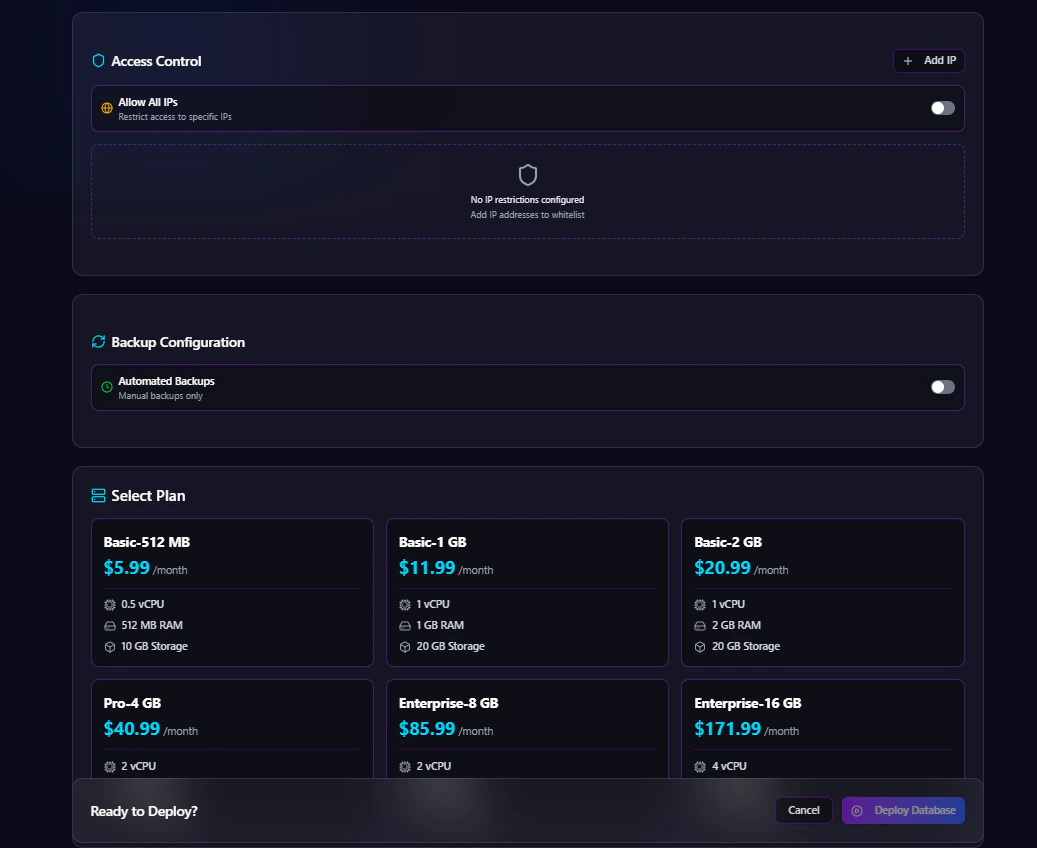
## Step 5: Configure Access Control
Antryk provides flexible database access management.
### Option 1: Allow Specific IP Addresses
Restrict database access to trusted IP addresses only.
Example:
```bash theme={null}
192.168.1.10
203.0.113.45
```
### Option 2: Allow All IPs
Enable public access from all IP addresses.
> Recommended only for development environments or temporary testing.
***
## Step 6: Configure Automated Backups
Automated backups help protect your data and simplify disaster recovery.
### Enable or Disable Backups
You can:
* Enable automated backups
* Disable automated backups
### Backup Frequency Options
If backups are enabled, choose a backup schedule:
* Hourly
* Daily
* Monthly
### Backup Retention Options
Select how long backups are stored:
* 7 Days
* 14 Days
* 30 Days
* 90 Days
Example:
```bash theme={null}
Backup Frequency: Daily
Retention Period: 30 Days
```
***
## Step 7: Select a Plan
Choose a Redis plan based on your workload requirements.
Plans may vary based on:
* CPU
* Memory
* Storage
* Network performance
* Backup limits
***
## Step 8: Deploy Database
After completing configuration:
1. Review all settings
2. Click **Deploy Database**
Antryk will automatically provision your Redis instance and prepare it for use.
***
# Redis Database Overview Page
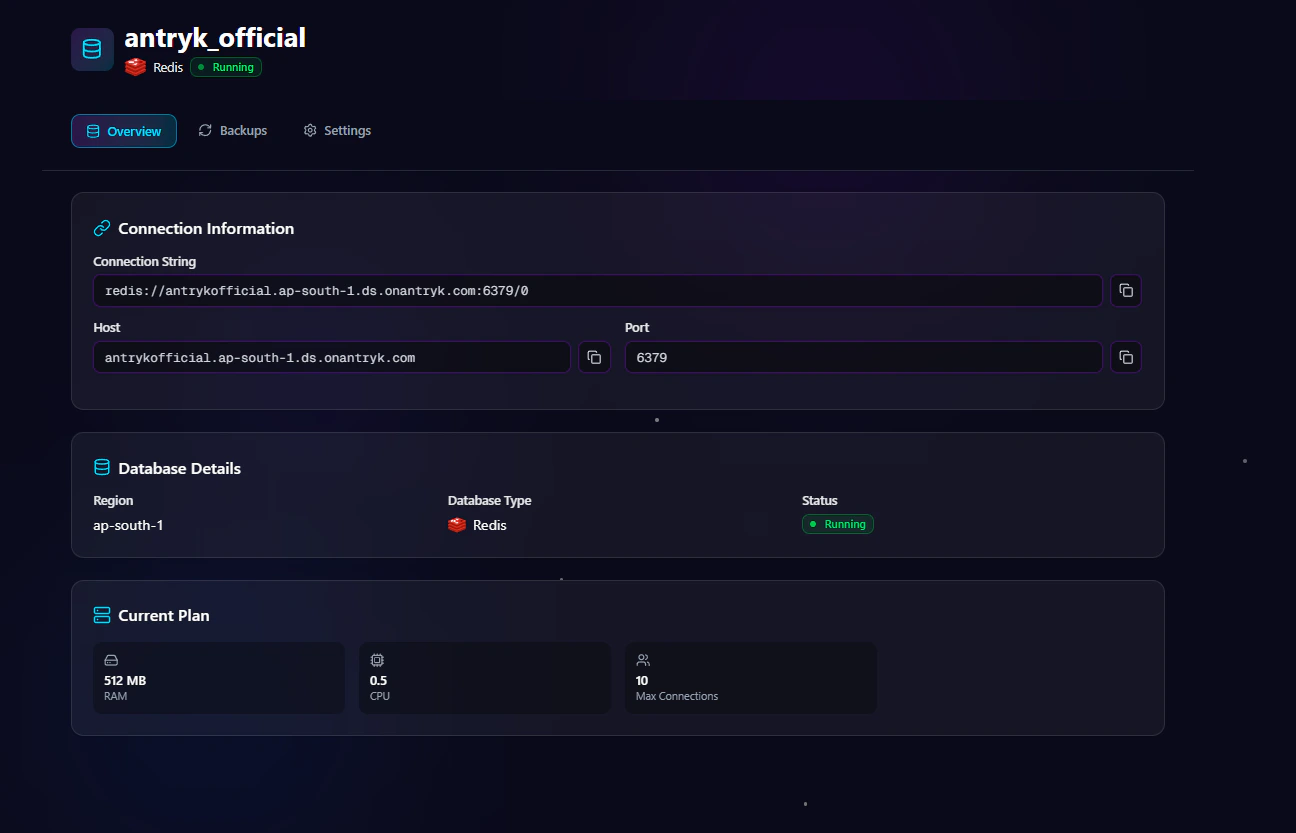
The **Overview** page provides essential database connection and deployment information.
## Available Information
### Connection String
Use the generated Redis connection string directly in your applications.
Example:
```bash theme={null}
redis://:password@host:6379
```
### Host
Database hostname used for external connections.
### Port
Default Redis port:
```bash theme={null}
6379
```
***
# Redis Settings Page
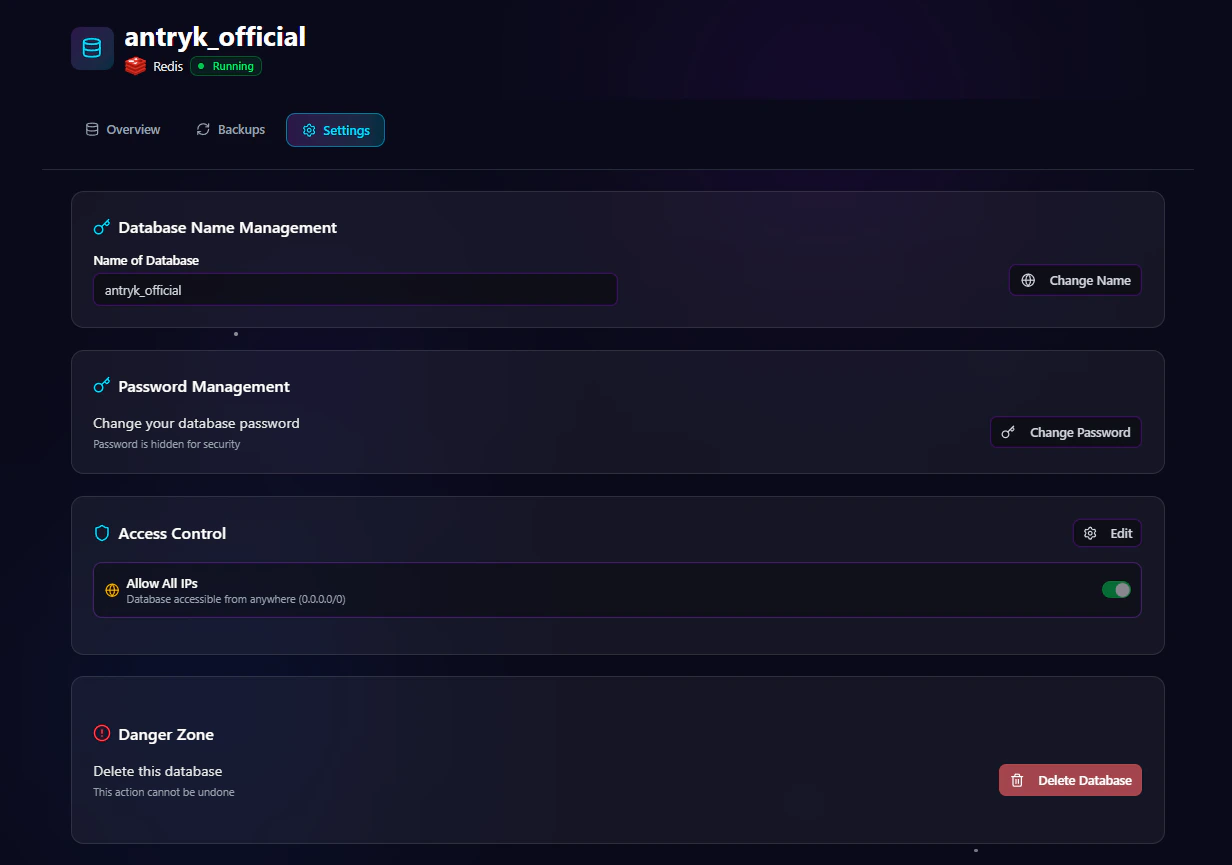
The **Settings** page allows you to manage database configuration and security.
## Available Settings
### Change Database Password
Rotate credentials securely without redeploying the database.
### Regenerate API Key
Generate a new API key for secure integrations.
### Rename Database
Update the database name when needed.
### Update Access Control
Modify IP allowlists or enable/disable public access.
### Delete Service
Permanently remove the Redis deployment.
> Warning: Deleting a service permanently removes the database and associated data.
***
# Redis Backup Page
The **Backup** page allows you to manage backup configurations and retention settings.
## Backup Management Features
### Update Backup Frequency
Change backup schedules anytime:
* Hourly
* Daily
* Monthly
### Modify Retention Period
Adjust how long backups are stored:
* 7 Days
* 14 Days
* 30 Days
* 90 Days
### Enable or Disable Backups
Turn automated backups on or off depending on project requirements.
***
# Security Features
Antryk Redis deployments include multiple security controls.
## Built-In Security
* IP-based access control
* Secure password authentication
* Encrypted connections
* Credential management
* Secure infrastructure isolation
***
# Common Redis Use Cases
Redis is suitable for many modern applications.
## Popular Use Cases
* Application caching
* Session storage
* Real-time analytics
* Queue management
* Rate limiting
* Leaderboards
* Real-time messaging
* Pub/Sub systems
***
# Connecting to Redis
Use the connection information from the Overview page to connect your application.
## Node.js Example
```javascript theme={null}
const redis = require("redis");
async function connectRedis() {
const client = redis.createClient({
url: process.env.REDIS_URL,
});
await client.connect();
console.log("Connected to Redis");
}
connectRedis();
```
***
## Python Example
```python theme={null}
import os
import redis
client = redis.Redis(
host=os.environ["REDIS_HOST"],
port=6379,
password=os.environ["REDIS_PASSWORD"],
decode_responses=True
)
client.ping()
print("Connected to Redis")
```
***
## PHP Example
```php theme={null}
connect(
getenv("REDIS_HOST"),
6379
);
$redis->auth(getenv("REDIS_PASSWORD"));
echo "Connected to Redis";
```
***
# Best Practices
## Recommended Production Configuration
* Use restricted IP access
* Enable automated backups
* Select daily or hourly backups for production workloads
* Use strong passwords
* Deploy in the closest region to your users
* Regularly rotate credentials
***
# Why Choose Redis on Antryk?
Antryk simplifies Redis infrastructure management so teams can focus on building applications instead of managing servers.
## Benefits
* Fast database deployment
* Simplified operations
* Secure infrastructure
* Flexible backup management
* Regional deployments
* Production-ready performance
* Developer-friendly experience
 Creating a Redis database on Antryk takes only a few steps.
## Step 1: Choose Database Type
From the deployment dashboard:
1. Click **Create Database**
2. Select **Redis**
***
## Step 2: Select Redis Version
Choose the Redis version you want to deploy.
Example versions may include:
* Redis 6
* Redis 7
* Redis 7.2
Using the latest stable version is recommended for new applications unless your application requires compatibility with an older version.
***
## Step 3: Configure Database Settings
Enter your database configuration details.
### Database Configuration Fields
| Field | Description |
| ------------- | ---------------------------------- |
| Database Name | Name of your Redis database |
| Password | Secure password for authentication |
### Example Configuration
```bash theme={null}
Database Name: production_cache
Password: ********
```
***
## Step 4: Select Deployment Region
Choose the region closest to your users or application infrastructure.
Available regions include:
* USA
* ASIA
* EUROPE
Selecting the nearest region helps reduce latency and improves application performance.
***
## Step 5: Configure Access Control
Antryk provides flexible database access management.
### Option 1: Allow Specific IP Addresses
Restrict database access to trusted IP addresses only.
Example:
```bash theme={null}
192.168.1.10
203.0.113.45
```
### Option 2: Allow All IPs
Enable public access from all IP addresses.
> Recommended only for development environments or temporary testing.
***
## Step 6: Configure Automated Backups
Automated backups help protect your data and simplify disaster recovery.
### Enable or Disable Backups
You can:
* Enable automated backups
* Disable automated backups
### Backup Frequency Options
If backups are enabled, choose a backup schedule:
* Hourly
* Daily
* Monthly
### Backup Retention Options
Select how long backups are stored:
* 7 Days
* 14 Days
* 30 Days
* 90 Days
Example:
```bash theme={null}
Backup Frequency: Daily
Retention Period: 30 Days
```
***
## Step 7: Select a Plan
Choose a Redis plan based on your workload requirements.
Plans may vary based on:
* CPU
* Memory
* Storage
* Network performance
* Backup limits
***
## Step 8: Deploy Database
After completing configuration:
1. Review all settings
2. Click **Deploy Database**
Antryk will automatically provision your Redis instance and prepare it for use.
***
# Redis Database Overview Page
The **Overview** page provides essential database connection and deployment information.
Creating a Redis database on Antryk takes only a few steps.
## Step 1: Choose Database Type
From the deployment dashboard:
1. Click **Create Database**
2. Select **Redis**
***
## Step 2: Select Redis Version
Choose the Redis version you want to deploy.
Example versions may include:
* Redis 6
* Redis 7
* Redis 7.2
Using the latest stable version is recommended for new applications unless your application requires compatibility with an older version.
***
## Step 3: Configure Database Settings
Enter your database configuration details.
### Database Configuration Fields
| Field | Description |
| ------------- | ---------------------------------- |
| Database Name | Name of your Redis database |
| Password | Secure password for authentication |
### Example Configuration
```bash theme={null}
Database Name: production_cache
Password: ********
```
***
## Step 4: Select Deployment Region
Choose the region closest to your users or application infrastructure.
Available regions include:
* USA
* ASIA
* EUROPE
Selecting the nearest region helps reduce latency and improves application performance.
***
## Step 5: Configure Access Control
Antryk provides flexible database access management.
### Option 1: Allow Specific IP Addresses
Restrict database access to trusted IP addresses only.
Example:
```bash theme={null}
192.168.1.10
203.0.113.45
```
### Option 2: Allow All IPs
Enable public access from all IP addresses.
> Recommended only for development environments or temporary testing.
***
## Step 6: Configure Automated Backups
Automated backups help protect your data and simplify disaster recovery.
### Enable or Disable Backups
You can:
* Enable automated backups
* Disable automated backups
### Backup Frequency Options
If backups are enabled, choose a backup schedule:
* Hourly
* Daily
* Monthly
### Backup Retention Options
Select how long backups are stored:
* 7 Days
* 14 Days
* 30 Days
* 90 Days
Example:
```bash theme={null}
Backup Frequency: Daily
Retention Period: 30 Days
```
***
## Step 7: Select a Plan
Choose a Redis plan based on your workload requirements.
Plans may vary based on:
* CPU
* Memory
* Storage
* Network performance
* Backup limits
***
## Step 8: Deploy Database
After completing configuration:
1. Review all settings
2. Click **Deploy Database**
Antryk will automatically provision your Redis instance and prepare it for use.
***
# Redis Database Overview Page
The **Overview** page provides essential database connection and deployment information.
 ## Available Information
### Connection String
Use the generated Redis connection string directly in your applications.
Example:
```bash theme={null}
redis://:password@host:6379
```
### Host
Database hostname used for external connections.
### Port
Default Redis port:
```bash theme={null}
6379
```
***
# Redis Settings Page
## Available Information
### Connection String
Use the generated Redis connection string directly in your applications.
Example:
```bash theme={null}
redis://:password@host:6379
```
### Host
Database hostname used for external connections.
### Port
Default Redis port:
```bash theme={null}
6379
```
***
# Redis Settings Page
 The **Settings** page allows you to manage database configuration and security.
## Available Settings
### Change Database Password
Rotate credentials securely without redeploying the database.
### Regenerate API Key
Generate a new API key for secure integrations.
### Rename Database
Update the database name when needed.
### Update Access Control
Modify IP allowlists or enable/disable public access.
### Delete Service
Permanently remove the Redis deployment.
> Warning: Deleting a service permanently removes the database and associated data.
***
# Redis Backup Page
The **Settings** page allows you to manage database configuration and security.
## Available Settings
### Change Database Password
Rotate credentials securely without redeploying the database.
### Regenerate API Key
Generate a new API key for secure integrations.
### Rename Database
Update the database name when needed.
### Update Access Control
Modify IP allowlists or enable/disable public access.
### Delete Service
Permanently remove the Redis deployment.
> Warning: Deleting a service permanently removes the database and associated data.
***
# Redis Backup Page
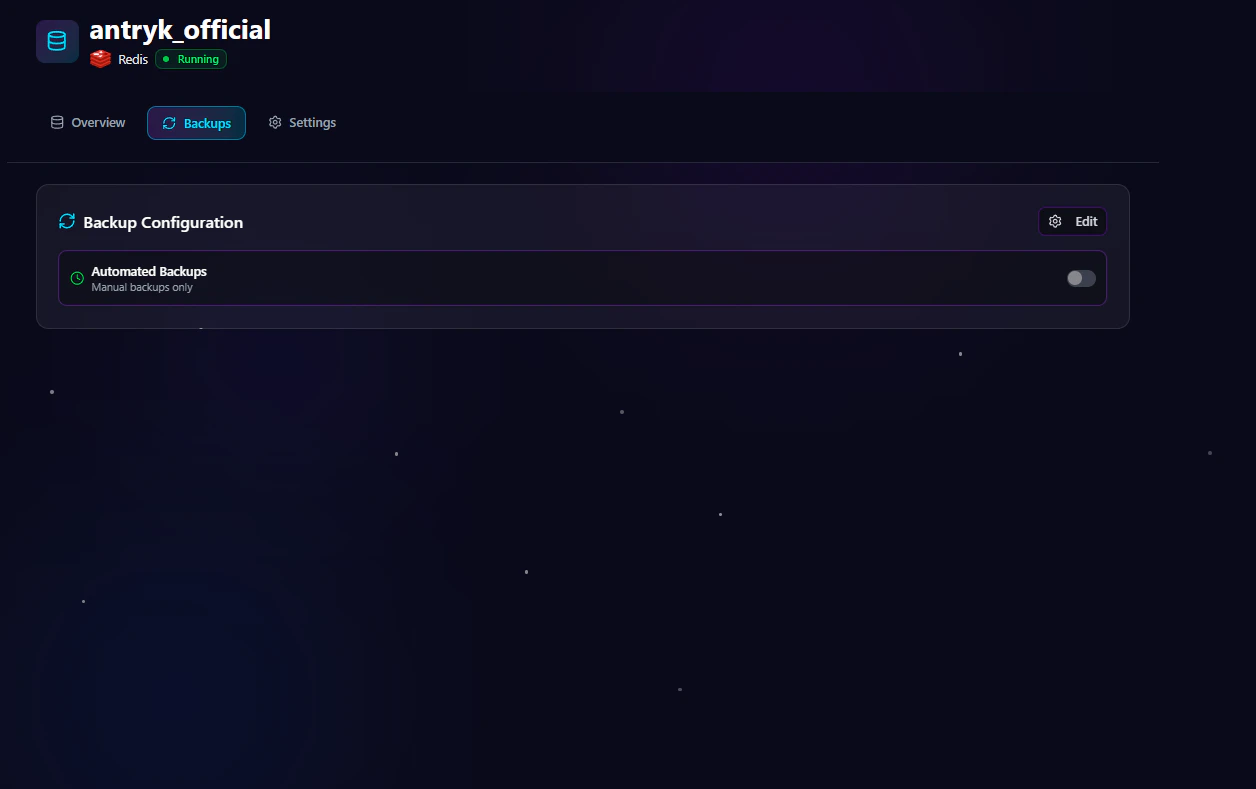 The **Backup** page allows you to manage backup configurations and retention settings.
## Backup Management Features
### Update Backup Frequency
Change backup schedules anytime:
* Hourly
* Daily
* Monthly
### Modify Retention Period
Adjust how long backups are stored:
* 7 Days
* 14 Days
* 30 Days
* 90 Days
### Enable or Disable Backups
Turn automated backups on or off depending on project requirements.
***
# Security Features
Antryk Redis deployments include multiple security controls.
## Built-In Security
* IP-based access control
* Secure password authentication
* Encrypted connections
* Credential management
* Secure infrastructure isolation
***
# Common Redis Use Cases
Redis is suitable for many modern applications.
## Popular Use Cases
* Application caching
* Session storage
* Real-time analytics
* Queue management
* Rate limiting
* Leaderboards
* Real-time messaging
* Pub/Sub systems
***
# Connecting to Redis
Use the connection information from the Overview page to connect your application.
## Node.js Example
```javascript theme={null}
const redis = require("redis");
async function connectRedis() {
const client = redis.createClient({
url: process.env.REDIS_URL,
});
await client.connect();
console.log("Connected to Redis");
}
connectRedis();
```
***
## Python Example
```python theme={null}
import os
import redis
client = redis.Redis(
host=os.environ["REDIS_HOST"],
port=6379,
password=os.environ["REDIS_PASSWORD"],
decode_responses=True
)
client.ping()
print("Connected to Redis")
```
***
## PHP Example
```php theme={null}
connect(
getenv("REDIS_HOST"),
6379
);
$redis->auth(getenv("REDIS_PASSWORD"));
echo "Connected to Redis";
```
***
# Best Practices
## Recommended Production Configuration
* Use restricted IP access
* Enable automated backups
* Select daily or hourly backups for production workloads
* Use strong passwords
* Deploy in the closest region to your users
* Regularly rotate credentials
***
# Why Choose Redis on Antryk?
Antryk simplifies Redis infrastructure management so teams can focus on building applications instead of managing servers.
## Benefits
* Fast database deployment
* Simplified operations
* Secure infrastructure
* Flexible backup management
* Regional deployments
* Production-ready performance
* Developer-friendly experience
The **Backup** page allows you to manage backup configurations and retention settings.
## Backup Management Features
### Update Backup Frequency
Change backup schedules anytime:
* Hourly
* Daily
* Monthly
### Modify Retention Period
Adjust how long backups are stored:
* 7 Days
* 14 Days
* 30 Days
* 90 Days
### Enable or Disable Backups
Turn automated backups on or off depending on project requirements.
***
# Security Features
Antryk Redis deployments include multiple security controls.
## Built-In Security
* IP-based access control
* Secure password authentication
* Encrypted connections
* Credential management
* Secure infrastructure isolation
***
# Common Redis Use Cases
Redis is suitable for many modern applications.
## Popular Use Cases
* Application caching
* Session storage
* Real-time analytics
* Queue management
* Rate limiting
* Leaderboards
* Real-time messaging
* Pub/Sub systems
***
# Connecting to Redis
Use the connection information from the Overview page to connect your application.
## Node.js Example
```javascript theme={null}
const redis = require("redis");
async function connectRedis() {
const client = redis.createClient({
url: process.env.REDIS_URL,
});
await client.connect();
console.log("Connected to Redis");
}
connectRedis();
```
***
## Python Example
```python theme={null}
import os
import redis
client = redis.Redis(
host=os.environ["REDIS_HOST"],
port=6379,
password=os.environ["REDIS_PASSWORD"],
decode_responses=True
)
client.ping()
print("Connected to Redis")
```
***
## PHP Example
```php theme={null}
connect(
getenv("REDIS_HOST"),
6379
);
$redis->auth(getenv("REDIS_PASSWORD"));
echo "Connected to Redis";
```
***
# Best Practices
## Recommended Production Configuration
* Use restricted IP access
* Enable automated backups
* Select daily or hourly backups for production workloads
* Use strong passwords
* Deploy in the closest region to your users
* Regularly rotate credentials
***
# Why Choose Redis on Antryk?
Antryk simplifies Redis infrastructure management so teams can focus on building applications instead of managing servers.
## Benefits
* Fast database deployment
* Simplified operations
* Secure infrastructure
* Flexible backup management
* Regional deployments
* Production-ready performance
* Developer-friendly experience