> ## Documentation Index
> Fetch the complete documentation index at: https://docs.antryk.com/llms.txt
> Use this file to discover all available pages before exploring further.
# Domain Management
> Manage custom domains, DNS records, SSL certificates, and production URLs for your Web Services with automatic HTTPS and DNS verification.
# Domain Management
Domain Management allows you to connect custom domains to your Web Services, manage DNS configuration, and automatically secure applications with SSL certificates.
Every deployed Web Service on Antryk receives a free default `onantryk.com` domain automatically. You can also attach your own custom domains, configure DNS records, and verify domain ownership directly from the dashboard.
This makes it easy to launch production-ready applications with branded URLs and secure HTTPS access.
***
## Default Antryk Domain
When you deploy a Web Service, Antryk automatically generates a default public URL for your application.
Example:
```bash theme={null}
my-api.onantryk.com
```
This default domain is instantly available after deployment and includes:
* Automatic HTTPS
* Public internet access
* Load balancing support
* Production-ready routing
* Zero manual DNS setup
### Benefits of Default Domains
* Instant application access after deploy
* Great for staging and testing environments
* No DNS configuration required
* SSL certificates enabled automatically
* Works seamlessly with autoscaling infrastructure
{" "}
Every Web Service receives a unique `onantryk.com` subdomain by default.{" "}
***
## Custom Domain Management
You can connect your own domains and subdomains to Web Services directly from the Antryk dashboard.
### Supported examples
* `api.example.com`
* `app.example.com`
* `www.example.com`
* `backend.yourcompany.com`
This allows you to use professional production URLs for APIs, SaaS platforms, dashboards, and customer-facing applications.
### Features
#### Attach Custom Domains
Connect domains and subdomains to your deployed applications in a few clicks.
#### Automatic SSL Certificates
Antryk automatically provisions and renews SSL certificates after successful domain verification.
#### DNS Verification
Verify domain ownership securely using DNS records.
#### HTTPS Enabled by Default
All verified domains automatically receive HTTPS support.
#### Multiple Domain Support
Attach multiple production or staging domains to the same service.
#### Real-Time Verification Status
Monitor SSL provisioning and DNS verification status directly from the dashboard.
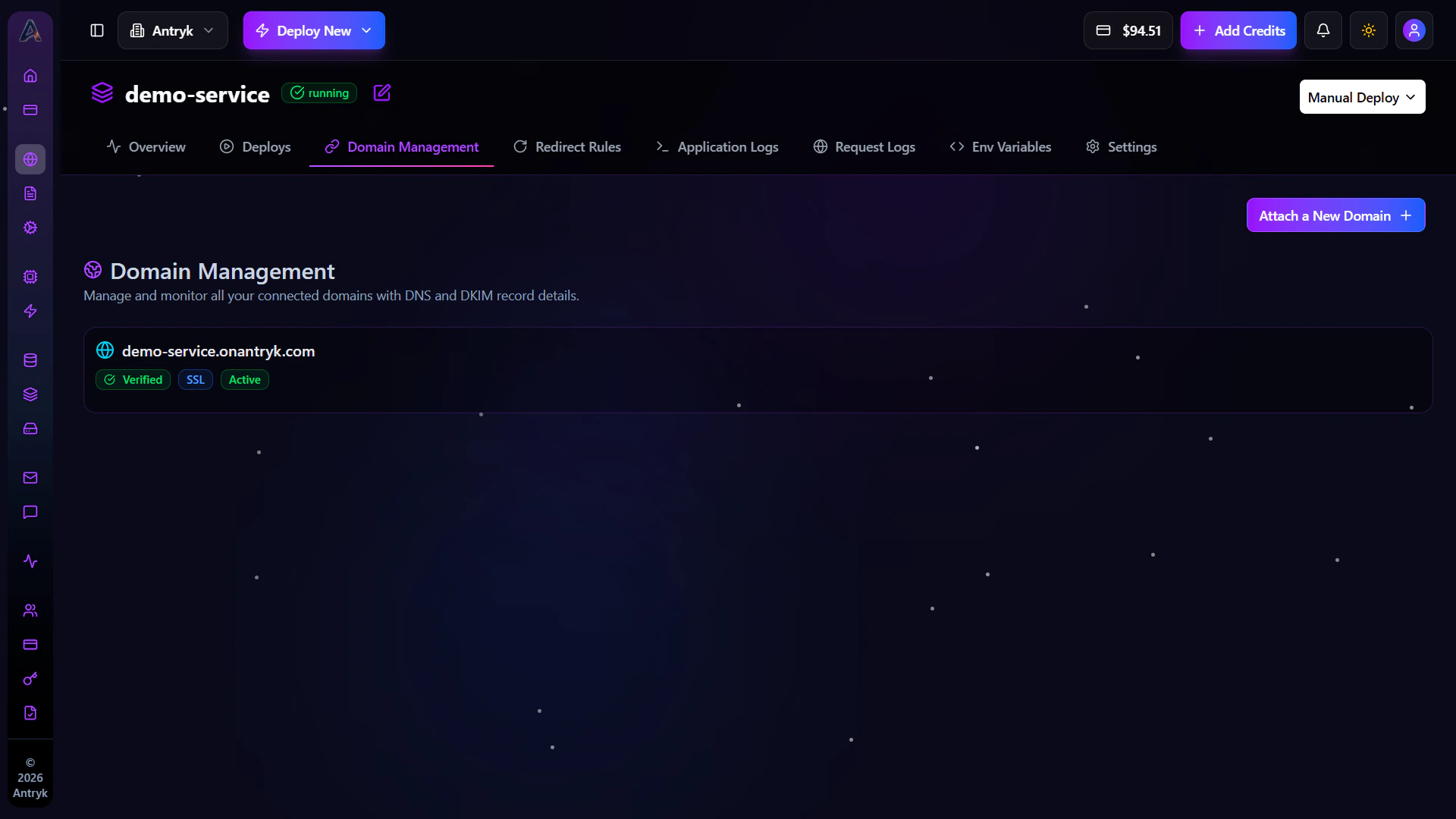 ### Adding a Custom Domain
To attach a custom domain:
1. Open your Web Service dashboard
2. Navigate to the Domain Management tab
3. Click Add Domain
4. Enter your custom domain name
5. Configure the required DNS records
6. Wait for verification and SSL provisioning
Once verification completes, your domain becomes active automatically.
***
### DNS Configuration
### Adding a Custom Domain
To attach a custom domain:
1. Open your Web Service dashboard
2. Navigate to the Domain Management tab
3. Click Add Domain
4. Enter your custom domain name
5. Configure the required DNS records
6. Wait for verification and SSL provisioning
Once verification completes, your domain becomes active automatically.
***
### DNS Configuration
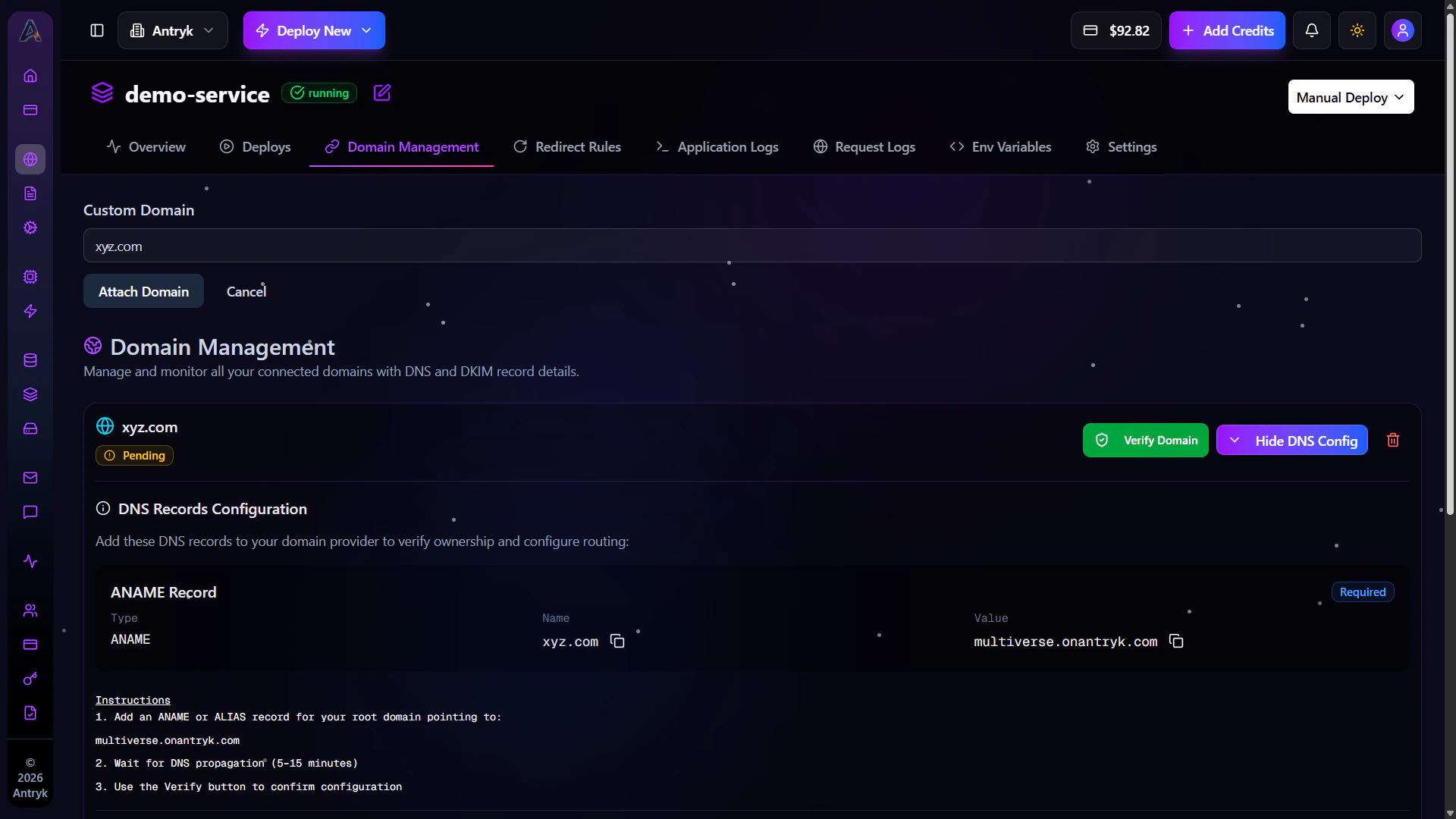 Antryk provides complete DNS configuration instructions directly inside the dashboard.
When adding a domain, you will receive the required DNS records such as:
* CNAME records
* A records
* TXT verification records
These records help connect your domain securely to Antryk infrastructure.
### Example DNS Records
#### CNAME Record
Use CNAME records for subdomains like:
* `app.example.com`
#### Example
| Type | Name | Value |
| ----- | ---- | ---------------- |
| CNAME | app | cname.antryk.com |
***
#### A Record
Use A records for apex/root domains like:
* `example.com`
#### Example
| Type | Name | Value |
| ---- | ---- | ------------- |
| A | @ | 76.76.xxx.xxx |
***
#### TXT Verification Record
Some domains may require verification records.
#### Example
| Type | Name | Value |
| ---- | ---- | ------------------------- |
| TXT | @ | antryk-verification=xxxxx |
***
DNS propagation may take a few minutes depending on your DNS provider.
***
### SSL Certificates
After DNS verification succeeds, Antryk automatically provisions SSL certificates for your domain.
SSL certificates are:
* Automatically generated
* Automatically renewed
* Configured with HTTPS
* Managed without manual intervention
This ensures secure encrypted traffic between users and your application.
### Domain Verification Status
The dashboard shows live domain verification and SSL status indicators.
You can monitor:
* DNS propagation
* Verification progress
* SSL certificate issuance
* HTTPS activation
* Active production domains
This helps developers quickly troubleshoot DNS configuration issues.
***
### Troubleshooting Domains
Domain Not Verifying
* Ensure DNS records match exactly
* Check for DNS propagation delays
* Remove conflicting DNS entries
* Verify nameserver configuration
### SSL Certificate Pending
* Wait for DNS propagation
* Confirm domain points to Antryk infrastructure
* Recheck verification records
### HTTPS Not Working
* Verify SSL provisioning completed
* Ensure DNS records are correct
* Retry verification from dashboard
{" "}
Incorrect DNS configuration can prevent your application from becoming
publicly accessible.{" "}
***
### Domain Management Overview
The Domain Management dashboard gives developers complete control over production domains and HTTPS configuration.
Using Domain Management, teams can:
* Launch branded production applications
* Secure services with HTTPS
* Manage DNS records easily
* Verify domain ownership
* Configure staging and production environments
* Monitor SSL and verification status
Get started with web services
Antryk provides complete DNS configuration instructions directly inside the dashboard.
When adding a domain, you will receive the required DNS records such as:
* CNAME records
* A records
* TXT verification records
These records help connect your domain securely to Antryk infrastructure.
### Example DNS Records
#### CNAME Record
Use CNAME records for subdomains like:
* `app.example.com`
#### Example
| Type | Name | Value |
| ----- | ---- | ---------------- |
| CNAME | app | cname.antryk.com |
***
#### A Record
Use A records for apex/root domains like:
* `example.com`
#### Example
| Type | Name | Value |
| ---- | ---- | ------------- |
| A | @ | 76.76.xxx.xxx |
***
#### TXT Verification Record
Some domains may require verification records.
#### Example
| Type | Name | Value |
| ---- | ---- | ------------------------- |
| TXT | @ | antryk-verification=xxxxx |
***
DNS propagation may take a few minutes depending on your DNS provider.
***
### SSL Certificates
After DNS verification succeeds, Antryk automatically provisions SSL certificates for your domain.
SSL certificates are:
* Automatically generated
* Automatically renewed
* Configured with HTTPS
* Managed without manual intervention
This ensures secure encrypted traffic between users and your application.
### Domain Verification Status
The dashboard shows live domain verification and SSL status indicators.
You can monitor:
* DNS propagation
* Verification progress
* SSL certificate issuance
* HTTPS activation
* Active production domains
This helps developers quickly troubleshoot DNS configuration issues.
***
### Troubleshooting Domains
Domain Not Verifying
* Ensure DNS records match exactly
* Check for DNS propagation delays
* Remove conflicting DNS entries
* Verify nameserver configuration
### SSL Certificate Pending
* Wait for DNS propagation
* Confirm domain points to Antryk infrastructure
* Recheck verification records
### HTTPS Not Working
* Verify SSL provisioning completed
* Ensure DNS records are correct
* Retry verification from dashboard
{" "}
Incorrect DNS configuration can prevent your application from becoming
publicly accessible.{" "}
***
### Domain Management Overview
The Domain Management dashboard gives developers complete control over production domains and HTTPS configuration.
Using Domain Management, teams can:
* Launch branded production applications
* Secure services with HTTPS
* Manage DNS records easily
* Verify domain ownership
* Configure staging and production environments
* Monitor SSL and verification status
Get started with web services