> ## Documentation Index
> Fetch the complete documentation index at: https://docs.antryk.com/llms.txt
> Use this file to discover all available pages before exploring further.
# Redirect URL Management
> Create and manage URL redirects with custom domains, DNS verification, 301 and 302 redirects, SSL support, and production-ready redirect routing for your applications.
# Redirect URL Management
Redirect URL Management allows you to create powerful URL redirects for custom domains and subdomains directly from the Antryk dashboard.
Using Redirect URL Management, developers can configure permanent and temporary redirects, manage DNS verification, attach branded domains, and securely route traffic between URLs with automatic HTTPS support.
This feature is ideal for:
* Website migrations
* Domain forwarding
* Marketing campaigns
* SaaS onboarding links
* Vanity URLs
* Product launch pages
* SEO-friendly URL redirection
* Redirecting deprecated endpoints
Every redirect is managed through a centralized dashboard with DNS verification, SSL provisioning, and real-time status tracking.
***
## What is URL Redirection?
URL redirection automatically forwards visitors from one URL to another destination URL.
For example:
### Source URL
```bash theme={null}
old.example.com
```
### Target URL
```bash theme={null}
new.example.com
```
When users open the source URL, they are automatically redirected to the target URL.
Antryk supports:
* **301 Permanent Redirects**
* **302 Temporary Redirects**
***
## Benefits of Redirect URL Management
* Create production-ready redirects instantly
* SEO-friendly permanent redirects
* Temporary redirects for testing and migrations
* Automatic HTTPS support
* DNS verification and configuration
* Custom branded domains
* Real-time redirect monitoring
* Fast global redirect routing
* Multiple redirect support
* Secure SSL-enabled infrastructure
Every redirect created on Antryk supports automatic HTTPS provisioning after
successful domain verification.
***
# Redirect Types
## 301 Redirect — Permanent Redirect
A 301 redirect tells browsers and search engines that a URL has permanently moved to a new destination.
Best used for:
* Website migrations
* Domain changes
* SEO preservation
* Rebranding
* Permanent route changes
### Example
```bash theme={null}
oldsite.com → newsite.com
```
### Benefits
* Preserves SEO rankings
* Transfers search engine authority
* Recommended for production migrations
* Cached by browsers for faster performance
***
## 302 Redirect — Temporary Redirect
A 302 redirect tells browsers that the redirect is temporary.
Best used for:
* Maintenance pages
* Temporary campaigns
* A/B testing
* Short-term routing changes
* Feature rollouts
### Example
```bash theme={null}
promo.example.com → summer-sale.example.com
```
### Benefits
* Temporary traffic routing
* Does not permanently transfer SEO authority
* Easy rollback support
* Useful for testing environments
***
# Redirect URL Dashboard
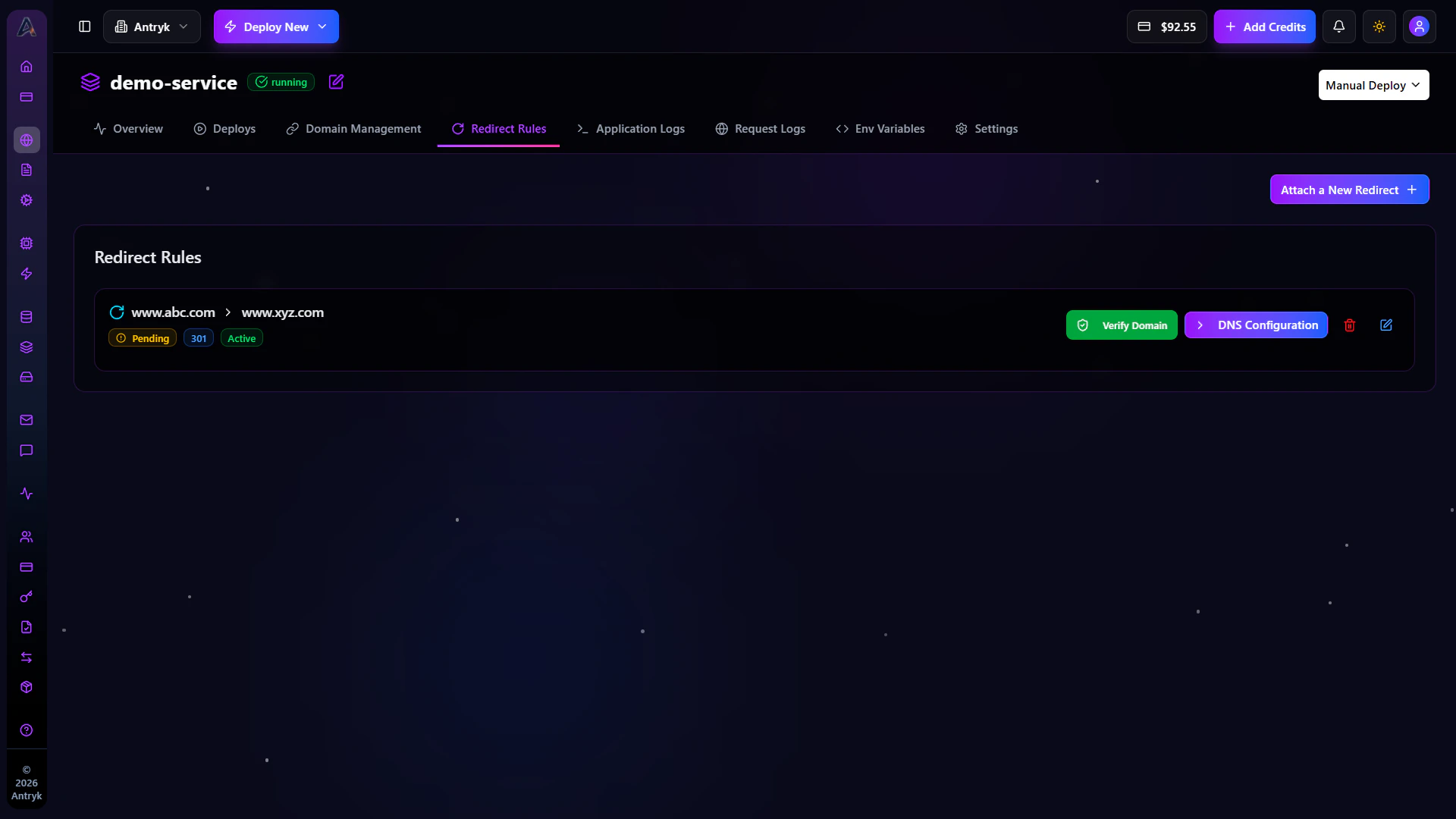 The Redirect URL dashboard provides centralized management for all your redirects.
Using the dashboard, users can:
* Add new redirects
* Configure source and target URLs
* Select redirect type
* Verify domains
* View DNS configuration
* Monitor verification status
* Enable HTTPS automatically
* Manage multiple redirects
***
# Creating a New Redirect
To create a redirect:
1. Open the Antryk Dashboard
2. Navigate to the **Redirect URL Management** section
3. Click **Add Redirect**
4. Enter the Source URL
5. Enter the Target URL
6. Select redirect type:
* 301 Permanent
* 302 Temporary
7. Save the redirect
8. Configure DNS records
9. Verify your domain
Once verification completes, the redirect becomes active automatically.
***
# Redirect Configuration
Each redirect contains the following configuration:
| Field | Description |
| ------------------- | ----------------------------------------------- |
| Source URL | The domain or URL users will visit |
| Target URL | The destination URL users will be redirected to |
| Redirect Type | 301 or 302 |
| Domain Verification | DNS ownership verification |
| SSL Status | HTTPS certificate provisioning |
| DNS Records | Required DNS configuration |
***
# Supported Redirect Examples
## Subdomain Redirects
```bash theme={null}
blog.example.com → articles.example.com
```
```bash theme={null}
go.example.com → app.example.com
```
## Root Domain Redirects
```bash theme={null}
example.com → www.example.com
```
## Marketing Redirects
```bash theme={null}
launch.example.com → product.example.com
```
***
The Redirect URL dashboard provides centralized management for all your redirects.
Using the dashboard, users can:
* Add new redirects
* Configure source and target URLs
* Select redirect type
* Verify domains
* View DNS configuration
* Monitor verification status
* Enable HTTPS automatically
* Manage multiple redirects
***
# Creating a New Redirect
To create a redirect:
1. Open the Antryk Dashboard
2. Navigate to the **Redirect URL Management** section
3. Click **Add Redirect**
4. Enter the Source URL
5. Enter the Target URL
6. Select redirect type:
* 301 Permanent
* 302 Temporary
7. Save the redirect
8. Configure DNS records
9. Verify your domain
Once verification completes, the redirect becomes active automatically.
***
# Redirect Configuration
Each redirect contains the following configuration:
| Field | Description |
| ------------------- | ----------------------------------------------- |
| Source URL | The domain or URL users will visit |
| Target URL | The destination URL users will be redirected to |
| Redirect Type | 301 or 302 |
| Domain Verification | DNS ownership verification |
| SSL Status | HTTPS certificate provisioning |
| DNS Records | Required DNS configuration |
***
# Supported Redirect Examples
## Subdomain Redirects
```bash theme={null}
blog.example.com → articles.example.com
```
```bash theme={null}
go.example.com → app.example.com
```
## Root Domain Redirects
```bash theme={null}
example.com → www.example.com
```
## Marketing Redirects
```bash theme={null}
launch.example.com → product.example.com
```
***
 # Domain Verification
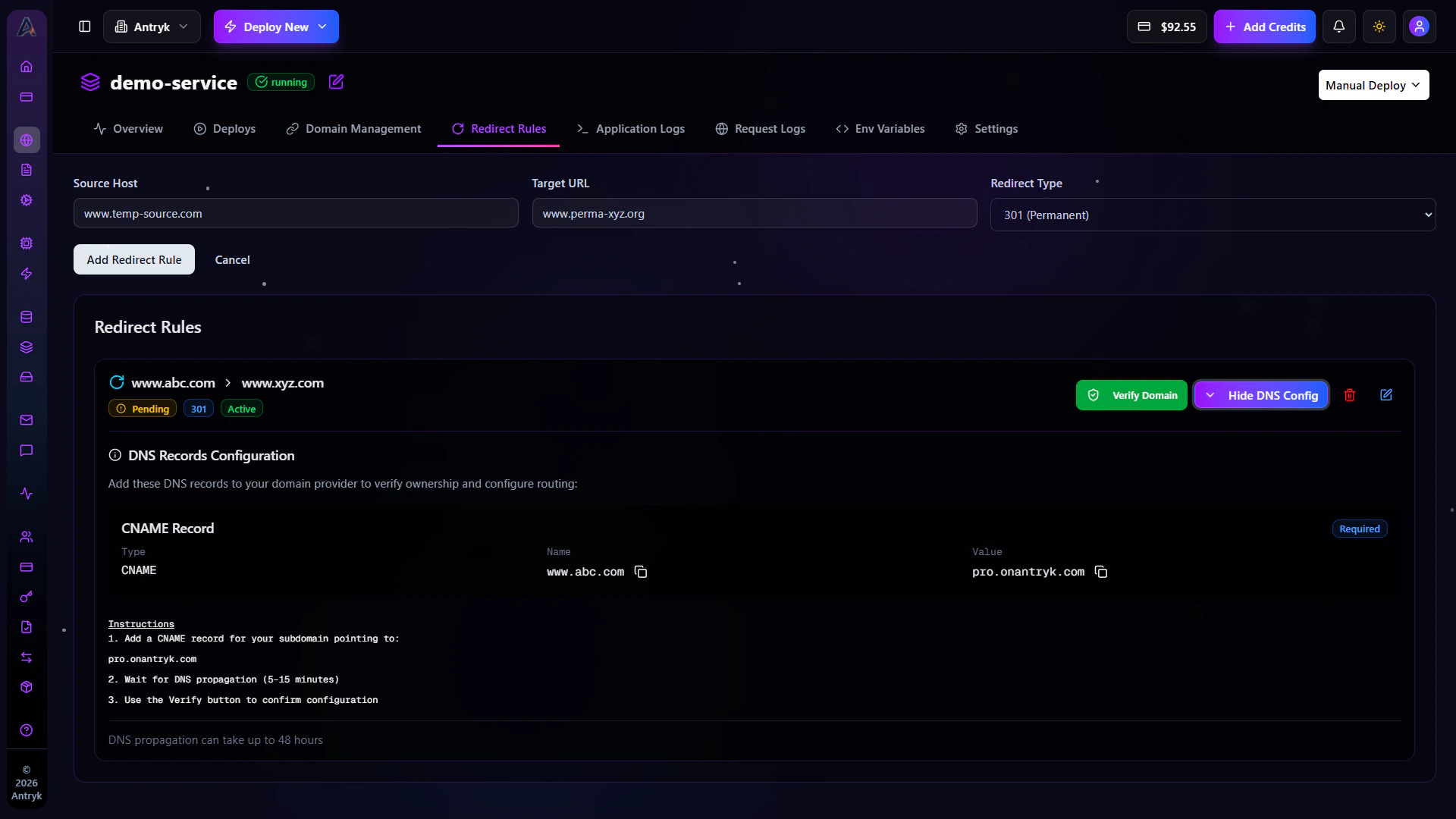
Before a redirect becomes active, Antryk verifies domain ownership through DNS records.
Users can click:
## Verify Domain
inside the dashboard to validate DNS configuration and activate the redirect.
Verification helps ensure:
* Secure ownership validation
* Correct DNS routing
* SSL certificate provisioning
* Safe HTTPS activation
***
# DNS Configuration
Antryk automatically provides DNS instructions required for redirect setup.
Users can view DNS configuration directly from the dashboard.
Supported DNS records include:
* CNAME Records
* A Records
* ANAME Records
* TXT Verification Records
***
# Example DNS Records
## CNAME Record
Use CNAME records for subdomains.
### Example
| Type | Name | Value |
| ----- | ---- | ---------------- |
| CNAME | app | cname.antryk.com |
### Supported For
```bash theme={null}
app.example.com
```
```bash theme={null}
redirect.example.com
```
***
## A Record
Use A records for apex/root domains.
### Example
| Type | Name | Value |
| ---- | ---- | ------------- |
| A | @ | 76.76.xxx.xxx |
### Supported For
```bash theme={null}
example.com
```
***
## ANAME Record
ANAME records help map root domains to redirect infrastructure.
### Example
| Type | Name | Value |
| ----- | ---- | ------------------- |
| ANAME | @ | redirect.antryk.com |
***
## TXT Verification Record
TXT records are used for domain ownership verification.
### Example
| Type | Name | Value |
| ---- | ---- | ------------------------- |
| TXT | @ | antryk-verification=xxxxx |
DNS propagation may take several minutes depending on your DNS provider.
***
# HTTPS and SSL Certificates
After successful DNS verification, Antryk automatically provisions SSL certificates for your redirect domains.
SSL certificates are:
* Automatically generated
* Automatically renewed
* HTTPS enabled by default
* Fully managed by Antryk
* Production ready
This ensures secure encrypted redirects across all environments.
***
# Redirect Status Monitoring
The dashboard provides real-time redirect status updates.
Users can monitor:
* DNS propagation
* Verification progress
* Redirect activity
* SSL provisioning
* HTTPS activation
* Active redirect status
This helps teams quickly troubleshoot redirect configuration issues.
***
# Managing Redirects
Users can manage all redirects directly from the dashboard.
Supported actions include:
* View redirects
* Edit redirect targets
* Change redirect types
* Reverify domains
* Delete redirects
* Monitor SSL status
* View DNS instructions
***
# Troubleshooting Redirects
## Domain Verification Failed
* Ensure DNS records are correct
* Wait for DNS propagation
* Remove conflicting DNS entries
* Verify nameserver configuration
***
## Redirect Not Working
* Verify redirect is active
* Confirm DNS points to Antryk
* Recheck source URL configuration
* Retry domain verification
***
## SSL Certificate Pending
* Wait for DNS propagation
* Verify domain ownership
* Ensure DNS records match dashboard instructions
***
## HTTPS Not Active
* Confirm SSL provisioning completed
* Retry verification
* Ensure redirect domain points correctly to Antryk infrastructure
Incorrect DNS configuration may prevent redirects from becoming publicly
accessible.
***
Get started with web services
# Domain Verification
Before a redirect becomes active, Antryk verifies domain ownership through DNS records.
Users can click:
## Verify Domain
inside the dashboard to validate DNS configuration and activate the redirect.
Verification helps ensure:
* Secure ownership validation
* Correct DNS routing
* SSL certificate provisioning
* Safe HTTPS activation
***
# DNS Configuration
Antryk automatically provides DNS instructions required for redirect setup.
Users can view DNS configuration directly from the dashboard.
Supported DNS records include:
* CNAME Records
* A Records
* ANAME Records
* TXT Verification Records
***
# Example DNS Records
## CNAME Record
Use CNAME records for subdomains.
### Example
| Type | Name | Value |
| ----- | ---- | ---------------- |
| CNAME | app | cname.antryk.com |
### Supported For
```bash theme={null}
app.example.com
```
```bash theme={null}
redirect.example.com
```
***
## A Record
Use A records for apex/root domains.
### Example
| Type | Name | Value |
| ---- | ---- | ------------- |
| A | @ | 76.76.xxx.xxx |
### Supported For
```bash theme={null}
example.com
```
***
## ANAME Record
ANAME records help map root domains to redirect infrastructure.
### Example
| Type | Name | Value |
| ----- | ---- | ------------------- |
| ANAME | @ | redirect.antryk.com |
***
## TXT Verification Record
TXT records are used for domain ownership verification.
### Example
| Type | Name | Value |
| ---- | ---- | ------------------------- |
| TXT | @ | antryk-verification=xxxxx |
DNS propagation may take several minutes depending on your DNS provider.
***
# HTTPS and SSL Certificates
After successful DNS verification, Antryk automatically provisions SSL certificates for your redirect domains.
SSL certificates are:
* Automatically generated
* Automatically renewed
* HTTPS enabled by default
* Fully managed by Antryk
* Production ready
This ensures secure encrypted redirects across all environments.
***
# Redirect Status Monitoring
The dashboard provides real-time redirect status updates.
Users can monitor:
* DNS propagation
* Verification progress
* Redirect activity
* SSL provisioning
* HTTPS activation
* Active redirect status
This helps teams quickly troubleshoot redirect configuration issues.
***
# Managing Redirects
Users can manage all redirects directly from the dashboard.
Supported actions include:
* View redirects
* Edit redirect targets
* Change redirect types
* Reverify domains
* Delete redirects
* Monitor SSL status
* View DNS instructions
***
# Troubleshooting Redirects
## Domain Verification Failed
* Ensure DNS records are correct
* Wait for DNS propagation
* Remove conflicting DNS entries
* Verify nameserver configuration
***
## Redirect Not Working
* Verify redirect is active
* Confirm DNS points to Antryk
* Recheck source URL configuration
* Retry domain verification
***
## SSL Certificate Pending
* Wait for DNS propagation
* Verify domain ownership
* Ensure DNS records match dashboard instructions
***
## HTTPS Not Active
* Confirm SSL provisioning completed
* Retry verification
* Ensure redirect domain points correctly to Antryk infrastructure
Incorrect DNS configuration may prevent redirects from becoming publicly
accessible.
***
Get started with web services