> ## Documentation Index
> Fetch the complete documentation index at: https://docs.antryk.com/llms.txt
> Use this file to discover all available pages before exploring further.
# Static Services
> Deploy static websites and frontend applications globally with automatic CDN delivery, custom domains, SSL certificates, redirect rules, and production-ready hosting infrastructure.
# Static Services
Static Services allow developers to deploy modern frontend applications and static websites globally with high performance, automatic HTTPS, CDN delivery, and production-ready infrastructure.
Using Static Services, teams can host:
* React applications
* Next.js static exports
* Vue applications
* Angular apps
* Astro projects
* Documentation websites
* Marketing landing pages
* Portfolio websites
* JAMstack applications
* Static HTML/CSS/JS sites
Antryk automatically handles deployments, SSL certificates, global delivery, caching, and domain management so developers can focus on building products instead of managing infrastructure.
***
## What are Static Services?
Static Services are globally distributed frontend hosting services optimized for static assets such as HTML, CSS, JavaScript, images, and pre-rendered applications.
Unlike traditional backend services, Static Services deliver content directly through edge infrastructure and CDN caching for ultra-fast page loads and scalable traffic handling.
Every Static Service receives:
* Automatic CDN delivery
* HTTPS by default
* Global edge caching
* Custom domain support
* Instant deployments
* Production-ready infrastructure
***
## Key Features
* **Global CDN Delivery**: Fast content delivery worldwide
* **Automatic HTTPS**: SSL certificates provisioned automatically
* **Custom Domains**: Connect your own domains easily
* **Redirect Rules**: Configure redirects and URL routing
* **Instant Deployments**: Deploy directly from Git repositories
* **Atomic Deployments**: Zero downtime frontend deployments
* **Environment Variables**: Manage frontend runtime configuration
* **High Performance Caching**: Optimized asset delivery
* **Git-Based CI/CD**: Automatic deployments on Git push
* **Production-Ready Hosting**: Scalable frontend infrastructure
***
## Use Cases
* Frontend applications
* SaaS dashboards
* Marketing websites
* Product landing pages
* Documentation platforms
* JAMstack applications
* Static blogs
* Portfolio websites
* E-commerce storefronts
* Web app frontends
***
## Supported Frameworks
* **Next.js**: Full SSR and ISR support
* **Nuxt**: SSR and static generation
* **SvelteKit**: SSR and adapter support
* **Gatsby**: Static site generation
* **Vite**: Build tool integration
* **React/Vue/Angular**: Static exports
***
# Quickstart: Deploy a React Application
## Guide on deploying static service
Deploy your frontend application on Antryk in just a few clicks.
***
## Step 1: Push Your Project to GitHub
Push your frontend project to GitHub, GitLab, or Bitbucket.
Supported frameworks include:
* React
* Next.js Static Export
* Vue
* Angular
* Astro
* Vite
* Svelte
* Static HTML websites
Static Services automatically detect common frontend frameworks and build
configurations.
***
## Example React App Structure
```json theme={null}
// package.json
{
"name": "frontend-app",
"version": "1.0.0",
"scripts": {
"dev": "vite",
"build": "vite build",
"start": "vite preview"
},
"dependencies": {
"react": "^18.2.0"
}
}
```
***
## Step 2: Create a Static Service
In the Antryk Dashboard:
**Sidebar → Static Services → Deploy Static Service**
***
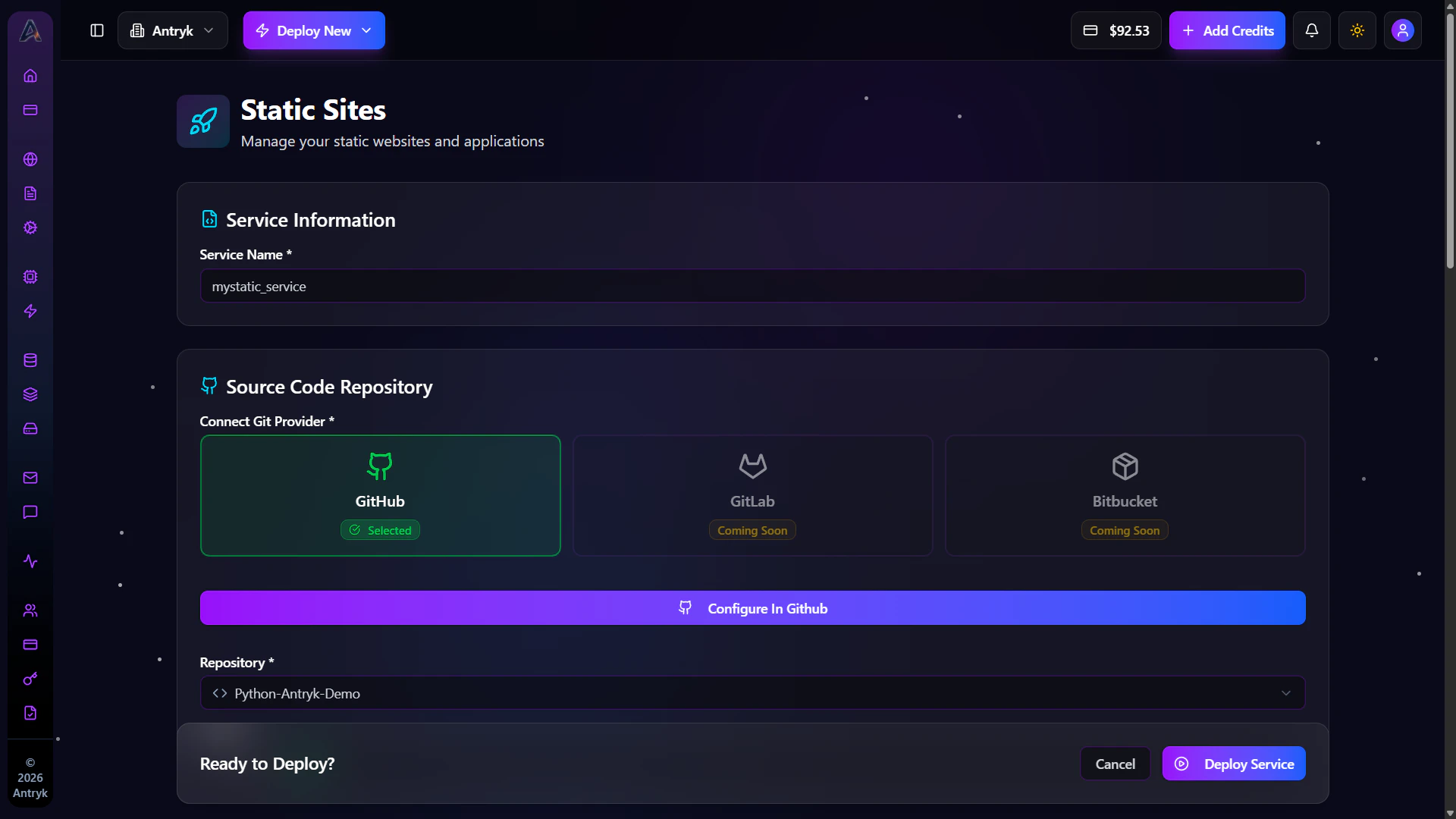
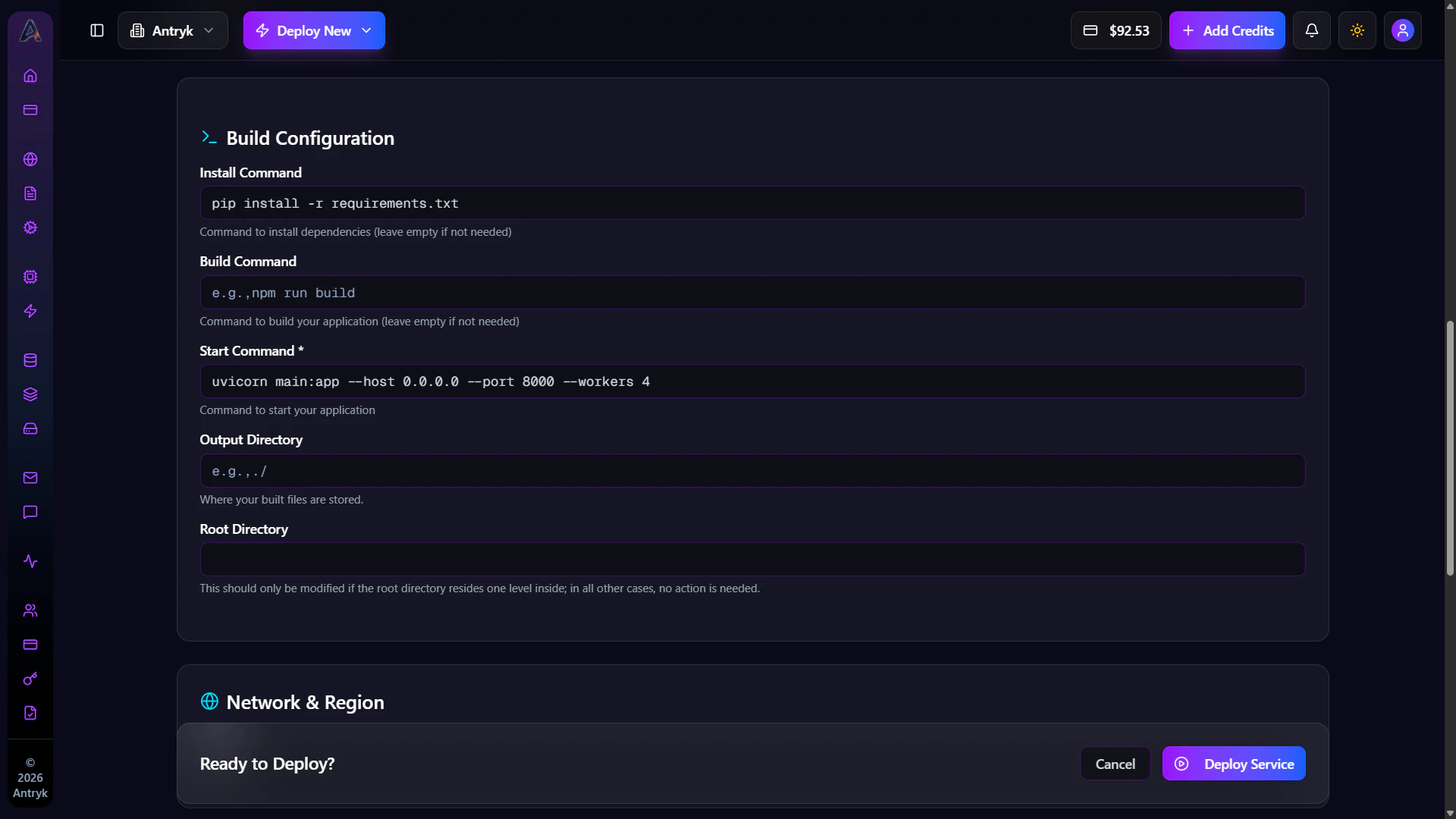
## Step 3: Configure Your Static Service
Provide the following configuration during deployment.
***
### Service Name
Give your Static Service a professional production name.
***
### Deploy from Git Providers
* **Git Provider** — Select your Git provider
* **Repository** — Select your frontend repository
* **Branch** — Choose deployment branch
* **Framework** — Automatically detected
* **Install Command** — Example: `npm install`
* **Build Command** — Example: `npm run build`
* **Output Directory** — Example: `dist`, `build`, or `out`
* **Version** — Automatically detected runtime version
***
### Region
Choose deployment region:
* USA
* Europe
* Asia
***
### Environment Variables
Add frontend environment variables if required.
Examples:
* API URLs
* Analytics keys
* Public environment variables
* Frontend runtime configuration
***
### Configuration Summary
| Setting | Value |
| ---------------- | ---------------------------- |
| Repository | `your-username/frontend-app` |
| Branch | `main` |
| Framework | `React` |
| Install Command | `npm install` |
| Build Command | `npm run build` |
| Output Directory | `dist` |
| Version | `18` |
| Region | `us-east-1` |
You can deploy any frontend framework by providing the correct build and
output directory configuration.
***
## Step 4: Deploy
Click **Deploy** and your Static Service will automatically build and go live on its public `onantryk.com` domain.
Antryk automatically:
* Builds your frontend
* Deploys assets globally
* Enables CDN delivery
* Provisions HTTPS certificates
* Configures edge caching
Every push to your connected Git branch automatically triggers a new
deployment.
***
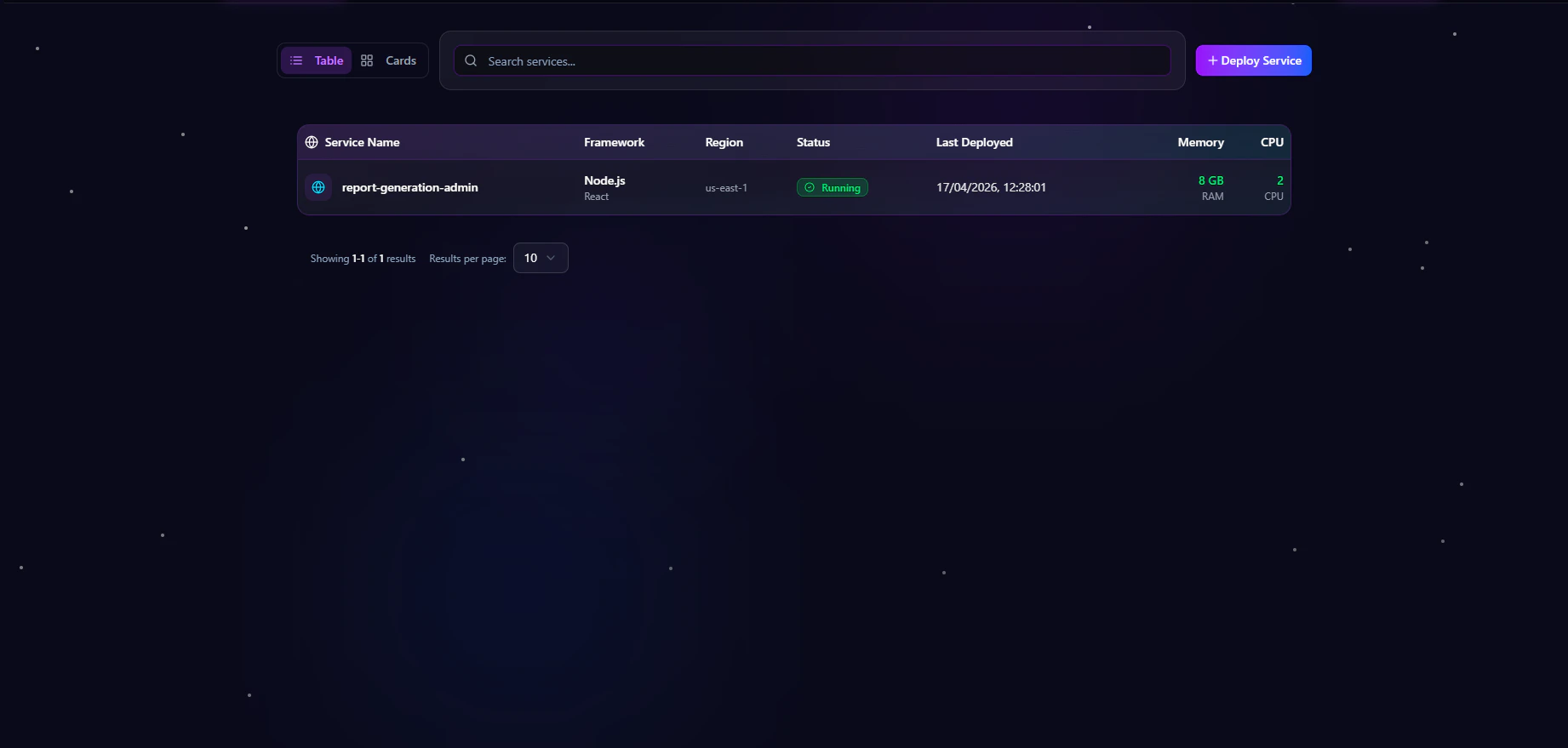
## Step 5: Monitor Your Deployment
Once deployed, you can:
* View deployment history
* Configure custom domains
* Add redirect rules
* Manage environment variables
* Monitor deployment status
* Configure frontend settings
 ***
# Getting Started
1. Create a new Static Service
2. Connect your Git repository
3. Configure build settings
4. Set output directory
5. Deploy globally
***
# Console Configuration
When creating a Static Service, you can configure the following settings.
***
## Deploy from GitHub
1. **Repository** — Select your repository
2. **Branch** — Choose deployment branch
3. **Framework** — Auto-detected frontend framework
4. **Install Command** — Install dependencies
5. **Build Command** — Build frontend assets
6. **Output Directory** — Generated frontend files
7. **Version** — Runtime version
***
## Supported Framework Examples
### React / Vite
```bash theme={null}
Install Command: npm install
Build Command: npm run build
Output Directory: dist
Version: 18
```
### Next.js Static Export
```bash theme={null}
Install Command: npm install
Build Command: npm run build
Output Directory: out
Version: 18
```
### Vue
```bash theme={null}
Install Command: npm install
Build Command: npm run build
Output Directory: dist
Version: 18
```
### Angular
```bash theme={null}
Install Command: npm install
Build Command: ng build
Output Directory: dist/
Version: 18
```
### Astro
```bash theme={null}
Install Command: npm install
Build Command: npm run build
Output Directory: dist
Version: 18
```
***
# Advanced Features
Static Services support advanced production-grade capabilities.
## Included Features
* CDN edge delivery
* Asset optimization
* Automatic HTTPS
* Redirect rules
* Domain management
* Cache optimization
* Environment configuration
* Git-based CI/CD
***
# Getting Started
1. Create a new Static Service
2. Connect your Git repository
3. Configure build settings
4. Set output directory
5. Deploy globally
***
# Console Configuration
When creating a Static Service, you can configure the following settings.
***
## Deploy from GitHub
1. **Repository** — Select your repository
2. **Branch** — Choose deployment branch
3. **Framework** — Auto-detected frontend framework
4. **Install Command** — Install dependencies
5. **Build Command** — Build frontend assets
6. **Output Directory** — Generated frontend files
7. **Version** — Runtime version
***
## Supported Framework Examples
### React / Vite
```bash theme={null}
Install Command: npm install
Build Command: npm run build
Output Directory: dist
Version: 18
```
### Next.js Static Export
```bash theme={null}
Install Command: npm install
Build Command: npm run build
Output Directory: out
Version: 18
```
### Vue
```bash theme={null}
Install Command: npm install
Build Command: npm run build
Output Directory: dist
Version: 18
```
### Angular
```bash theme={null}
Install Command: npm install
Build Command: ng build
Output Directory: dist/
Version: 18
```
### Astro
```bash theme={null}
Install Command: npm install
Build Command: npm run build
Output Directory: dist
Version: 18
```
***
# Advanced Features
Static Services support advanced production-grade capabilities.
## Included Features
* CDN edge delivery
* Asset optimization
* Automatic HTTPS
* Redirect rules
* Domain management
* Cache optimization
* Environment configuration
* Git-based CI/CD
 ***
# Pricing
Static Services are billed based on:
* Build usage
* CDN bandwidth
* Storage usage
* Deployment frequency
***
# Static Service Detail Insights
Click any Static Service to open the detailed management dashboard.
This dashboard gives developers complete control over deployments, domains, redirect rules, environment variables, and production settings.
***
# Overview
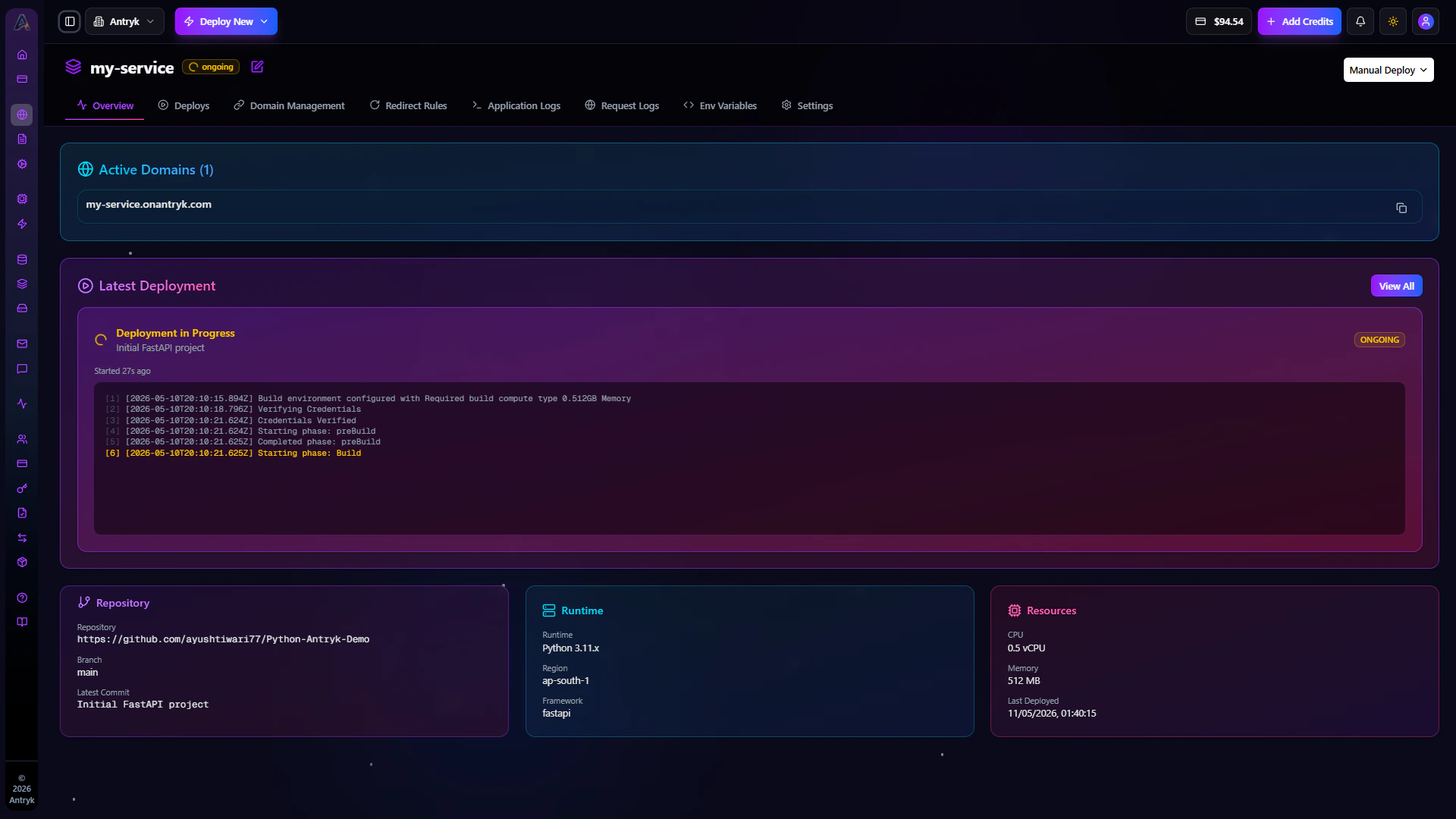
The Overview tab provides a complete summary of your Static Service configuration and deployment status.
Developers can monitor:
* Production domains
* Latest deployment
* Connected repository
* Build configuration
* Framework information
* Deployment region
* Deployment timestamps
***
## Available Information
* Active production domains
* Latest deployment status
* Git repository details
* Deployment branch
* Framework runtime
* Build configuration
* Region configuration
***
## Operational Benefits
The Overview tab helps teams:
* Verify production deployments
* Review deployment metadata
* Monitor frontend infrastructure
* Validate deployment configuration
***
# Pricing
Static Services are billed based on:
* Build usage
* CDN bandwidth
* Storage usage
* Deployment frequency
***
# Static Service Detail Insights
Click any Static Service to open the detailed management dashboard.
This dashboard gives developers complete control over deployments, domains, redirect rules, environment variables, and production settings.
***
# Overview
The Overview tab provides a complete summary of your Static Service configuration and deployment status.
Developers can monitor:
* Production domains
* Latest deployment
* Connected repository
* Build configuration
* Framework information
* Deployment region
* Deployment timestamps
***
## Available Information
* Active production domains
* Latest deployment status
* Git repository details
* Deployment branch
* Framework runtime
* Build configuration
* Region configuration
***
## Operational Benefits
The Overview tab helps teams:
* Verify production deployments
* Review deployment metadata
* Monitor frontend infrastructure
* Validate deployment configuration
 ***
# Deploys
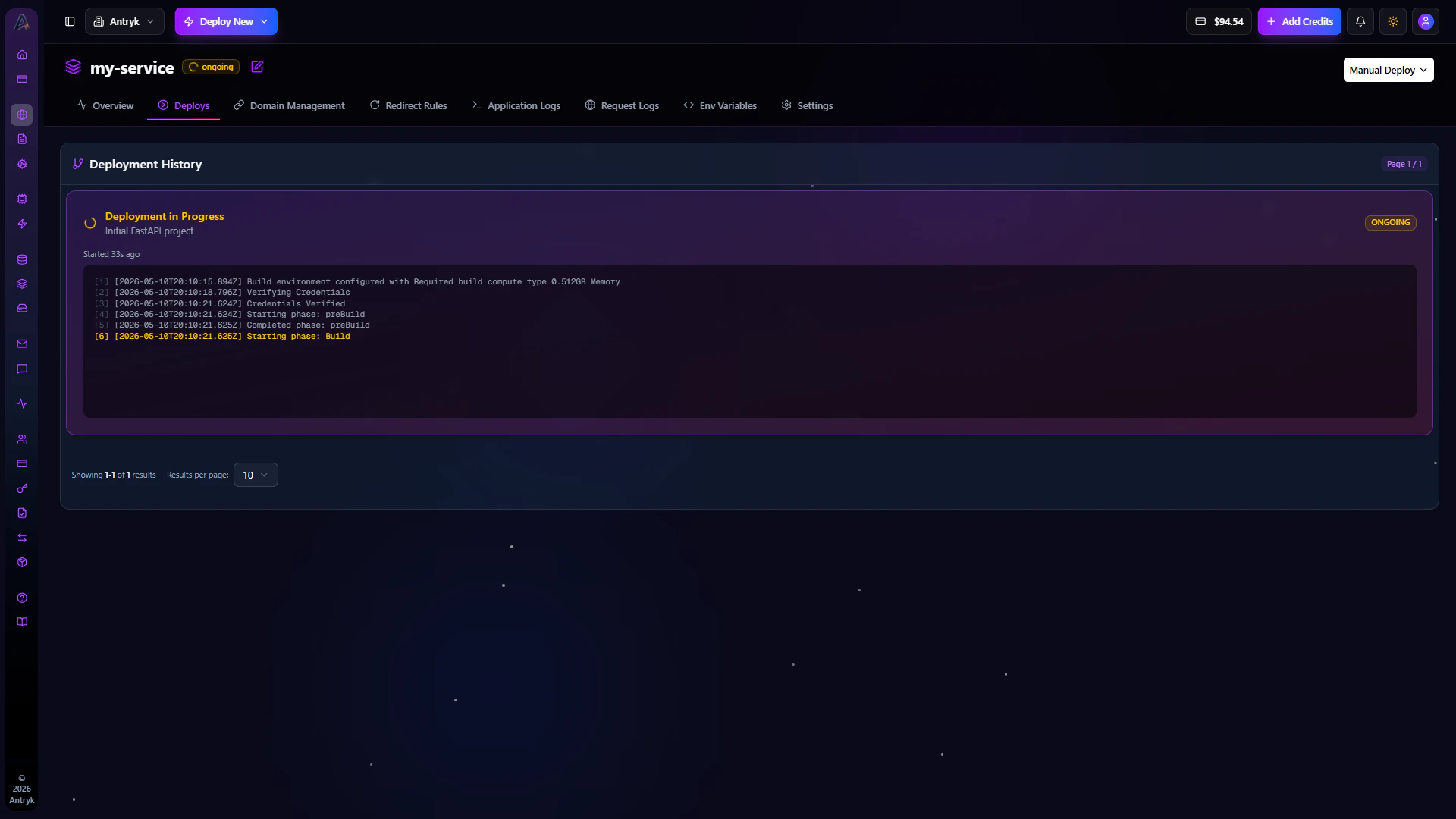
The Deploys tab contains your complete frontend deployment history.
Each deployment includes:
* Deployment status
* Build logs
* Deployment duration
* Commit information
* Trigger source
* Deployment timestamp
***
## Deployment Features
* View deployment history
* Inspect failed deployments
* Review build logs
* Redeploy previous versions
* Monitor deployment performance
Every Git push automatically creates a new deployment for your Static Service.
***
# Deploys
The Deploys tab contains your complete frontend deployment history.
Each deployment includes:
* Deployment status
* Build logs
* Deployment duration
* Commit information
* Trigger source
* Deployment timestamp
***
## Deployment Features
* View deployment history
* Inspect failed deployments
* Review build logs
* Redeploy previous versions
* Monitor deployment performance
Every Git push automatically creates a new deployment for your Static Service.
 ***
# Domain Management
Get started with Domains.
***
# Redirect Rules
Get started with Redirect Rules.
***
# Environment Variables
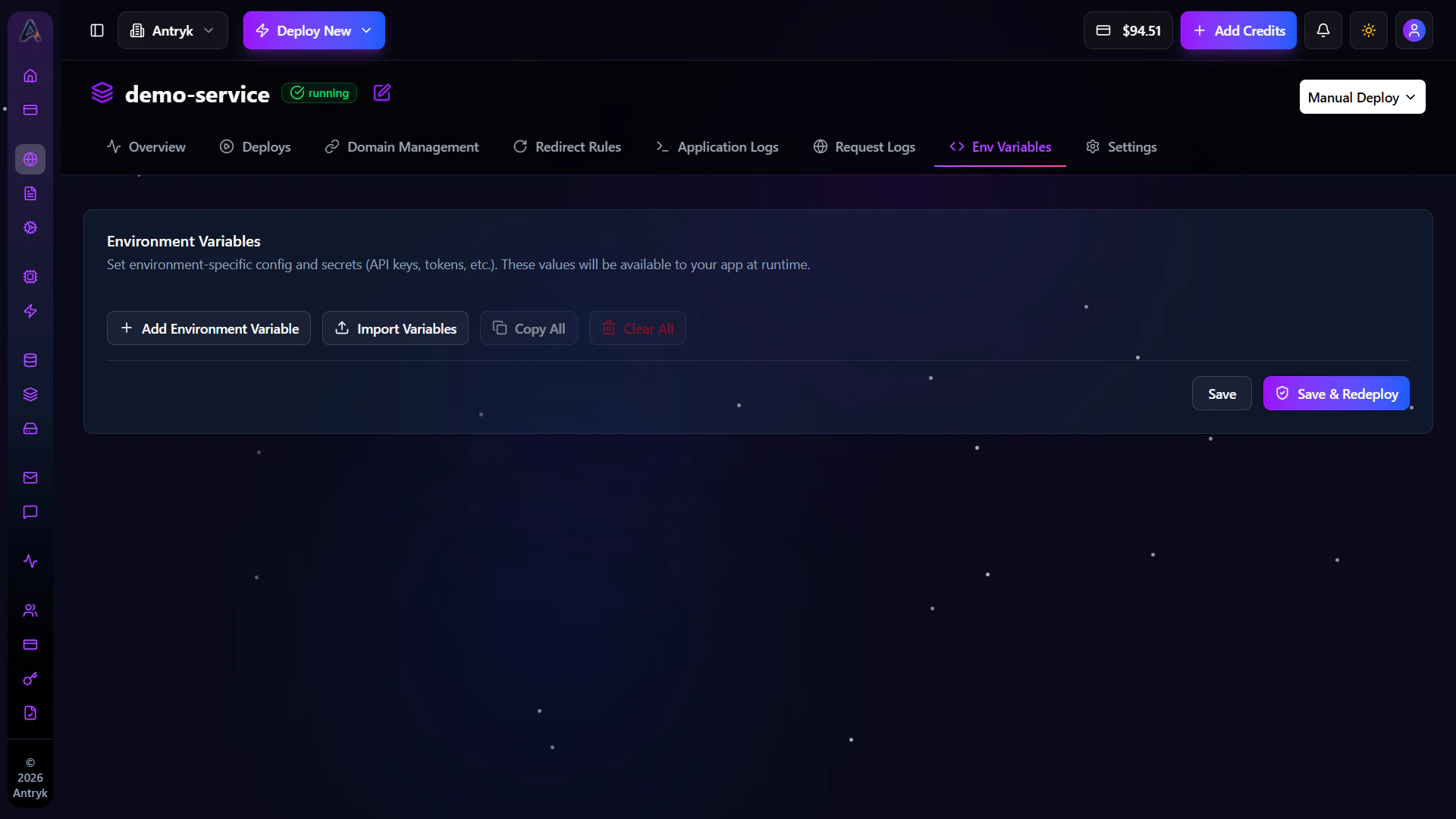
The Env tab allows you to securely manage frontend environment variables and runtime configuration.
Environment variables help manage:
* API endpoints
* Analytics configuration
* Public runtime variables
* Frontend environment settings
***
## Environment Variable Features
* Add environment variables
* Edit existing values
* Delete unused variables
* Import `.env` files
* Secure sensitive configuration
***
## Security Benefits
Environment variables improve security by:
* Keeping secrets outside source code
* Supporting environment-specific configuration
* Simplifying deployment management
Never expose sensitive API keys directly inside public frontend code unless
intended for client-side usage.
***
# Domain Management
Get started with Domains.
***
# Redirect Rules
Get started with Redirect Rules.
***
# Environment Variables
The Env tab allows you to securely manage frontend environment variables and runtime configuration.
Environment variables help manage:
* API endpoints
* Analytics configuration
* Public runtime variables
* Frontend environment settings
***
## Environment Variable Features
* Add environment variables
* Edit existing values
* Delete unused variables
* Import `.env` files
* Secure sensitive configuration
***
## Security Benefits
Environment variables improve security by:
* Keeping secrets outside source code
* Supporting environment-specific configuration
* Simplifying deployment management
Never expose sensitive API keys directly inside public frontend code unless
intended for client-side usage.
 ***
# Settings
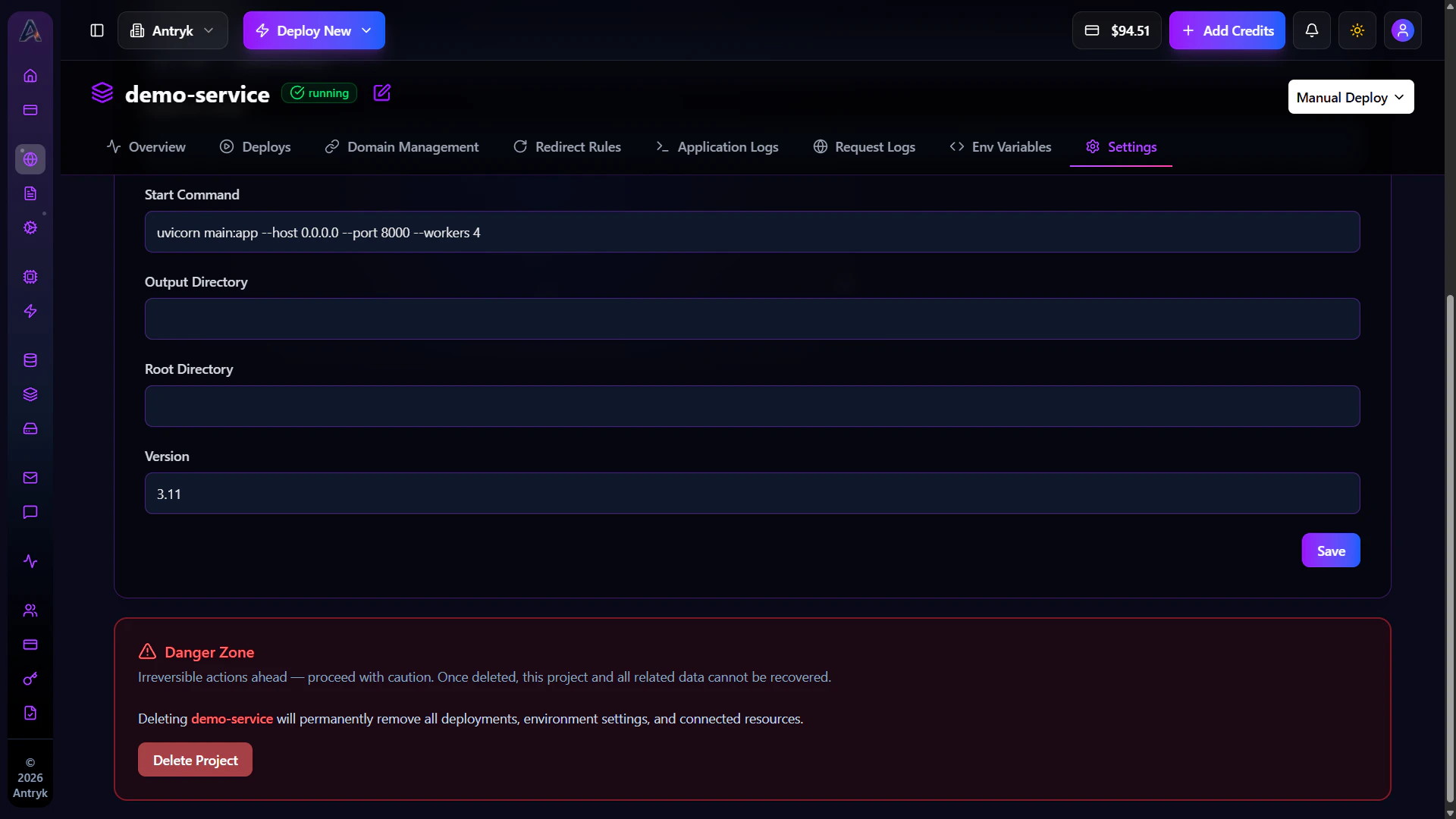
The Settings tab provides advanced service management and operational controls for your Static Service.
***
## Available Configuration
* Update service name
* Modify build configuration
* Change deployment settings
* Configure framework settings
* Manage deployment behavior
***
## Administrative Actions
* Redeploy applications
* Delete Static Services
* Update service configuration
* Modify runtime settings
***
## Operational Benefits
The Settings tab helps teams:
* Manage production frontend infrastructure
* Optimize deployments
* Configure build environments
* Control application lifecycle
Deleting a Static Service permanently removes deployments, domains, redirect
rules, and hosting configuration.
***
# Settings
The Settings tab provides advanced service management and operational controls for your Static Service.
***
## Available Configuration
* Update service name
* Modify build configuration
* Change deployment settings
* Configure framework settings
* Manage deployment behavior
***
## Administrative Actions
* Redeploy applications
* Delete Static Services
* Update service configuration
* Modify runtime settings
***
## Operational Benefits
The Settings tab helps teams:
* Manage production frontend infrastructure
* Optimize deployments
* Configure build environments
* Control application lifecycle
Deleting a Static Service permanently removes deployments, domains, redirect
rules, and hosting configuration.
 ***
# SEO Benefits of Static Services
Static Services are optimized for performance and search engine visibility.
Benefits include:
* Fast page load speeds
* Global CDN delivery
* HTTPS enabled by default
* Optimized frontend caching
* SEO-friendly hosting infrastructure
* Improved Core Web Vitals
This helps improve user experience and search engine rankings.
***
# Troubleshooting Static Services
## Build Failed
* Verify build commands
* Check dependency installation
* Review build logs
* Confirm framework compatibility
***
## Deployment Failed
* Verify output directory
* Ensure repository access permissions
* Check runtime version compatibility
***
## Custom Domain Not Working
* Verify DNS records
* Wait for DNS propagation
* Confirm SSL provisioning completed
***
## Redirect Rules Not Working
* Verify redirect configuration
* Ensure source and target URLs are correct
* Recheck domain verification status
***
# Static Services Overview
Static Services provide developers with scalable, high-performance frontend hosting infrastructure optimized for modern web applications.
Using Static Services, teams can:
* Deploy frontend applications globally
* Configure custom domains
* Add redirect rules
* Enable HTTPS automatically
* Manage frontend deployments
* Optimize website performance
* Scale globally with CDN delivery
Get started with Static Services
***
# SEO Benefits of Static Services
Static Services are optimized for performance and search engine visibility.
Benefits include:
* Fast page load speeds
* Global CDN delivery
* HTTPS enabled by default
* Optimized frontend caching
* SEO-friendly hosting infrastructure
* Improved Core Web Vitals
This helps improve user experience and search engine rankings.
***
# Troubleshooting Static Services
## Build Failed
* Verify build commands
* Check dependency installation
* Review build logs
* Confirm framework compatibility
***
## Deployment Failed
* Verify output directory
* Ensure repository access permissions
* Check runtime version compatibility
***
## Custom Domain Not Working
* Verify DNS records
* Wait for DNS propagation
* Confirm SSL provisioning completed
***
## Redirect Rules Not Working
* Verify redirect configuration
* Ensure source and target URLs are correct
* Recheck domain verification status
***
# Static Services Overview
Static Services provide developers with scalable, high-performance frontend hosting infrastructure optimized for modern web applications.
Using Static Services, teams can:
* Deploy frontend applications globally
* Configure custom domains
* Add redirect rules
* Enable HTTPS automatically
* Manage frontend deployments
* Optimize website performance
* Scale globally with CDN delivery
Get started with Static Services