> ## Documentation Index
> Fetch the complete documentation index at: https://docs.antryk.com/llms.txt
> Use this file to discover all available pages before exploring further.
# Storage Solutions
> Deploy scalable object storage buckets with global CDN delivery, secure file management, CORS configuration, and high availability using Antryk Storage Services.
# Storage Buckets
Antryk Storage Buckets provide scalable object storage infrastructure for applications, websites, media assets, backups, AI datasets, and static content delivery.
Store and manage files securely with global access, CDN-ready endpoints, file explorer management, and developer-friendly APIs.
You can integrate storage services using the official @antryk/sdk package.
***
## What are Storage Buckets?
Storage Buckets are cloud object storage containers used to store and organize files such as:
* Images
* Videos
* Documents
* Static assets
* Application uploads
* Backups
* AI datasets
* Media files
Each bucket includes secure endpoints, configurable CORS policies, regional deployment support, and scalable storage infrastructure.
***
## Storage Features
### Global Infrastructure
* Multi-region deployment
* High availability architecture
* CDN-ready object delivery
* Optimized file access
* Low-latency storage endpoints
### File Management
* Upload and download files
* Folder-based organization
* File explorer interface
* File metadata inspection
* Signed URL generation
### Security & Access Control
* Configurable CORS policies
* Private and public object access
* Secure object URLs
* HTTPS endpoints
* Signed URL support
### Developer Experience
* SDK integration
* REST APIs
* Object metadata APIs
* File search functionality
* Structured storage management
***
## Common Use Cases
### Application Uploads
Store user-uploaded files such as:
* Profile images
* Documents
* Attachments
* Media uploads
### Static Asset Hosting
Serve:
* Images
* CSS files
* JavaScript bundles
* Fonts
* Website assets
### Media Storage
Store:
* Videos
* Audio files
* Podcasts
* Streaming assets
### AI & Data Storage
Manage:
* AI datasets
* Training assets
* Model artifacts
* Embeddings
* Backup archives
***
## SDK & API Usage
Antryk provides SDKs and APIs for managing storage buckets and objects.
Supported operations include:
* Upload objects
* Delete objects
* Read bucket contents
* Retrieve metadata
* Browse files and folders
Learn how to upload, delete, retrieve, and manage storage objects using APIs
and SDKs.
***
# Deploying a Storage Bucket
You can deploy new storage buckets directly from the Antryk dashboard.
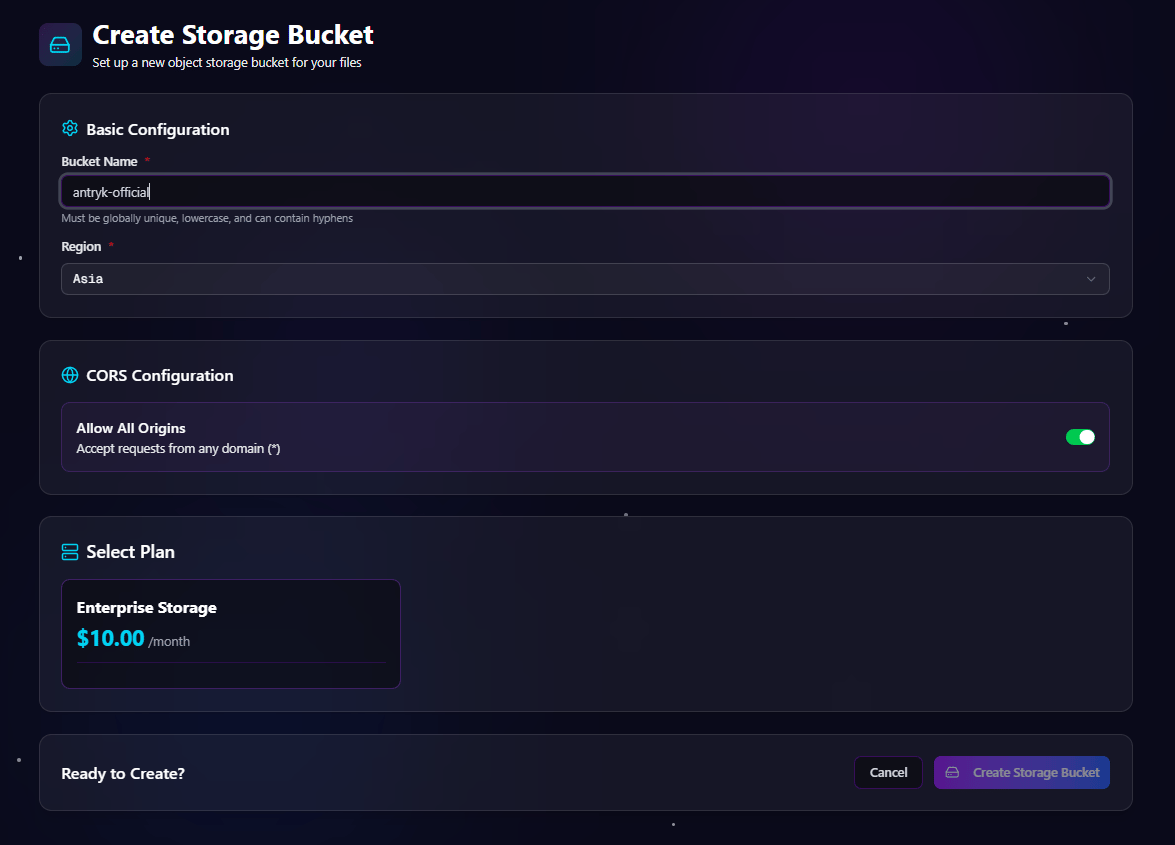
The deployment workflow allows you to configure region selection, CORS policies, and storage plans.
***
## Bucket Deployment Form
During bucket creation, you configure:
| Configuration | Description |
| ------------------ | --------------------------- |
| Bucket Name | Unique bucket identifier |
| Region | Deployment region |
| CORS Configuration | Configure allowed origins |
| Storage Plan | Select storage pricing tier |
### Supported Regions
* Asia
* Europe
* USA
### CORS Configuration
You can configure bucket access policies using:
* Allowed origins list
* Allow all origins toggle
This helps securely expose files to frontend applications and APIs.
### Deployment Workflow
1. Open the Storage dashboard
2. Click **Create Bucket**
3. Enter a unique bucket name
4. Select deployment region
5. Configure CORS settings
6. Select a storage plan
7. Click **Create Bucket**
***
## Deploy Bucket Form
***
# Storage Dashboard
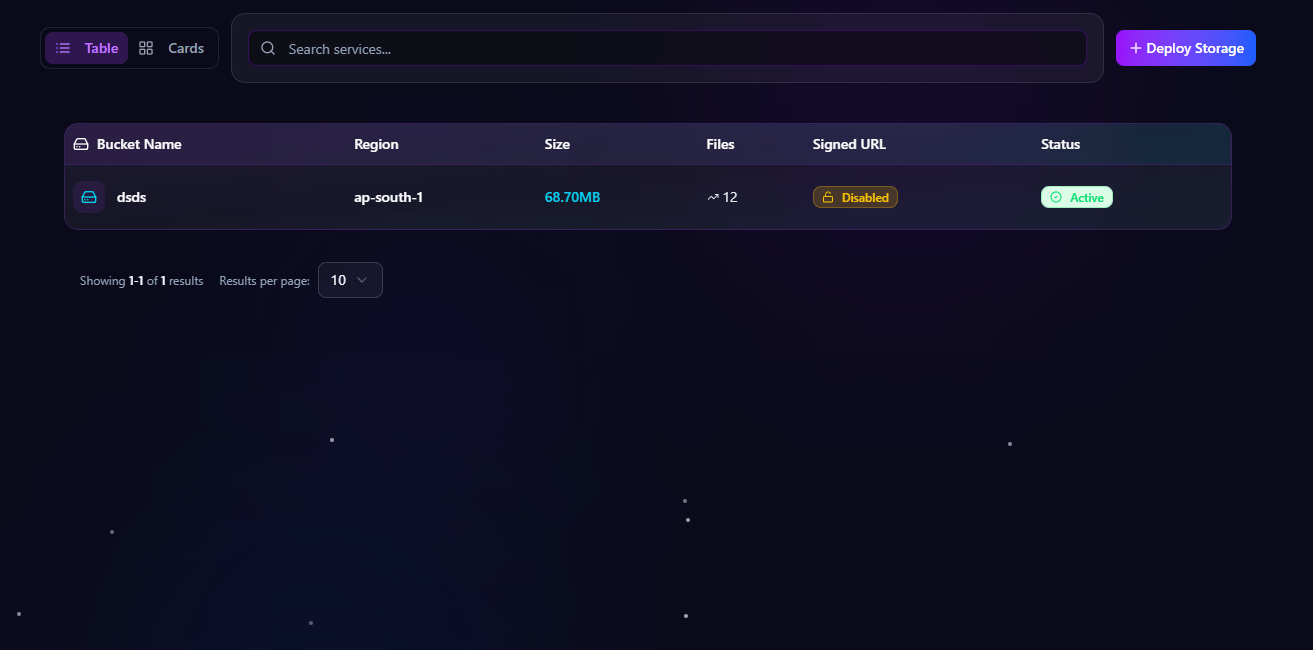
All deployed buckets are available from the storage dashboard.
The dashboard provides storage analytics, bucket monitoring, and quick access to bucket management pages.
***
## Bucket Listing Information
Each bucket displays the following information:
| Column | Description |
| ----------- | -------------------------- |
| Bucket Name | Name of the storage bucket |
| Region | Bucket deployment region |
| Size | Total storage used |
| Files | Total file count |
| Signed\_URL | Signed URL availability |
| Status | Current bucket status |
***
##
# Bucket Detail Pages
Each storage bucket includes dedicated management pages for:
* Overview
* Files
* Settings
These pages provide complete control over storage infrastructure and file management.
***
# Overview Page
The overview page displays storage analytics, bucket information, and endpoint configuration.
***
## Overview Information
### Storage Analytics
| Metric | Description |
| ------------ | -------------------------------- |
| Storage Used | Total bucket storage consumption |
| Total Files | Number of stored objects |
### Bucket Information
| Field | Description |
| ----------- | -------------------------- |
| Bucket Name | Unique bucket identifier |
| Status | Active bucket status |
| Created At | Bucket creation timestamp |
| CORS | Current CORS configuration |
| Region | Deployment region |
### Endpoint Information
Each bucket includes dedicated endpoints such as:
```txt theme={null}
https://xyz.ap-south-1.storage.onantryk.com
```
These endpoints can be used for object access, integrations, CDN workflows, and file delivery.
***
***
# Files Page
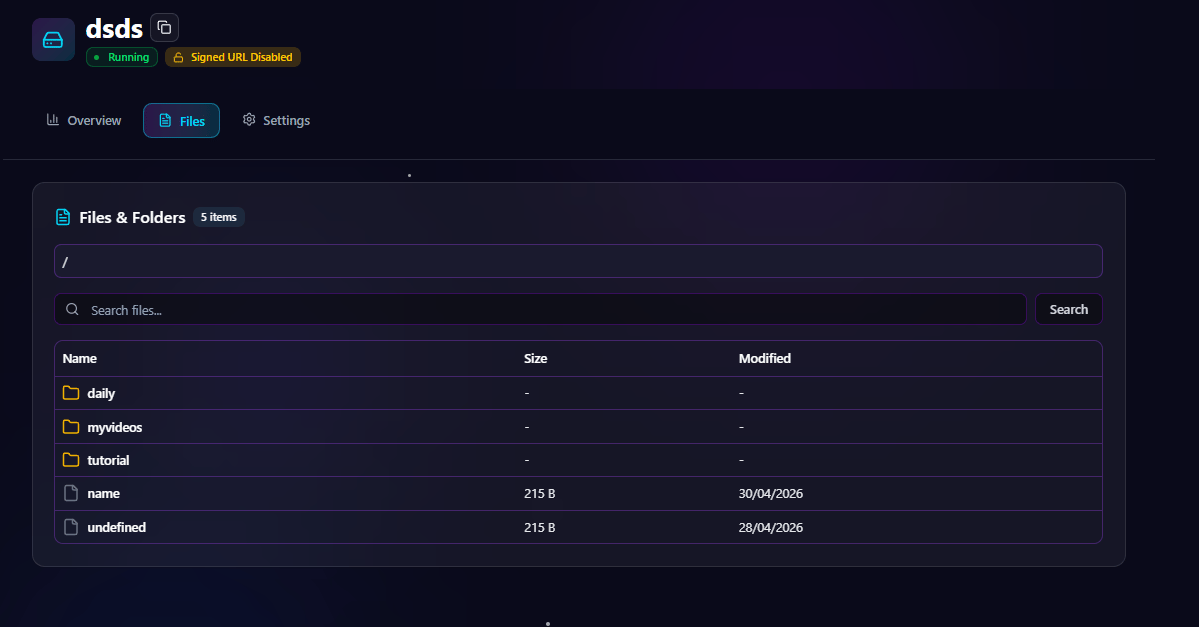
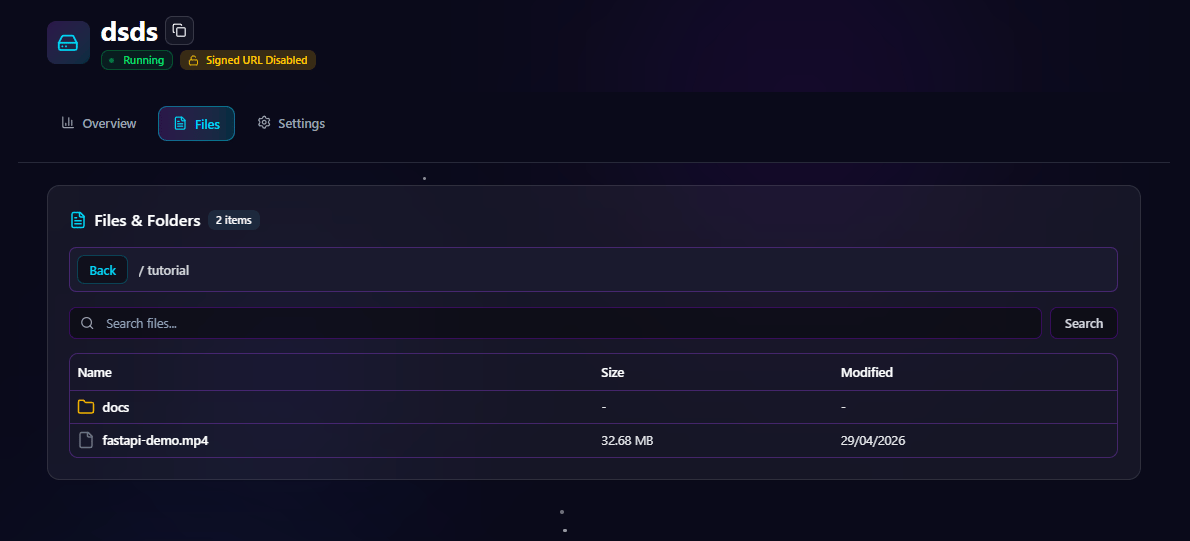
The files page provides a complete file explorer interface for browsing bucket contents.
Users can search, navigate folders, inspect files, and manage objects directly from the dashboard.
***
## File Explorer Features
### File & Folder Navigation
* Browse folders
* Open nested directories
* Navigate object hierarchy
* View files in explorer layout
### Search Functionality
Search files and folders instantly using:
* File name
* Folder name
* Object key
### Object Management
* Inspect file details
* Download files
* Copy URLs
* View metadata
***
## Files Explorer Page
***
# File Details Dialog
Clicking a file opens a detailed object information dialog.
This helps developers and administrators inspect storage objects quickly.
***
## File Information
| Field | Description |
| ------------- | ------------------------- |
| Name | File name |
| Key | Full object key |
| Size | Object size |
| Last Modified | Last update timestamp |
| URL | Public or signed file URL |
### Actions
* Download file
* Copy URL
* Inspect metadata
***
## File Details Dialog
***
# Settings Page
The settings page allows administrators to manage bucket-level configurations.
***
## CORS Configuration
CORS settings control which domains are allowed to access bucket resources.
You can:
* Add allowed domains
* Remove origins
* Enable allow-all origins
* Configure frontend access policies
This is especially useful for frontend applications, SPAs, and external integrations.
***
## Bucket Settings Page
***
# Storage Architecture
Antryk Storage infrastructure is designed for reliability and scalability.
### Platform Features
* Multi-region deployment
* High availability
* Object durability
* Secure object access
* Optimized storage endpoints
* CDN-ready infrastructure
### Security Features
* HTTPS-only endpoints
* Configurable CORS
* Signed URL support
* Secure SDK authentication
* Protected object delivery
***
# Monitoring & Analytics
Track storage usage and bucket performance directly from the dashboard.
### Monitoring Capabilities
* Storage usage
* Total object count
* Upload activity
* File access analytics
* Signed URL monitoring
* Regional bucket metrics
***
# Tutorial Video
Watch the complete tutorial for deploying and managing storage buckets on Antryk.
***
# Best Practices
## Bucket Organization
* Use descriptive bucket names
* Organize files into folders
* Separate environments by bucket
* Keep object keys predictable
## Security
* Configure CORS carefully
* Use signed URLs for private content
* Restrict public access when necessary
* Monitor bucket activity regularly
## Performance
* Use regional buckets close to users
* Optimize media assets
* Structure folders efficiently
* Use CDN-ready delivery paths
***
# Conclusion
Antryk Storage Buckets provide scalable cloud object storage with secure access, regional deployment, advanced file management, and developer-friendly APIs.
With dashboard-based management, SDK integrations, configurable CORS policies, and global-ready infrastructure, teams can build reliable storage workflows for applications of any size.
 ***
# Storage Dashboard
All deployed buckets are available from the storage dashboard.
The dashboard provides storage analytics, bucket monitoring, and quick access to bucket management pages.
***
## Bucket Listing Information
Each bucket displays the following information:
| Column | Description |
| ----------- | -------------------------- |
| Bucket Name | Name of the storage bucket |
| Region | Bucket deployment region |
| Size | Total storage used |
| Files | Total file count |
| Signed\_URL | Signed URL availability |
| Status | Current bucket status |
***
##
***
# Storage Dashboard
All deployed buckets are available from the storage dashboard.
The dashboard provides storage analytics, bucket monitoring, and quick access to bucket management pages.
***
## Bucket Listing Information
Each bucket displays the following information:
| Column | Description |
| ----------- | -------------------------- |
| Bucket Name | Name of the storage bucket |
| Region | Bucket deployment region |
| Size | Total storage used |
| Files | Total file count |
| Signed\_URL | Signed URL availability |
| Status | Current bucket status |
***
##  # Bucket Detail Pages
Each storage bucket includes dedicated management pages for:
* Overview
* Files
* Settings
These pages provide complete control over storage infrastructure and file management.
***
# Overview Page
The overview page displays storage analytics, bucket information, and endpoint configuration.
***
## Overview Information
### Storage Analytics
| Metric | Description |
| ------------ | -------------------------------- |
| Storage Used | Total bucket storage consumption |
| Total Files | Number of stored objects |
### Bucket Information
| Field | Description |
| ----------- | -------------------------- |
| Bucket Name | Unique bucket identifier |
| Status | Active bucket status |
| Created At | Bucket creation timestamp |
| CORS | Current CORS configuration |
| Region | Deployment region |
### Endpoint Information
Each bucket includes dedicated endpoints such as:
```txt theme={null}
https://xyz.ap-south-1.storage.onantryk.com
```
These endpoints can be used for object access, integrations, CDN workflows, and file delivery.
***
# Bucket Detail Pages
Each storage bucket includes dedicated management pages for:
* Overview
* Files
* Settings
These pages provide complete control over storage infrastructure and file management.
***
# Overview Page
The overview page displays storage analytics, bucket information, and endpoint configuration.
***
## Overview Information
### Storage Analytics
| Metric | Description |
| ------------ | -------------------------------- |
| Storage Used | Total bucket storage consumption |
| Total Files | Number of stored objects |
### Bucket Information
| Field | Description |
| ----------- | -------------------------- |
| Bucket Name | Unique bucket identifier |
| Status | Active bucket status |
| Created At | Bucket creation timestamp |
| CORS | Current CORS configuration |
| Region | Deployment region |
### Endpoint Information
Each bucket includes dedicated endpoints such as:
```txt theme={null}
https://xyz.ap-south-1.storage.onantryk.com
```
These endpoints can be used for object access, integrations, CDN workflows, and file delivery.
***
 ***
# Files Page
The files page provides a complete file explorer interface for browsing bucket contents.
Users can search, navigate folders, inspect files, and manage objects directly from the dashboard.
***
## File Explorer Features
### File & Folder Navigation
* Browse folders
* Open nested directories
* Navigate object hierarchy
* View files in explorer layout
### Search Functionality
Search files and folders instantly using:
* File name
* Folder name
* Object key
### Object Management
* Inspect file details
* Download files
* Copy URLs
* View metadata
***
## Files Explorer Page
***
# Files Page
The files page provides a complete file explorer interface for browsing bucket contents.
Users can search, navigate folders, inspect files, and manage objects directly from the dashboard.
***
## File Explorer Features
### File & Folder Navigation
* Browse folders
* Open nested directories
* Navigate object hierarchy
* View files in explorer layout
### Search Functionality
Search files and folders instantly using:
* File name
* Folder name
* Object key
### Object Management
* Inspect file details
* Download files
* Copy URLs
* View metadata
***
## Files Explorer Page
 ***
# File Details Dialog
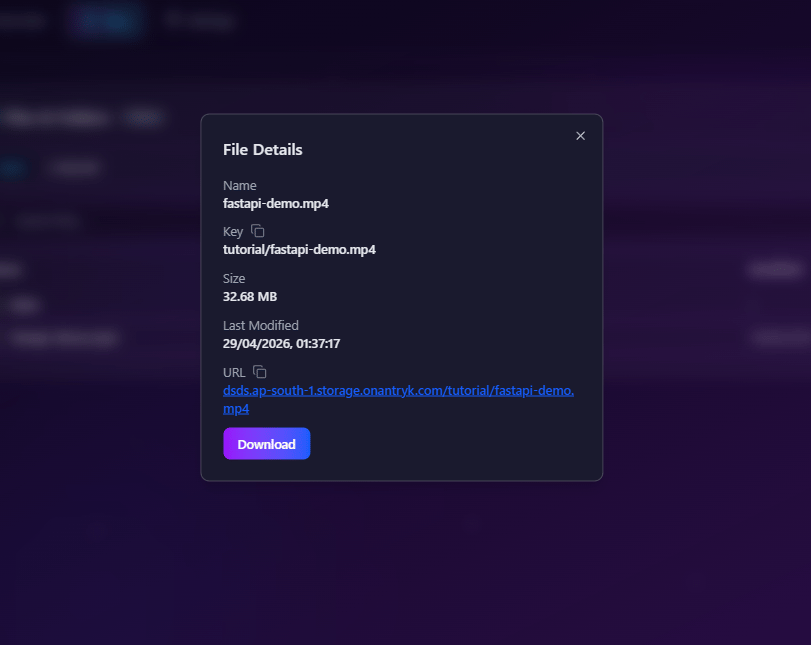
Clicking a file opens a detailed object information dialog.
This helps developers and administrators inspect storage objects quickly.
***
## File Information
| Field | Description |
| ------------- | ------------------------- |
| Name | File name |
| Key | Full object key |
| Size | Object size |
| Last Modified | Last update timestamp |
| URL | Public or signed file URL |
### Actions
* Download file
* Copy URL
* Inspect metadata
***
## File Details Dialog
***
# File Details Dialog
Clicking a file opens a detailed object information dialog.
This helps developers and administrators inspect storage objects quickly.
***
## File Information
| Field | Description |
| ------------- | ------------------------- |
| Name | File name |
| Key | Full object key |
| Size | Object size |
| Last Modified | Last update timestamp |
| URL | Public or signed file URL |
### Actions
* Download file
* Copy URL
* Inspect metadata
***
## File Details Dialog
 ***
# Settings Page
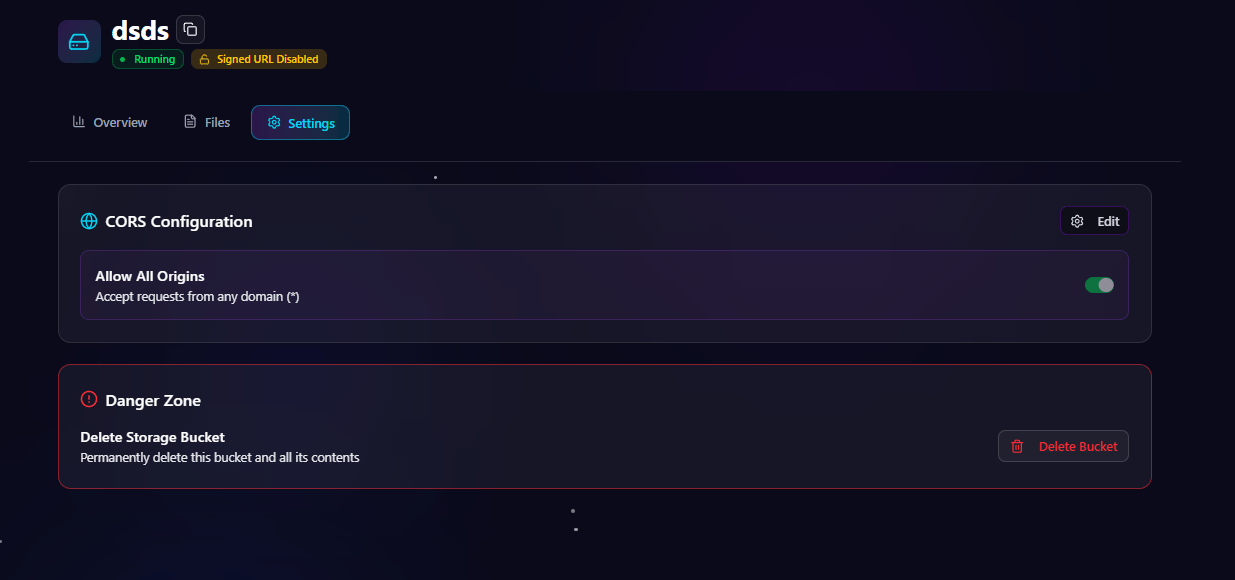
The settings page allows administrators to manage bucket-level configurations.
***
## CORS Configuration
CORS settings control which domains are allowed to access bucket resources.
You can:
* Add allowed domains
* Remove origins
* Enable allow-all origins
* Configure frontend access policies
This is especially useful for frontend applications, SPAs, and external integrations.
***
## Bucket Settings Page
***
# Settings Page
The settings page allows administrators to manage bucket-level configurations.
***
## CORS Configuration
CORS settings control which domains are allowed to access bucket resources.
You can:
* Add allowed domains
* Remove origins
* Enable allow-all origins
* Configure frontend access policies
This is especially useful for frontend applications, SPAs, and external integrations.
***
## Bucket Settings Page
 ***
# Storage Architecture
Antryk Storage infrastructure is designed for reliability and scalability.
### Platform Features
* Multi-region deployment
* High availability
* Object durability
* Secure object access
* Optimized storage endpoints
* CDN-ready infrastructure
### Security Features
* HTTPS-only endpoints
* Configurable CORS
* Signed URL support
* Secure SDK authentication
* Protected object delivery
***
# Monitoring & Analytics
Track storage usage and bucket performance directly from the dashboard.
### Monitoring Capabilities
* Storage usage
* Total object count
* Upload activity
* File access analytics
* Signed URL monitoring
* Regional bucket metrics
***
# Tutorial Video
Watch the complete tutorial for deploying and managing storage buckets on Antryk.
***
# Best Practices
## Bucket Organization
* Use descriptive bucket names
* Organize files into folders
* Separate environments by bucket
* Keep object keys predictable
## Security
* Configure CORS carefully
* Use signed URLs for private content
* Restrict public access when necessary
* Monitor bucket activity regularly
## Performance
* Use regional buckets close to users
* Optimize media assets
* Structure folders efficiently
* Use CDN-ready delivery paths
***
# Conclusion
Antryk Storage Buckets provide scalable cloud object storage with secure access, regional deployment, advanced file management, and developer-friendly APIs.
With dashboard-based management, SDK integrations, configurable CORS policies, and global-ready infrastructure, teams can build reliable storage workflows for applications of any size.
***
# Storage Architecture
Antryk Storage infrastructure is designed for reliability and scalability.
### Platform Features
* Multi-region deployment
* High availability
* Object durability
* Secure object access
* Optimized storage endpoints
* CDN-ready infrastructure
### Security Features
* HTTPS-only endpoints
* Configurable CORS
* Signed URL support
* Secure SDK authentication
* Protected object delivery
***
# Monitoring & Analytics
Track storage usage and bucket performance directly from the dashboard.
### Monitoring Capabilities
* Storage usage
* Total object count
* Upload activity
* File access analytics
* Signed URL monitoring
* Regional bucket metrics
***
# Tutorial Video
Watch the complete tutorial for deploying and managing storage buckets on Antryk.
***
# Best Practices
## Bucket Organization
* Use descriptive bucket names
* Organize files into folders
* Separate environments by bucket
* Keep object keys predictable
## Security
* Configure CORS carefully
* Use signed URLs for private content
* Restrict public access when necessary
* Monitor bucket activity regularly
## Performance
* Use regional buckets close to users
* Optimize media assets
* Structure folders efficiently
* Use CDN-ready delivery paths
***
# Conclusion
Antryk Storage Buckets provide scalable cloud object storage with secure access, regional deployment, advanced file management, and developer-friendly APIs.
With dashboard-based management, SDK integrations, configurable CORS policies, and global-ready infrastructure, teams can build reliable storage workflows for applications of any size.