> ## Documentation Index
> Fetch the complete documentation index at: https://docs.antryk.com/llms.txt
> Use this file to discover all available pages before exploring further.
# Qdrant
> Deploy fully managed Qdrant vector databases on Antryk with secure API authentication, automated backups, scalable infrastructure, AI-ready vector search, and production-grade performance.
## What is Qdrant?
Qdrant is a high-performance open-source vector database built for similarity search, semantic search, AI retrieval systems, recommendation engines, and machine learning applications. It enables developers to efficiently store, index, and query vector embeddings for modern AI-powered workloads.
Qdrant is optimized for applications that require fast vector similarity matching, metadata filtering, and scalable AI search infrastructure.
With Antryk Qdrant, you can deploy production-ready vector databases in minutes while Antryk manages infrastructure, networking, backups, scaling, and operational reliability.
***
## Qdrant Features on Antryk
* Fully managed Qdrant deployments
* High-performance vector similarity search
* Secure API key authentication
* Automated backups and retention management
* Regional database deployments
* Simplified deployment workflow
* Scalable infrastructure for AI applications
* Production-ready vector search performance
* Secure credential management
* Developer-friendly management dashboard
***
# Deploy a Qdrant Database
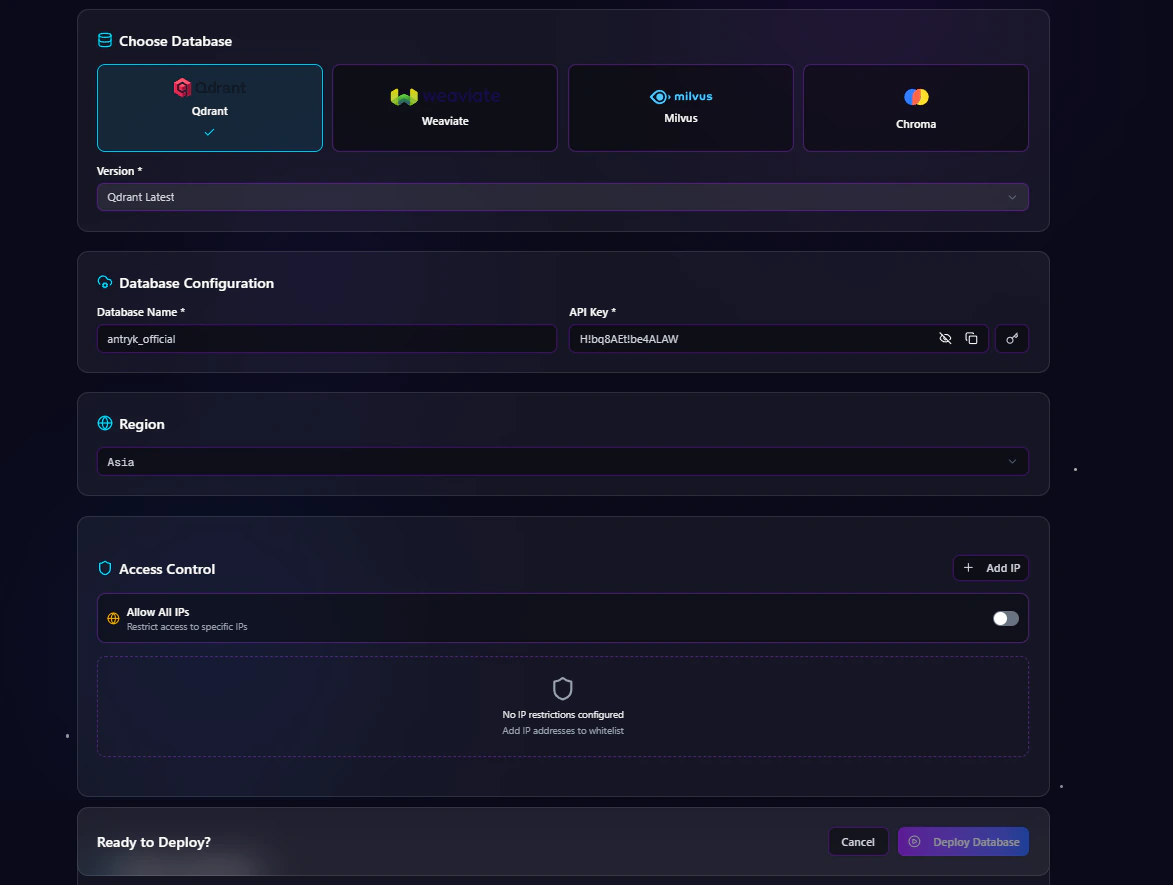
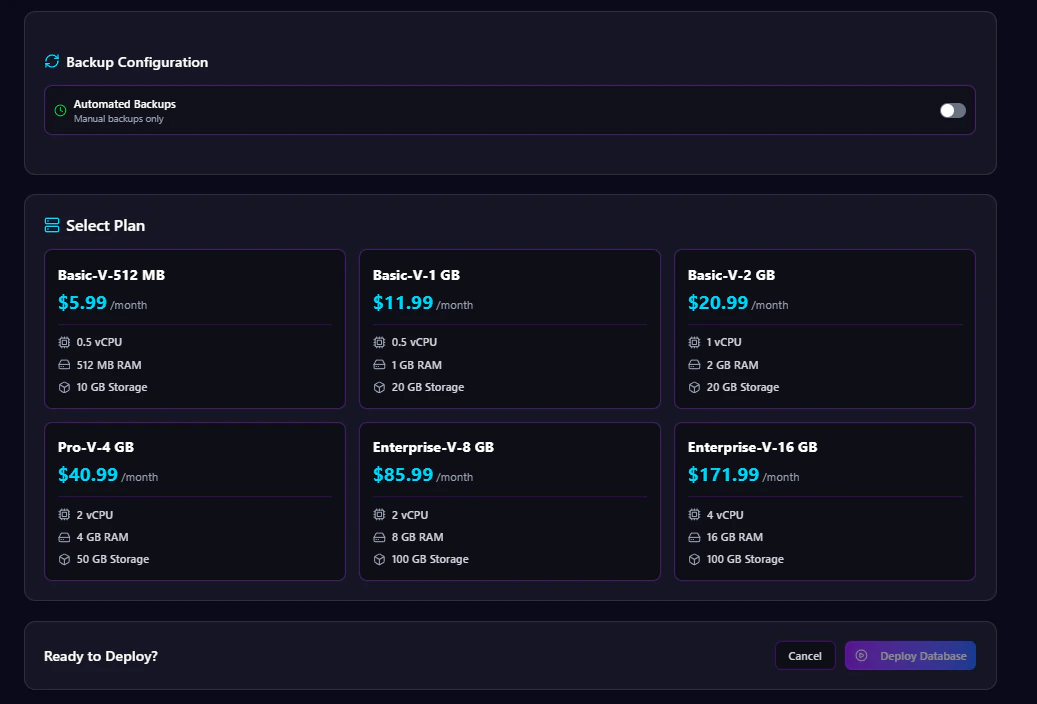 Creating a Qdrant database on Antryk takes only a few steps.
## Step 1: Choose Database Type
From the deployment dashboard:
1. Click **Create Database**
2. Select **Qdrant**
***
## Step 2: Configure Database Settings
Enter your Qdrant database configuration details.
### Database Configuration Fields
| Field | Description |
| ------------- | --------------------------------- |
| Database Name | Name of your Qdrant database |
| API Key | API key for secure authentication |
### API Key Options
You can either:
* Enter your own API key
* Generate a secure API key using the **Generate Key** button
### Example Configuration
```bash theme={null}
Database Name: ai_vector_db
API Key: qdrant_secure_api_key
```
***
## Step 3: Select Deployment Region
Choose the region closest to your users or application infrastructure.
Available regions include:
* USA
* ASIA
* EUROPE
Selecting the nearest region helps reduce latency and improves vector search performance.
***
## Step 4: Configure Access Control
Antryk provides flexible database access management.
### Option 1: Allow Specific IP Addresses
Restrict database access to trusted IP addresses only.
Example:
```bash theme={null}
192.168.1.10
203.0.113.45
```
### Option 2: Allow All IPs
Enable public access from all IP addresses.
> Recommended only for development environments or temporary testing.
***
## Step 5: Configure Automated Backups
Automated backups help protect your vector data and simplify disaster recovery.
### Enable or Disable Backups
You can:
* Enable automated backups
* Disable automated backups
### Backup Frequency Options
If backups are enabled, choose a backup schedule:
* Hourly
* Daily
* Monthly
### Backup Retention Options
Select how long backups should be stored:
* 7 Days
* 14 Days
* 30 Days
* 90 Days
Example:
```bash theme={null}
Backup Frequency: Daily
Retention Period: 30 Days
```
***
## Step 6: Select a Plan
Choose a Qdrant plan based on your workload requirements.
Plans may vary based on:
* CPU
* Memory
* Storage
* Network performance
* Backup limits
***
## Step 7: Deploy Database
After completing configuration:
1. Review all settings
2. Click **Deploy Database**
Antryk will automatically provision your Qdrant instance and prepare it for use.
***
# Qdrant Database Overview Page
The **Overview** page provides essential deployment and connection information.
Creating a Qdrant database on Antryk takes only a few steps.
## Step 1: Choose Database Type
From the deployment dashboard:
1. Click **Create Database**
2. Select **Qdrant**
***
## Step 2: Configure Database Settings
Enter your Qdrant database configuration details.
### Database Configuration Fields
| Field | Description |
| ------------- | --------------------------------- |
| Database Name | Name of your Qdrant database |
| API Key | API key for secure authentication |
### API Key Options
You can either:
* Enter your own API key
* Generate a secure API key using the **Generate Key** button
### Example Configuration
```bash theme={null}
Database Name: ai_vector_db
API Key: qdrant_secure_api_key
```
***
## Step 3: Select Deployment Region
Choose the region closest to your users or application infrastructure.
Available regions include:
* USA
* ASIA
* EUROPE
Selecting the nearest region helps reduce latency and improves vector search performance.
***
## Step 4: Configure Access Control
Antryk provides flexible database access management.
### Option 1: Allow Specific IP Addresses
Restrict database access to trusted IP addresses only.
Example:
```bash theme={null}
192.168.1.10
203.0.113.45
```
### Option 2: Allow All IPs
Enable public access from all IP addresses.
> Recommended only for development environments or temporary testing.
***
## Step 5: Configure Automated Backups
Automated backups help protect your vector data and simplify disaster recovery.
### Enable or Disable Backups
You can:
* Enable automated backups
* Disable automated backups
### Backup Frequency Options
If backups are enabled, choose a backup schedule:
* Hourly
* Daily
* Monthly
### Backup Retention Options
Select how long backups should be stored:
* 7 Days
* 14 Days
* 30 Days
* 90 Days
Example:
```bash theme={null}
Backup Frequency: Daily
Retention Period: 30 Days
```
***
## Step 6: Select a Plan
Choose a Qdrant plan based on your workload requirements.
Plans may vary based on:
* CPU
* Memory
* Storage
* Network performance
* Backup limits
***
## Step 7: Deploy Database
After completing configuration:
1. Review all settings
2. Click **Deploy Database**
Antryk will automatically provision your Qdrant instance and prepare it for use.
***
# Qdrant Database Overview Page
The **Overview** page provides essential deployment and connection information.
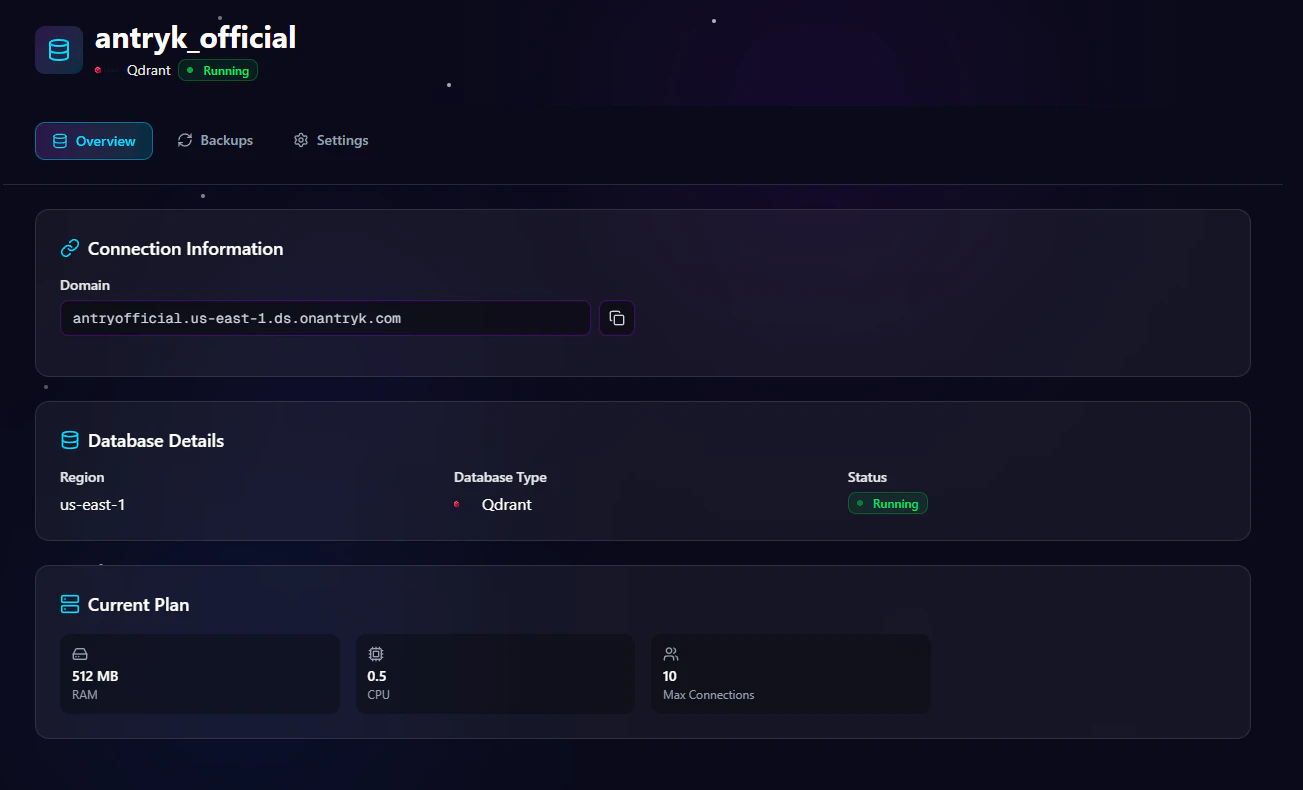 ## Available Information
### Domain
Use the generated Qdrant domain endpoint to connect your applications and AI services.
Example:
```bash theme={null}
https://your-qdrant-instance.antryk.com
```
***
# Qdrant Settings Page
## Available Information
### Domain
Use the generated Qdrant domain endpoint to connect your applications and AI services.
Example:
```bash theme={null}
https://your-qdrant-instance.antryk.com
```
***
# Qdrant Settings Page
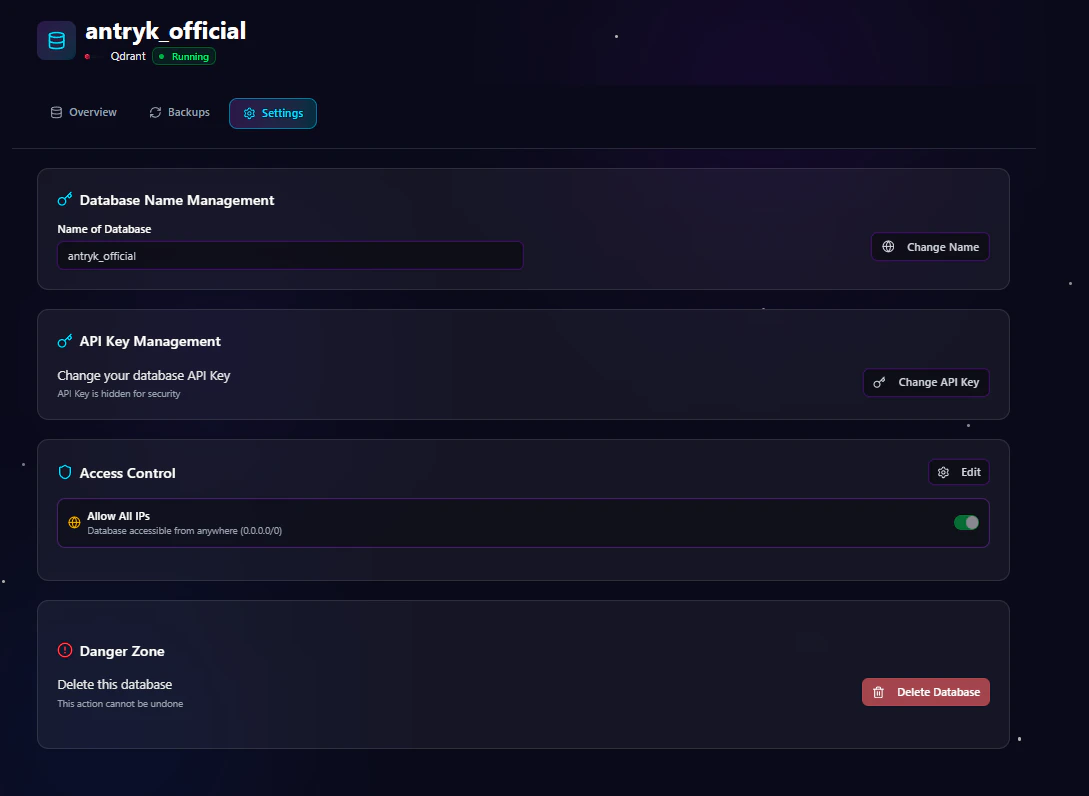 The **Settings** page allows you to manage database configuration and security.
## Available Settings
### Change API Key
Rotate API credentials securely without redeploying the database.
### Regenerate API Key
Generate a new API key for secure integrations.
### Rename Database
Update the database name when needed.
### Update Access Control
Modify IP allowlists or enable/disable public access.
### Delete Service
Permanently remove the Qdrant deployment.
> Warning: Deleting a service permanently removes the database and associated vector data.
***
# Qdrant Backup Page
The **Settings** page allows you to manage database configuration and security.
## Available Settings
### Change API Key
Rotate API credentials securely without redeploying the database.
### Regenerate API Key
Generate a new API key for secure integrations.
### Rename Database
Update the database name when needed.
### Update Access Control
Modify IP allowlists or enable/disable public access.
### Delete Service
Permanently remove the Qdrant deployment.
> Warning: Deleting a service permanently removes the database and associated vector data.
***
# Qdrant Backup Page
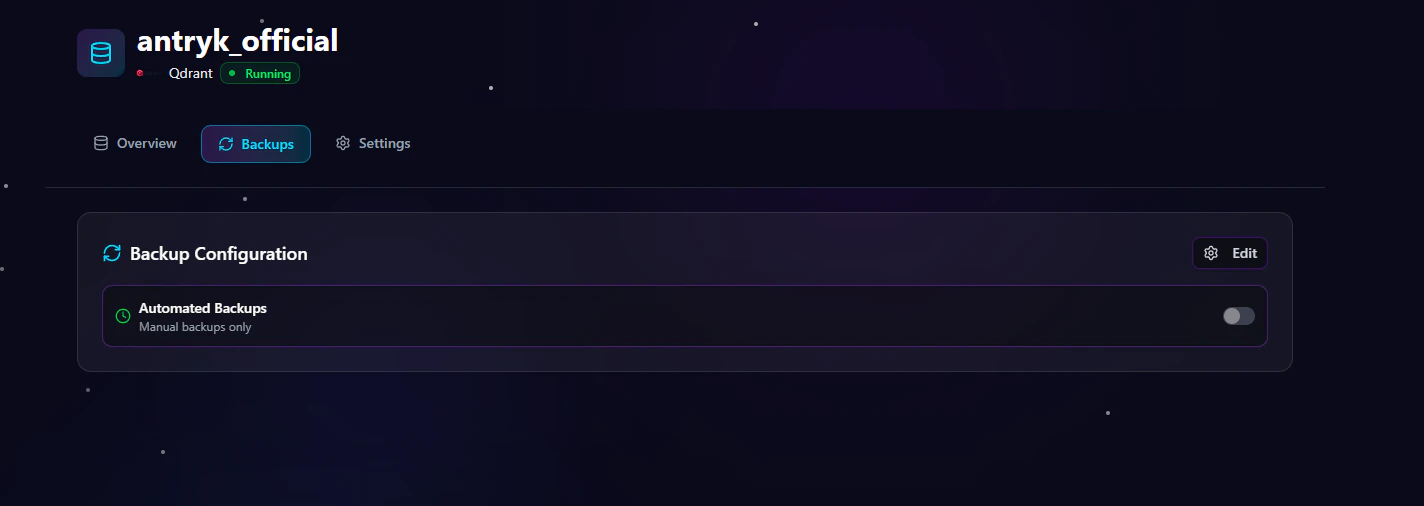 The **Backup** page allows you to manage backup configurations and retention settings.
## Backup Management Features
### Update Backup Frequency
Change backup schedules anytime:
* Hourly
* Daily
* Monthly
### Modify Retention Period
Adjust how long backups are stored:
* 7 Days
* 14 Days
* 30 Days
* 90 Days
### Enable or Disable Backups
Turn automated backups on or off depending on project requirements.
***
# Scaling
Qdrant on Antryk supports flexible scaling options for growing AI workloads and vector search applications.
## Scaling Features
### Vertical Scaling
Increase CPU and memory resources to improve vector query performance and handle larger workloads.
### Horizontal Scaling
Add read replicas to distribute query traffic and improve high-availability performance.
### Storage Scaling
Automatic storage scaling helps manage growing vector datasets without manual intervention.
***
# Security
Antryk Qdrant deployments include multiple built-in security controls for protecting vector data and AI infrastructure.
## Built-In Security Features
### SSL/TLS Encryption
Encrypted connections are required to secure data in transit.
### VPC Integration
Private network connectivity for secure internal communication.
### IP Whitelisting
Restrict database access to approved IP addresses only.
### Authentication
Secure API key authentication for database access and integrations.
***
# Backups
Reliable backup management helps protect your vector data and AI indexes.
## Backup Features
### Automatic Backups
Scheduled automated backups run daily for disaster recovery and data protection.
### Manual Backups
Create on-demand backups whenever needed before migrations or major updates.
***
# Monitoring
Monitor Qdrant database performance and infrastructure health directly from the Antryk platform.
## Monitoring Features
### Query Performance
Identify slow vector queries and optimize search performance.
### Storage Usage
Track disk usage and monitor vector dataset growth trends.
### CPU & Memory Metrics
Monitor infrastructure resource utilization and workload performance.
***
# Common Qdrant Use Cases
Qdrant is ideal for modern AI-powered applications and vector search systems.
## Popular Use Cases
* AI chatbots
* Semantic search engines
* Recommendation systems
* Retrieval-Augmented Generation (RAG)
* AI document search
* Image similarity search
* Vector similarity search
* Personalized search systems
* Machine learning applications
* Generative AI platforms
***
# Connecting to Qdrant
Use the domain endpoint and API key from the Overview page to connect your application.
## Node.js Example
```javascript theme={null}
const { QdrantClient } = require("@qdrant/js-client-rest");
const client = new QdrantClient({
url: process.env.QDRANT_URL,
apiKey: process.env.QDRANT_API_KEY,
});
async function connectQdrant() {
const collections = await client.getCollections();
console.log("Connected to Qdrant");
}
connectQdrant();
```
***
## Python Example
```python theme={null}
from qdrant_client import QdrantClient
import os
client = QdrantClient(
url=os.environ["QDRANT_URL"],
api_key=os.environ["QDRANT_API_KEY"]
)
print("Connected to Qdrant")
```
***
## cURL Example
```bash theme={null}
curl \
-H "api-key: YOUR_QDRANT_API_KEY" \
https://your-qdrant-instance.antryk.com/collections
```
***
# Best Practices
## Recommended Production Configuration
* Use restricted IP access
* Enable automated backups
* Use strong API keys
* Deploy in the closest region to your users
* Rotate API keys regularly
* Monitor vector storage growth
* Enable SSL/TLS connections
* Use private networking when possible
***
# Why Choose Qdrant on Antryk?
Antryk simplifies vector database infrastructure management so teams can focus on building AI applications instead of managing servers and infrastructure.
## Benefits
* Fast vector database deployment
* Simplified AI infrastructure management
* Secure authentication and networking
* Flexible backup management
* Regional deployments
* Production-ready vector search performance
* Scalable AI-ready infrastructure
* Developer-friendly experience
* Optimized for semantic search and AI workloads
The **Backup** page allows you to manage backup configurations and retention settings.
## Backup Management Features
### Update Backup Frequency
Change backup schedules anytime:
* Hourly
* Daily
* Monthly
### Modify Retention Period
Adjust how long backups are stored:
* 7 Days
* 14 Days
* 30 Days
* 90 Days
### Enable or Disable Backups
Turn automated backups on or off depending on project requirements.
***
# Scaling
Qdrant on Antryk supports flexible scaling options for growing AI workloads and vector search applications.
## Scaling Features
### Vertical Scaling
Increase CPU and memory resources to improve vector query performance and handle larger workloads.
### Horizontal Scaling
Add read replicas to distribute query traffic and improve high-availability performance.
### Storage Scaling
Automatic storage scaling helps manage growing vector datasets without manual intervention.
***
# Security
Antryk Qdrant deployments include multiple built-in security controls for protecting vector data and AI infrastructure.
## Built-In Security Features
### SSL/TLS Encryption
Encrypted connections are required to secure data in transit.
### VPC Integration
Private network connectivity for secure internal communication.
### IP Whitelisting
Restrict database access to approved IP addresses only.
### Authentication
Secure API key authentication for database access and integrations.
***
# Backups
Reliable backup management helps protect your vector data and AI indexes.
## Backup Features
### Automatic Backups
Scheduled automated backups run daily for disaster recovery and data protection.
### Manual Backups
Create on-demand backups whenever needed before migrations or major updates.
***
# Monitoring
Monitor Qdrant database performance and infrastructure health directly from the Antryk platform.
## Monitoring Features
### Query Performance
Identify slow vector queries and optimize search performance.
### Storage Usage
Track disk usage and monitor vector dataset growth trends.
### CPU & Memory Metrics
Monitor infrastructure resource utilization and workload performance.
***
# Common Qdrant Use Cases
Qdrant is ideal for modern AI-powered applications and vector search systems.
## Popular Use Cases
* AI chatbots
* Semantic search engines
* Recommendation systems
* Retrieval-Augmented Generation (RAG)
* AI document search
* Image similarity search
* Vector similarity search
* Personalized search systems
* Machine learning applications
* Generative AI platforms
***
# Connecting to Qdrant
Use the domain endpoint and API key from the Overview page to connect your application.
## Node.js Example
```javascript theme={null}
const { QdrantClient } = require("@qdrant/js-client-rest");
const client = new QdrantClient({
url: process.env.QDRANT_URL,
apiKey: process.env.QDRANT_API_KEY,
});
async function connectQdrant() {
const collections = await client.getCollections();
console.log("Connected to Qdrant");
}
connectQdrant();
```
***
## Python Example
```python theme={null}
from qdrant_client import QdrantClient
import os
client = QdrantClient(
url=os.environ["QDRANT_URL"],
api_key=os.environ["QDRANT_API_KEY"]
)
print("Connected to Qdrant")
```
***
## cURL Example
```bash theme={null}
curl \
-H "api-key: YOUR_QDRANT_API_KEY" \
https://your-qdrant-instance.antryk.com/collections
```
***
# Best Practices
## Recommended Production Configuration
* Use restricted IP access
* Enable automated backups
* Use strong API keys
* Deploy in the closest region to your users
* Rotate API keys regularly
* Monitor vector storage growth
* Enable SSL/TLS connections
* Use private networking when possible
***
# Why Choose Qdrant on Antryk?
Antryk simplifies vector database infrastructure management so teams can focus on building AI applications instead of managing servers and infrastructure.
## Benefits
* Fast vector database deployment
* Simplified AI infrastructure management
* Secure authentication and networking
* Flexible backup management
* Regional deployments
* Production-ready vector search performance
* Scalable AI-ready infrastructure
* Developer-friendly experience
* Optimized for semantic search and AI workloads