> ## Documentation Index
> Fetch the complete documentation index at: https://docs.antryk.com/llms.txt
> Use this file to discover all available pages before exploring further.
# Transactions
> Track payment history, monitor transaction records, review subscription payments, and manage billing activity securely within your Antryk workspace.
# Transactions & Payment History
Transactions & Payment History allows workspace owners and administrators to monitor completed payments, subscription activity, and billing-related transaction records inside Antryk.
Using the Transactions dashboard, users can:
* View completed payments
* Monitor transaction status
* Review subscription activity
* Track payment gateways
* Access transaction identifiers
* Monitor payment history
* Review billing records
* Validate successful payment processing
This helps organizations maintain accurate financial tracking and operational visibility across workspace billing activities.
***
# What is the Transactions Dashboard?
The Transactions dashboard provides a centralized overview of all workspace payment activity.
Instead of manually tracking infrastructure payments, users can review complete transaction records directly from the platform dashboard.
Each transaction record includes:
* Payment date and time
* Transaction amount
* Payment status
* Transaction ID
* Subscription ID
* Currency information
* Payment gateway details
This enables teams to securely monitor financial operations and payment processing activity.
***
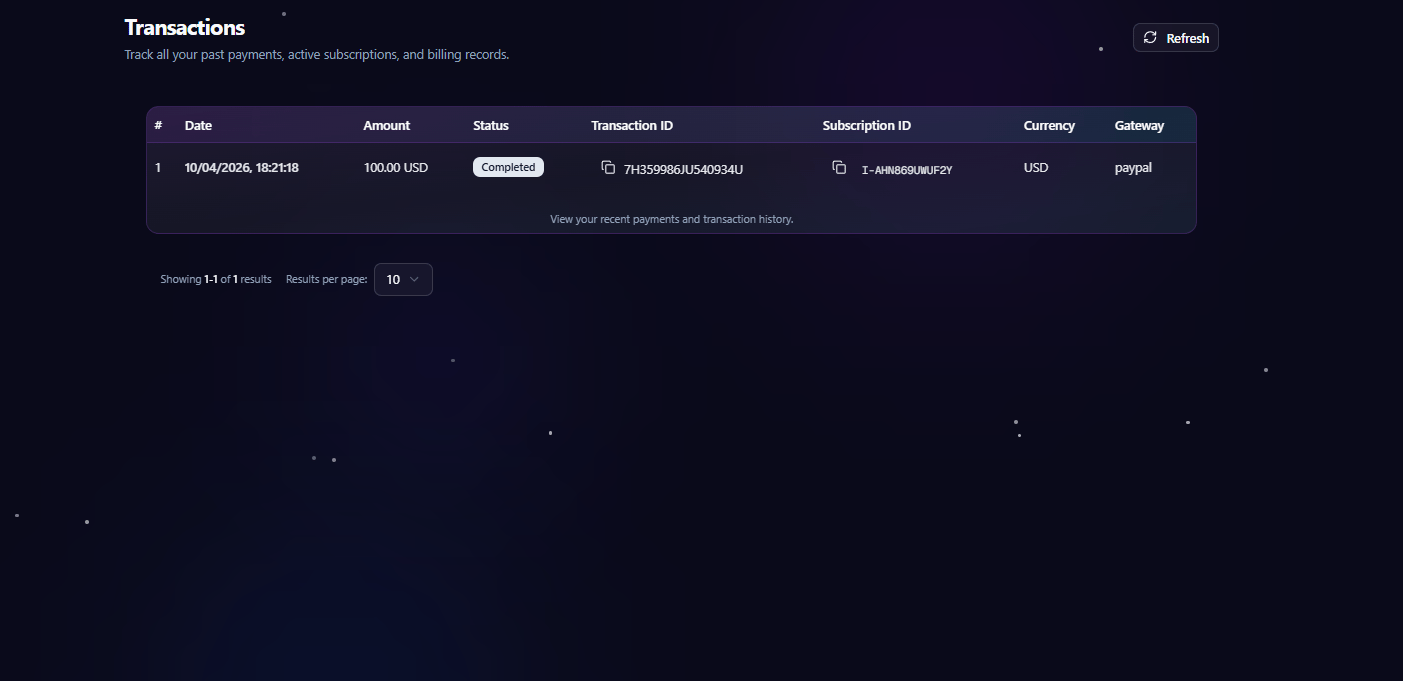
# Transactions Dashboard
When users navigate to **Transactions** inside a workspace, they are redirected to the transaction management dashboard.
The dashboard allows users to:
* Review recent payments
* Monitor subscription transactions
* Track successful payments
* View transaction identifiers
* Review gateway information
* Access billing activity history
* Refresh payment records
 ***
# Transaction Overview
Each transaction entry contains detailed information about a completed or processed payment.
The transaction table includes the following information:
| Field | Description |
| --------------- | ------------------------------------- |
| Date | Payment processing date and timestamp |
| Amount | Total payment amount |
| Status | Current transaction status |
| Transaction ID | Unique payment transaction identifier |
| Subscription ID | Associated subscription reference |
| Currency | Payment currency used |
| Gateway | Payment provider used for processing |
This structure helps organizations maintain accurate payment and subscription tracking.
***
# Supported Payment Gateways
Antryk supports multiple secure payment gateways for workspace billing and credit management.
Currently supported gateways include:
| Gateway | Description |
| -------- | ------------------------------------------------------------------------ |
| PayPal | International payment processing and subscriptions |
| Razorpay | Secure payment processing for cards, UPI, banking, and regional payments |
These gateways provide reliable payment infrastructure for workspace billing operations.
***
# Transaction Status
Each transaction includes a real-time payment status indicator.
Supported statuses include:
| Status | Description |
| --------- | ------------------------------ |
| Completed | Payment processed successfully |
| Pending | Payment awaiting confirmation |
| Failed | Payment could not be processed |
| Refunded | Payment refunded successfully |
| Cancelled | Payment was cancelled |
This allows users to quickly identify payment outcomes and billing activity.
***
# Subscription Transactions
Transactions may include recurring subscription-related billing activity.
Users can monitor:
* Active subscription payments
* Subscription identifiers
* Recurring billing charges
* Payment success history
* Gateway processing records
This helps organizations maintain visibility into recurring infrastructure and platform costs.
***
# Payment Gateway Information
Each transaction record displays the payment gateway used during processing.
Gateway information helps users:
* Verify payment providers
* Audit transaction history
* Track external billing references
* Validate payment workflows
Supported providers currently include:
* PayPal
* Razorpay
***
# Refreshing Transaction Records
The Transactions dashboard includes a refresh option to retrieve the latest payment activity and billing updates.
Refreshing transaction data allows users to:
* Sync recent payments
* Retrieve updated statuses
* View newly processed transactions
* Refresh subscription activity
This ensures payment information remains accurate and up to date.
***
# Best Practices
* Review transactions regularly
* Monitor recurring subscription payments
* Verify successful payment statuses
* Keep billing information updated
* Maintain records for accounting purposes
Regularly reviewing transaction history helps organizations maintain accurate financial records and quickly identify payment-related issues.
***
# Transaction Overview
Each transaction entry contains detailed information about a completed or processed payment.
The transaction table includes the following information:
| Field | Description |
| --------------- | ------------------------------------- |
| Date | Payment processing date and timestamp |
| Amount | Total payment amount |
| Status | Current transaction status |
| Transaction ID | Unique payment transaction identifier |
| Subscription ID | Associated subscription reference |
| Currency | Payment currency used |
| Gateway | Payment provider used for processing |
This structure helps organizations maintain accurate payment and subscription tracking.
***
# Supported Payment Gateways
Antryk supports multiple secure payment gateways for workspace billing and credit management.
Currently supported gateways include:
| Gateway | Description |
| -------- | ------------------------------------------------------------------------ |
| PayPal | International payment processing and subscriptions |
| Razorpay | Secure payment processing for cards, UPI, banking, and regional payments |
These gateways provide reliable payment infrastructure for workspace billing operations.
***
# Transaction Status
Each transaction includes a real-time payment status indicator.
Supported statuses include:
| Status | Description |
| --------- | ------------------------------ |
| Completed | Payment processed successfully |
| Pending | Payment awaiting confirmation |
| Failed | Payment could not be processed |
| Refunded | Payment refunded successfully |
| Cancelled | Payment was cancelled |
This allows users to quickly identify payment outcomes and billing activity.
***
# Subscription Transactions
Transactions may include recurring subscription-related billing activity.
Users can monitor:
* Active subscription payments
* Subscription identifiers
* Recurring billing charges
* Payment success history
* Gateway processing records
This helps organizations maintain visibility into recurring infrastructure and platform costs.
***
# Payment Gateway Information
Each transaction record displays the payment gateway used during processing.
Gateway information helps users:
* Verify payment providers
* Audit transaction history
* Track external billing references
* Validate payment workflows
Supported providers currently include:
* PayPal
* Razorpay
***
# Refreshing Transaction Records
The Transactions dashboard includes a refresh option to retrieve the latest payment activity and billing updates.
Refreshing transaction data allows users to:
* Sync recent payments
* Retrieve updated statuses
* View newly processed transactions
* Refresh subscription activity
This ensures payment information remains accurate and up to date.
***
# Best Practices
* Review transactions regularly
* Monitor recurring subscription payments
* Verify successful payment statuses
* Keep billing information updated
* Maintain records for accounting purposes
Regularly reviewing transaction history helps organizations maintain accurate financial records and quickly identify payment-related issues.