

GPU Compute Services
Deploy GPU-powered applications and compute-intensive workloads directly inside Antryk using the built-in GPU Service platform. Antryk GPU Services provide scalable infrastructure for AI/ML workloads, inference engines, training pipelines, rendering systems, data processing applications, and high-performance backend services. The deployment platform allows organizations to connect repositories, configure runtime environments, manage environment variables, and launch production-ready GPU instances with a simplified deployment workflow. Using Antryk GPU Services, teams can:- Deploy AI & ML applications
- Run model training workloads
- Launch GPU inference services
- Deploy CUDA-enabled applications
- Host LLM infrastructure
- Run rendering pipelines
- Execute compute-intensive workloads
- Configure scalable GPU resources
- Manage deployments from Git repositories
- Configure build & runtime environments
- Manage environment variables securely
- Deploy applications with one-click infrastructure provisioning
What is GPU Service?
GPU Service is Antryk’s high-performance compute deployment platform designed for AI systems, machine learning workloads, backend GPU services, rendering applications, and infrastructure-heavy compute operations. The platform enables users to deploy applications directly from connected Git repositories while selecting dedicated GPU hardware configurations based on workload requirements. Antryk automatically provisions infrastructure, installs dependencies, builds the application, configures runtime execution, and deploys the service using the selected GPU resources. The platform supports:- AI/ML model hosting
- Deep learning training
- CUDA applications
- LLM inference services
- GPU rendering workloads
- Data processing pipelines
- API deployment
- Background workers
- Python GPU workloads
- Node.js GPU services
- Containerized compute applications
Creating a New GPU Service
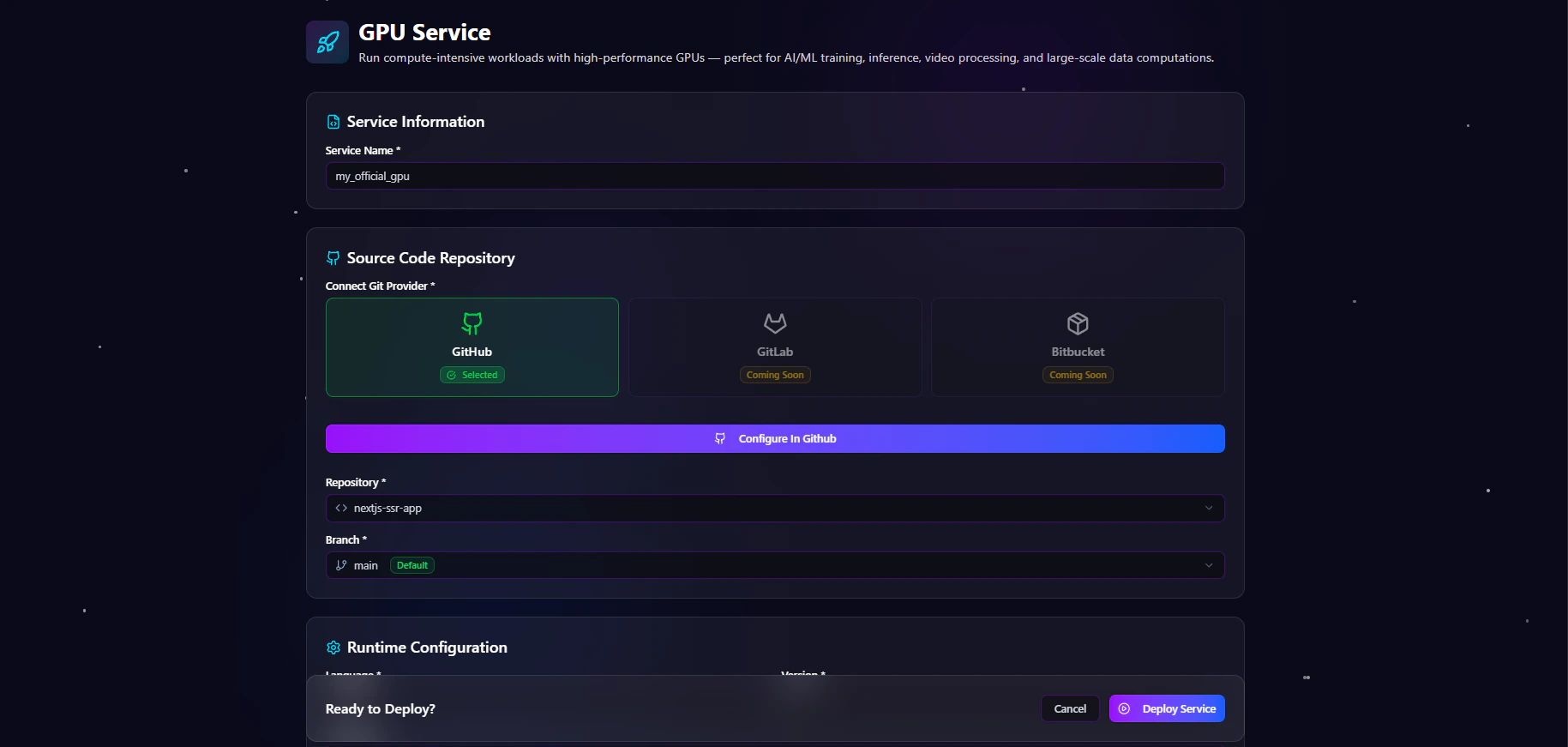
Antryk allows users to deploy GPU-powered applications directly from connected Git repositories using a guided deployment workflow. The deployment system simplifies infrastructure provisioning and GPU workload deployment.Create GPU Service Form
The Create GPU Service form allows users to configure repository settings, build pipelines, runtime environments, environment variables, and GPU hardware selection. The deployment workflow includes:- Basic service information
- Git provider connection
- Repository selection
- Branch configuration
- Build configuration
- Runtime settings
- Environment variable management
- GPU infrastructure selection
- Deployment execution
Step 1 — Service Information
The Service Information section defines the deployment identity.Service Name
Enter a descriptive name for the GPU service. Examples:- ai-inference-service
- production-llm
- image-generation-worker
- ml-training-cluster
- gpu-render-service
Step 2 — Source Code Repository
The Source Code Repository section connects the deployment to a Git provider.Connect Git Provider
Users can connect supported Git providers for deployment integration. Supported providers include:
After connecting the provider, users can select repositories directly from their account.
Repository Selection
Choose the repository that contains the application source code. Examples:Branch Selection
Select the Git branch to deploy. Examples:Step 3 — Build Configuration
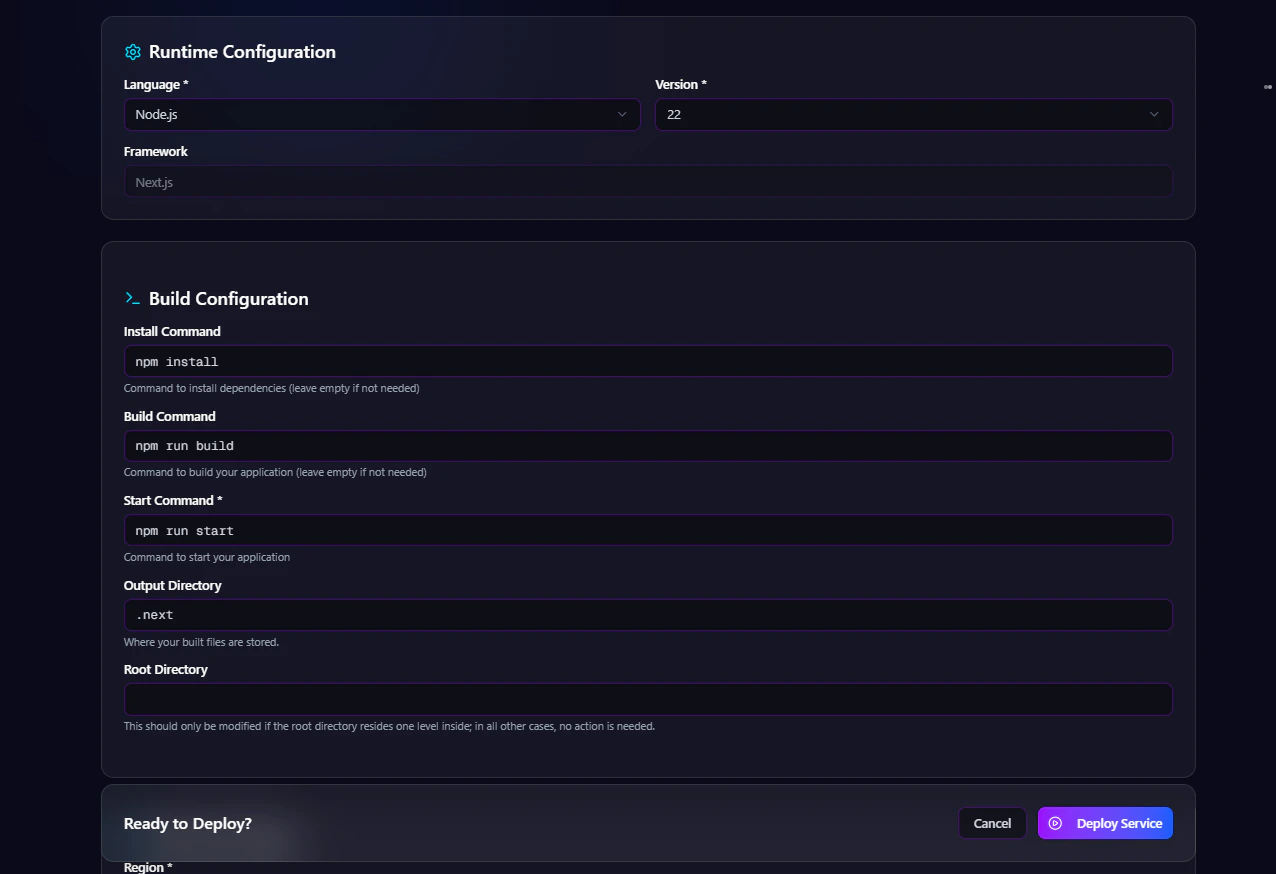
The Build Configuration section defines how the application should be installed, built, and started inside the GPU runtime environment. Users can configure:- Install command
- Build command
- Start command
- Output directory
- Root directory

Install Command
Defines the dependency installation process. Examples:Build Command
Defines the application build process. Examples:Start Command
Defines the runtime execution command. Examples:Output Directory
Defines the generated build output directory. Examples:Root Directory
Defines the application root path inside the repository. Examples:Step 4 — Environment Variables
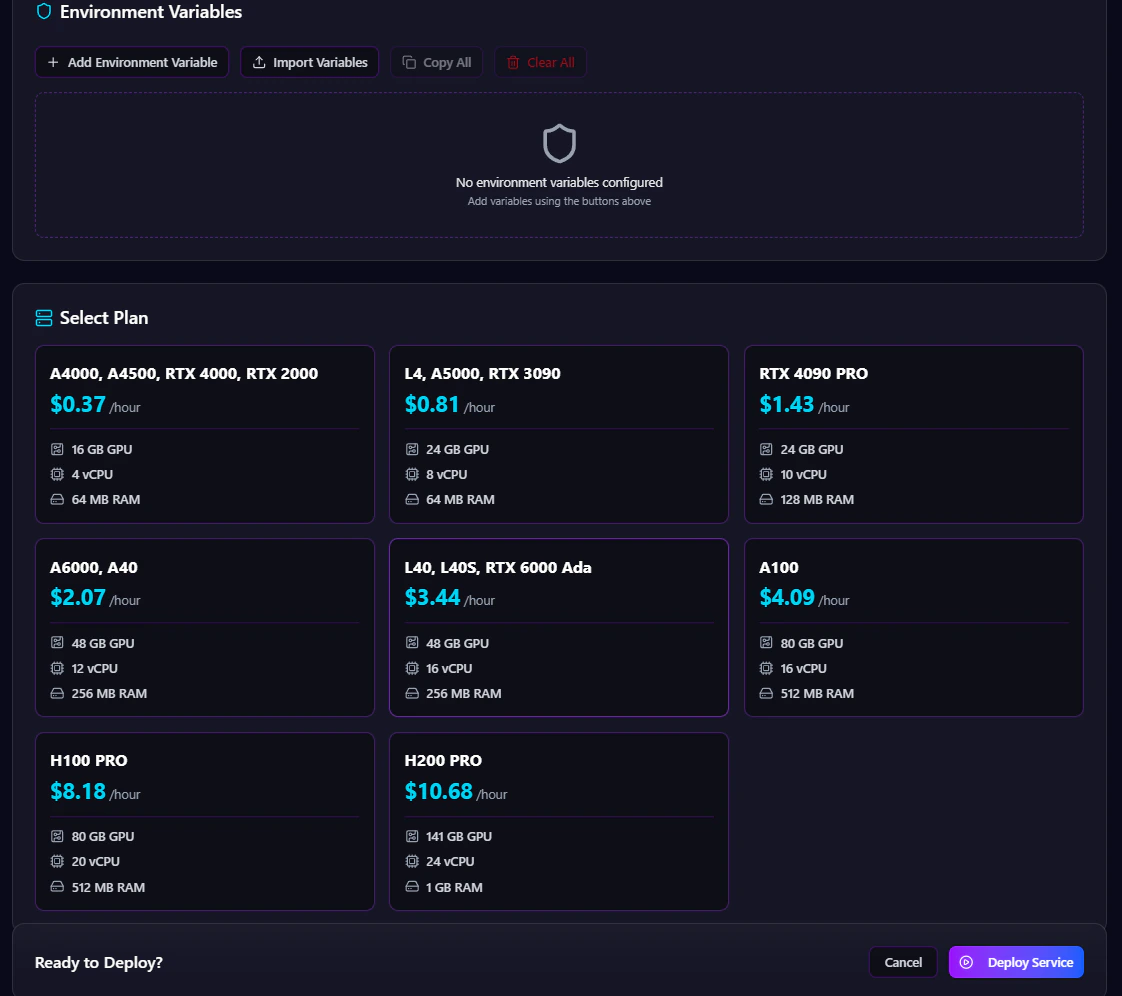
The Environment Variables section allows users to securely configure runtime secrets and application configuration values. Users can:- Add environment variables
- Import variables
- Copy existing variables
- Remove variables
- Manage secret configurations securely
Step 5 — Select GPU Plan
The Select Plan section allows users to choose GPU hardware based on workload requirements. Antryk provides multiple GPU infrastructure options optimized for AI, rendering, inference, and high-performance compute workloads. Available GPU plans include:
The GPU plan selection system enables organizations to optimize infrastructure costs and workload performance.
Step 6 — Deploy Service
After completing the configuration process, users can deploy the GPU service directly from the dashboard.Deploy Workflow
The deployment system automatically:- Provisions GPU infrastructure
- Pulls repository source code
- Installs dependencies
- Builds the application
- Configures runtime services
- Injects environment variables
- Starts the application
- Launches the deployment
Supported Workloads
Antryk GPU Services are optimized for:- Large Language Models (LLMs)
- AI inference APIs
- Stable Diffusion workloads
- CUDA applications
- Machine learning training
- Deep learning pipelines
- Video rendering
- Image generation
- Scientific computing
- Data processing systems
- Backend GPU workers
- AI-powered SaaS applications
Infrastructure Scalability
Antryk allows organizations to scale GPU workloads based on application demand and infrastructure requirements. Teams can:- Upgrade GPU plans
- Redeploy workloads
- Modify runtime settings
- Scale AI infrastructure
- Optimize compute resources
- Manage production GPU services centrally