Documentation Index
Fetch the complete documentation index at: https://docs.antryk.com/llms.txt
Use this file to discover all available pages before exploring further.
Billing & Credits Management
Billing & Credits Management allows workspace owners and administrators to securely manage account balances, add platform credits, and maintain accurate billing information for infrastructure usage and platform services inside an Antryk workspace. Using the Billing dashboard, users can:- Add workspace credits
- View account balance
- Update billing information
- Manage billing profiles
- Track workspace payment settings
- Configure business billing information
- Support infrastructure usage payments
What is Billing Management?
Billing Management provides a centralized interface for managing workspace payments, credits, and billing details inside Antryk. Instead of handling infrastructure payments manually, teams can securely maintain prepaid balances and business billing information directly from the workspace dashboard. This enables simplified financial management for cloud infrastructure, deployments, domains, and platform resources.Billing Dashboard
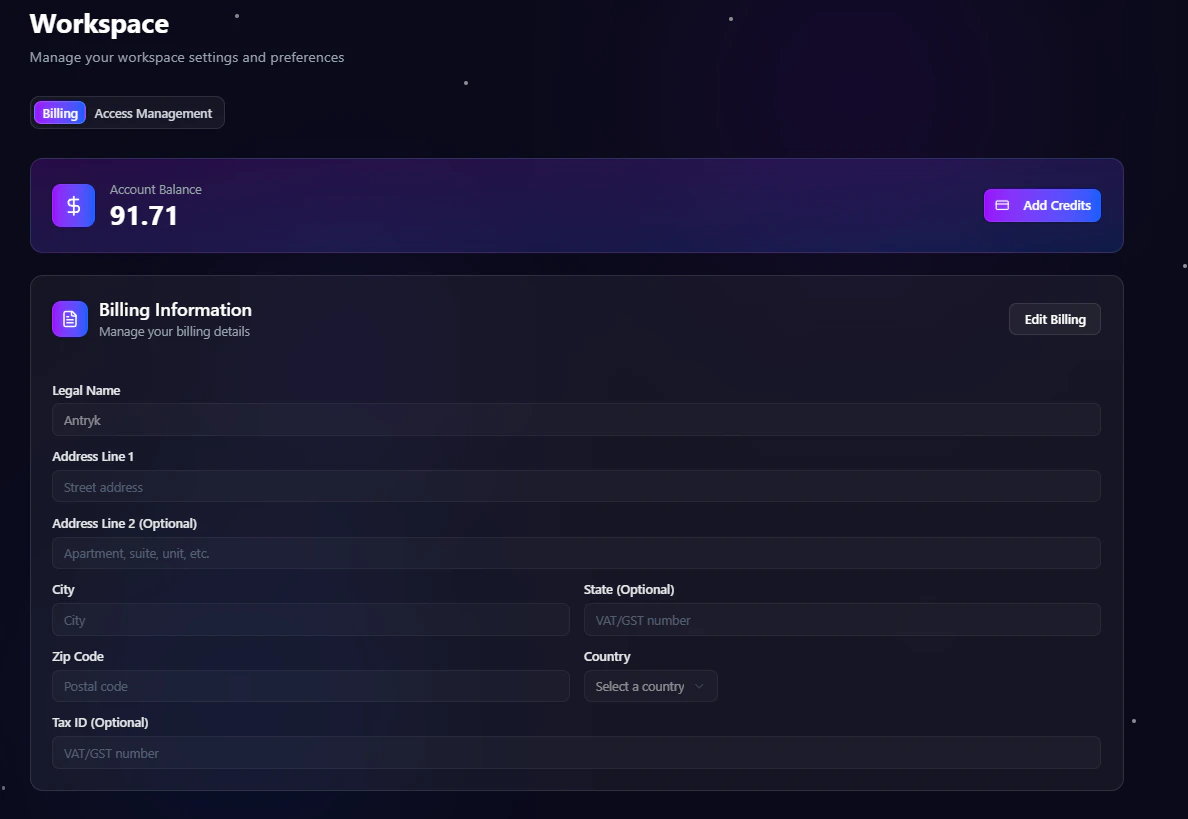
When users open the Billing section inside a workspace, they are redirected to the Billing dashboard. The dashboard allows users to:- View available account balance
- Add new credits
- Edit billing details
- Manage legal business information
- Update address and tax details
- Maintain workspace payment settings
- Review billing configuration

Account Balance
The Billing dashboard displays the current available workspace credit balance. Workspace credits are used to pay for:- Cloud infrastructure usage
- Application deployments
- Compute resources
- Managed services
- Domain-related services
- Platform operations
Add Credits
Workspace owners and administrators can add credits directly from the Billing dashboard. To add credits:- Open the Workspace Dashboard
- Navigate to Billing
- Click Add Credits
- Enter the desired credit amount
- Complete the payment process
- Credits are added to the workspace balance
Billing Information
Antryk allows organizations to maintain accurate billing and invoicing details for operational and financial records. Users can configure:- Legal business name
- Billing address
- City and postal code
- State or region
- Country information
- Tax ID or VAT/GST number
Edit Billing Details
Workspace administrators can update billing information anytime from the Billing dashboard. To edit billing information:- Open the Workspace Dashboard
- Navigate to Billing
- Click Edit Billing
- Update the required billing fields
- Save changes
Supported Billing Fields
The Billing section supports configurable business and payment details including:| Field | Description |
|---|---|
| Legal Name | Registered business or individual name |
| Address Line 1 | Primary billing address |
| Address Line 2 | Optional apartment, suite, or unit details |
| City | Billing city |
| State | State or regional information |
| Zip Code | Postal or ZIP code |
| Country | Billing country |
| Tax ID | VAT, GST, or tax identification number |
Common Use Cases
Prepaid Infrastructure Usage
Add workspace credits in advance to ensure uninterrupted infrastructure availability and deployment operations.Team Billing Management
Allow workspace administrators to maintain centralized billing information for teams and organizations.Business Invoicing
Store accurate legal and tax information for invoices, accounting, and operational reporting.Multi-Project Operations
Manage billing centrally across deployments, services, and infrastructure resources inside a shared workspace.Best Practices
- Keep billing information updated
- Maintain sufficient workspace credits
- Review account balance regularly
- Restrict billing access to trusted administrators
- Verify tax and invoice details periodically