

Subscriptions Management
Subscriptions Management allows workspace owners and administrators to manage active billing plans, monitor recurring subscriptions, control renewals, and maintain payment methods directly inside Antryk. Using the Subscriptions dashboard, users can:- View active subscriptions
- Monitor subscription status
- Track billing cycles
- Review subscription identifiers
- Manage recurring renewals
- Update payment methods
- Cancel subscriptions securely
- Monitor billing periods
- Review plan activity
What is the Subscriptions Dashboard?
The Subscriptions dashboard provides a centralized overview of all active and pending workspace subscriptions. Instead of managing subscription plans externally, users can securely monitor subscription activity, billing schedules, renewal settings, and payment configurations directly from the platform dashboard. Each subscription record includes:- Subscription plan name
- Current subscription status
- Billing start date
- Billing end date
- Subscription ID
- Auto-renewal status
- Payment management options
Subscriptions Dashboard
When users navigate to Subscriptions inside a workspace, they are redirected to the subscription management dashboard. The dashboard allows users to:- View active plans
- Monitor billing periods
- Track subscription lifecycle status
- Review renewal configurations
- Update payment methods
- Cancel subscriptions securely
- Refresh subscription records
- Monitor recurring billing activity
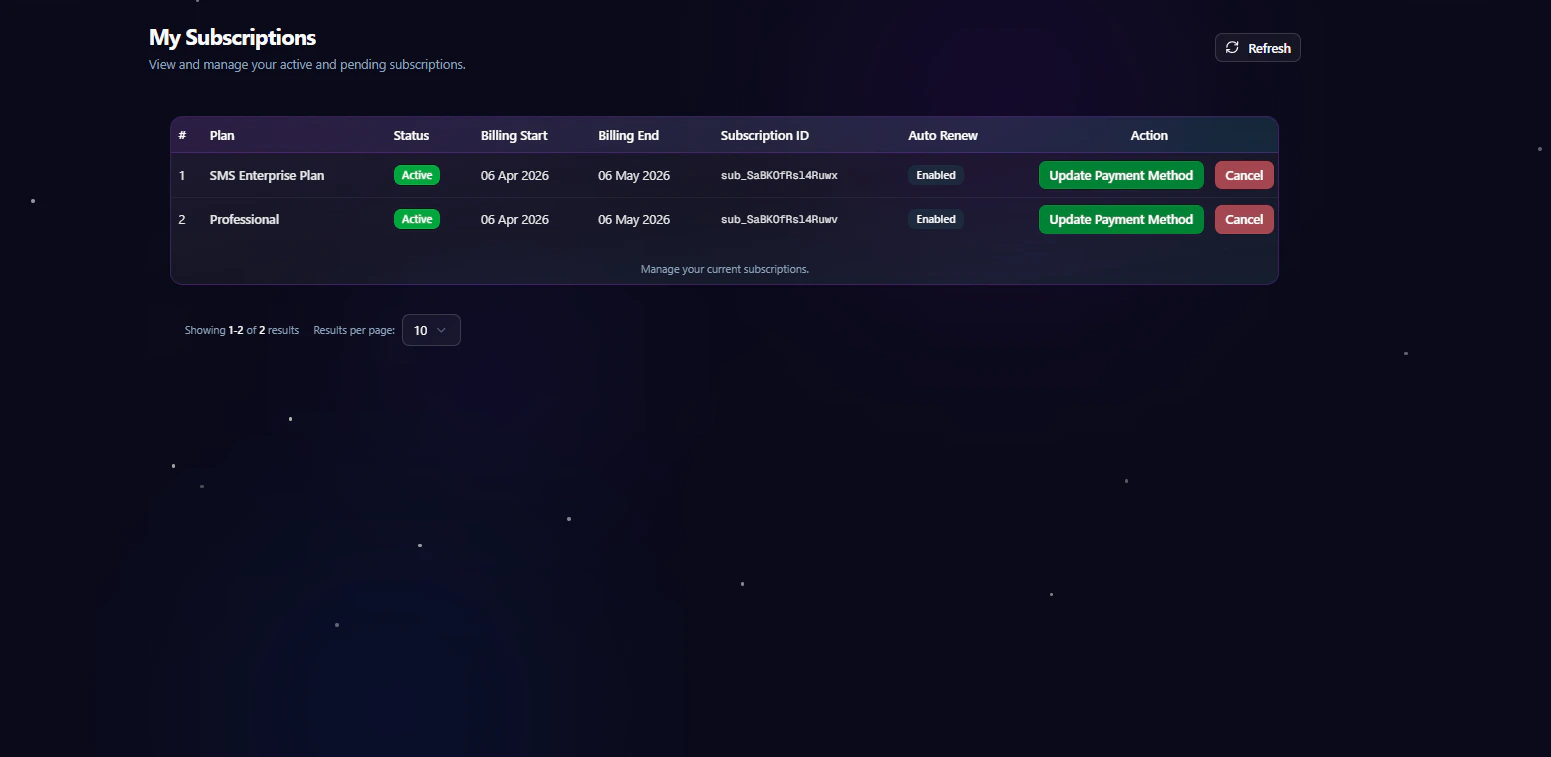
Subscription Overview
Each subscription entry contains detailed information about an active or managed workspace subscription. The subscription table includes the following information:
This structure helps organizations maintain clear visibility into recurring billing operations and subscription lifecycle management.
Subscription Status
Each subscription includes a real-time status indicator to help users monitor active services and billing activity. Supported statuses include:
These status indicators help teams quickly identify subscription conditions and billing states.
Auto Renewal Management
Subscriptions support automated recurring renewals to ensure uninterrupted workspace access and infrastructure availability. Users can:- Enable automatic renewals
- Disable recurring billing
- Monitor renewal status
- Prevent unexpected subscription interruptions
- Maintain continuous service availability
Updating Payment Methods
Users can securely update payment methods directly from the Subscriptions dashboard. Updating payment information allows organizations to:- Replace expired payment methods
- Update billing cards or accounts
- Prevent payment failures
- Maintain uninterrupted subscription renewals
- Ensure successful recurring billing
Cancelling Subscriptions
The dashboard includes secure subscription cancellation functionality for administrative billing control. Users can:- Cancel recurring subscriptions
- Prevent future renewals
- Manage operational billing costs
- Control workspace subscription activity
Billing Cycle Visibility
Each subscription displays its billing start and billing end dates for accurate renewal tracking. Billing visibility helps organizations:- Monitor upcoming renewals
- Plan infrastructure budgets
- Track subscription durations
- Maintain financial transparency
- Avoid unexpected billing interruptions
Refreshing Subscription Records
The Subscriptions dashboard includes a refresh option to retrieve the latest subscription activity and billing updates. Refreshing subscription data allows users to:- Sync updated subscription information
- Retrieve renewal status changes
- View newly activated subscriptions
- Refresh billing activity records
Best Practices
- Review subscription activity regularly
- Monitor upcoming billing renewals
- Keep payment methods updated
- Verify active subscription statuses
- Audit recurring billing records periodically
- Disable unused subscriptions when necessary